File Sync Rule Followed by Device Restart (RESET)

Solved
SI
Sean I
Expeditors International of Washington, Inc.

Hi,

I have a case where we created a File Sync Rule to send files from Server to Device. the files Sync Rule has a script of REST to run After Sync. this is working perfectly. and the files are Synced correctly and after that the Android Device is doing a restart.

One problem that we faced is that 1 Android Device kept restarting and we didn't why! i suspect that the file Syn Rule kept doing it since it has a restart script. but i am not sure about it.

My question, when the files Sync Rule execute and the files already exist are no difference, does the Sync Rule Execute the Script?

here are the Options:

Only Transmit Files when = Files are Different

Sync Option = Execute if Sync'd

Sync Files When Device Connects  
No 

Schedule = use device Update schedule

6 years ago
Android
ANSWERS
RC
Raymond Chan Diamond Contributor
6 years ago

With the option "Only Transmit Files when = Files are Different"  mentioned in your title post, the comparison use should be binary file comparison.

If what you described about what the Honeywell 8.1.3 new OS image does is actually what happen, you probably should choose the file-sync option "Only Transmit Files when  = Destination File Does Not Exist".   However,  I actually have doubt about how sure you can be about what and when the OS image does to the file just after each device reset.  

Solution
RC
Raymond Chan Diamond Contributor
6 years ago (edited 6 years ago)

Scripts in the pre-script part are ALWAYS executed before any actual file-sync irrespective of the sync criteria

Scripts in the post-script part can be executed ONLY if one or more files are actually synchronized (i.e. meet the sync criteria and the data transfer is completed without any error), OR unconditionally even if the sync process fails.

S
Scott Silver Contributor
6 years ago

There IS a radio button on the Scripts panel that controls execution:
Always Execute
or
Only execute if files transmitted

However, I assume this is not the issue otherwise ALL of the devices would be doing it.  You would need to do some more digging to determine why the single device is rebooting.  How long does it take for the device to reboot?  Are you saying it is rebooting continually or just after every file sync?  If it is the latter, enable device debugging and then check the device log.  You will see the script being executed in the log if that is the source.  If it is happening after a sync then I expect something else is modifying or deleting the sync'd file after it gets to the device.

RC
Raymond Chan Diamond Contributor
6 years ago

Did you put the  "restart" script in the pre-script (i.e. the "Always Execute" option)?

SI
Sean I
6 years ago

Thanks guys for the great explanation,

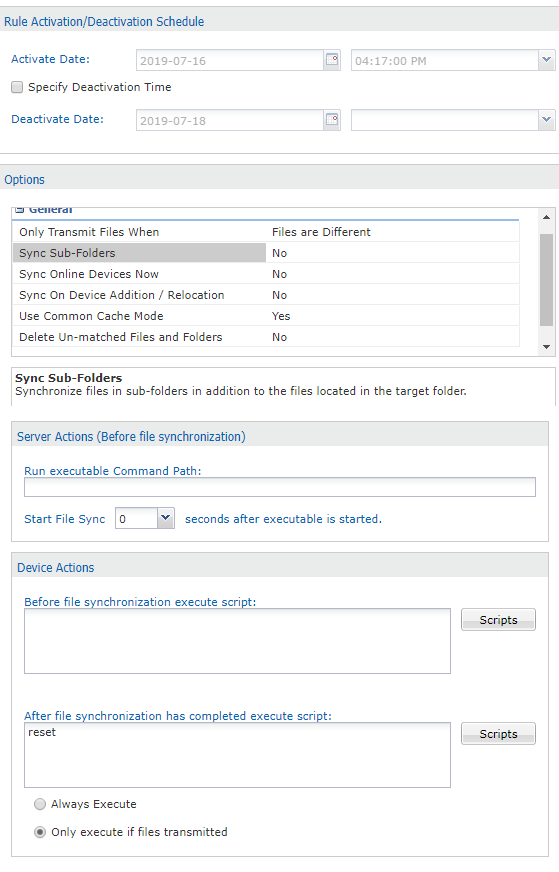
I put my script command in the post script execution. here is a screenshot of my Rule Advanced Page. i am running MOBI 13.4 and Android 8.1.

It might appear to me that this was a specific problem on this device, i will turn again the Rule on and see. 

RC
Raymond Chan Diamond Contributor
6 years ago

Your options look OK. 

If there is no problem in all but one device, maybe that device has some problem of its own.  E.g. file system full or other I/O error.  To stop the reset deadlock,  take away the "reset" script command, and check the log tab associated with your device to see if file-sync has been completed.  Then check the target directory of the device to see if the expected file(s) have already been written correctly on the device. 

SI
Sean I
6 years ago (edited 6 years ago)

The problem is happening on all 13 devices that are under the same folder (same company branch), other devices on other branches including our devices here at our DEV team are not having this problem. these 134 devices are not physically here.

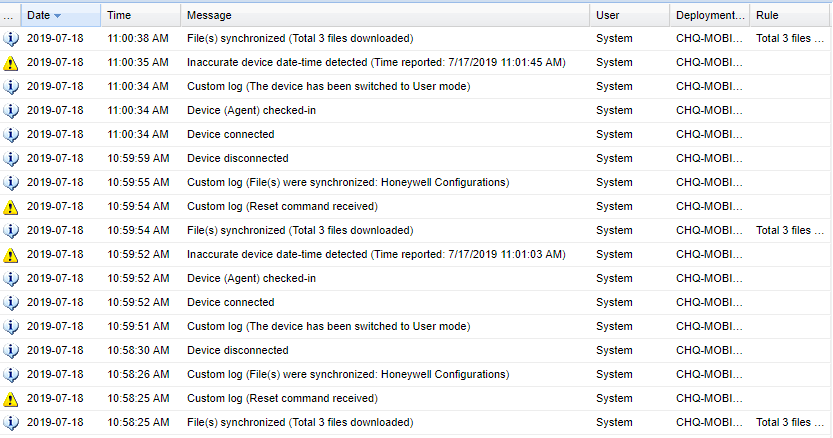
As you can see the the device 1-Sync the 3 files, and 2- restarts and again same loop after a minutes.

The devices that are not having this problem, the log shows that rule executed and there was an attempt to Sync, but Sync did not push the files as files are there and unchanged, thus script is not executed.

Now, what do i conclude from this? is the problem in the Rule or in the devices?

It's weird, if the Rule is stating that the files are Synced, why after 1 minutes if attempts to push the files again (it's either considering that the files are not on the device, or that the files are changed)?

I have tried to clear the files and let the Rule push a fresh copy of the files, and it kept doing the infinite restart!!!

The question, why the rule is considering that there is a difference? when the files are previously pushed successfully? and nobody changed the files on the server! 

Lately those scanners got new Android OS image by the provider Honeywell, i suspect (maybe) this is a cause!

S
Scott Silver Contributor
6 years ago

Where are the files being stored on the device?  You mentioned that these had a new OS image.  Perhaps the location you're storing the files is not persistent through a reboot on the newer OS.

Do this:

Sync the device

While it is restarting, disable the rule on the server

After the device reboots examine the filesystem and see if the sync'd file is still there.  If not, you probably need to find a different place to store the files.

RC
Raymond Chan Diamond Contributor
6 years ago

Are these 13 devices located in a different timezone from those devices that work fine?

What are the brands/models of your problematic devices?  Are they using Android+ or Android Enterprise device agents?

MD
Matt Dermody Diamond Contributor
6 years ago

It does appear that the time sync issue seems to be the isolated variable between the devices working and not working. 

S
Scott Silver Contributor
6 years ago

I can't imagine the sync comparison depends on device time to determine if files are different as there is always the possibility of some amount of drift between device and server.  To the extent that timestamp is a factor, any timestamp on the device file would have to contain the server's timestamp (UTC), not the device's in order to evaluate a difference.

SI
Sean I
6 years ago

Raymond, Scott, and Matt,

First of all thanks for your help, and instant response, much appreciated.

The devices are in Monterrey Mexico, and the others having no issue are in Seattle, Houston. Server is in Seattle. I have Honeywell CN80 scanners, they got upgraded from Android 7 to 8.1. Android Plus.

BTW: The Log shows this

could this be the problem?

I would say no, as the devices that do not have this Sync Rule issue also shows this "inaccurate device date-time"

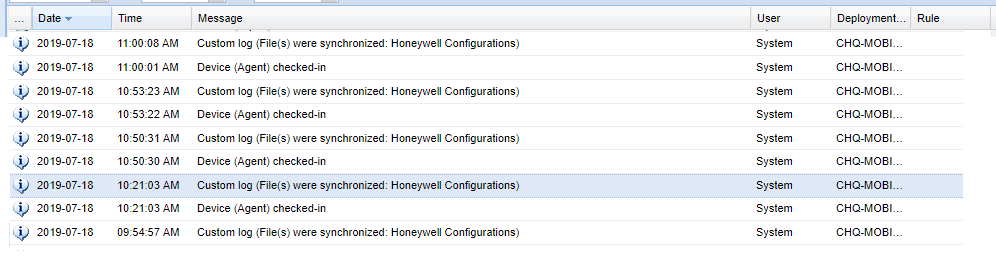
Now what i have tried, is copying the files manually from a remote session and then enabling on the Rule and it worked. the Rule attempted to  Sync but didn't see any difference!!!

As you can see, it didn't show any files transmitted like before on the very right. thus the device did not restart.

The files are pushed to a folder under "internal storage" \honeywell\persist\ these are needed to be pushed one time on the initial setup, or if changed, for the purpose of provisioning the device.

Still the mystery, why when pushed by the Rule it keeps pushing!!!!

this could be a temporary solution, as next time we make changes to these files on the server, this problem might happen again on those scanners.

RC
Raymond Chan Diamond Contributor
6 years ago (edited 6 years ago)

Hi Moine,

We had previous experiences that some Mobicontrol functionalities do get problems if the device time and server time drift by 1-2 minutes or more.  So, in any case, if the Android+ device agent on your devices supports time synchronization (Advanced Settings), then I highly recommend you to add the configurations (either get time reference from your MobiControl  server or an SNTP/NTP server).

However, if time drift is not the  real cause of your problem, the next possible issue may be related to your target device directory.   Are the 13 problematic devices exactly the same brand+model+firmware version as those that work fine?  Could you show screenshot of what you set for folder in the file-sync rule? 

Also, could you please check if the recurring reset problem persists when you disable the "Sync Files When Device Connects" option in the Schedule tab of your File-Sync rule?    Does the files expected to be synchronized include parameters that affect Wifi/Cellular connection settings on your device?

SI
Sean I
6 years ago

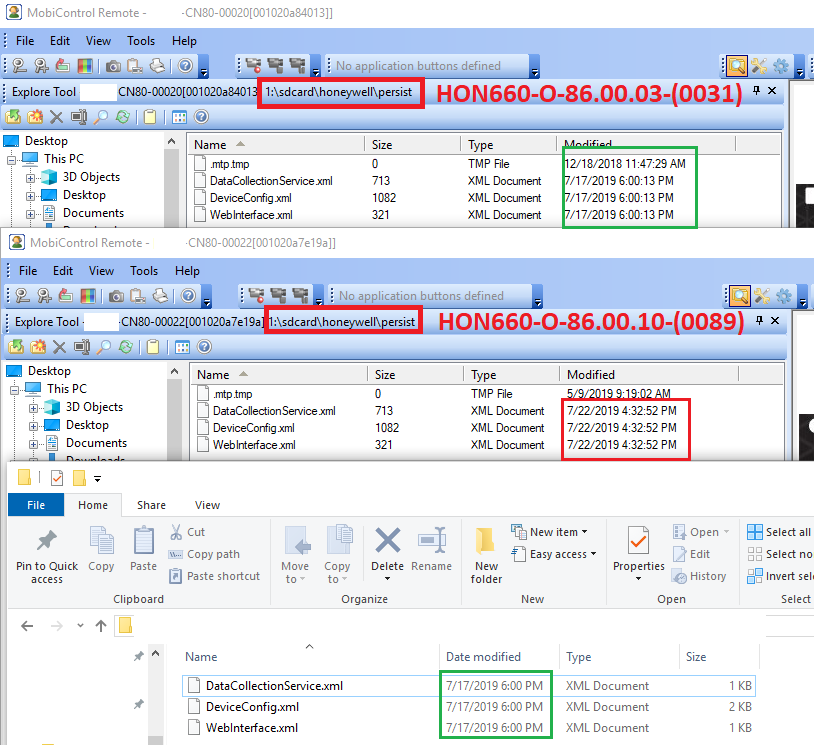
After deep investigations, we discovered that the files are being changed after the restart, ideally they should not. these files are XML files for provisioning with Honeywell scanners. This happened with the new Honeywell OS image Android 8.1.10, with the 8.1.3 we didn't have this problem as files remain unchanged. Actually the change on the file is all about the Last Modified Date, it seemed that the OS is parsing the XML files and saving them (while eventually no content changes, only Last Modified date). these are Honeywell problems that you don't have to deal with. I am just explaining the situation.

Now my question to you, how does the FileSynRule compare the files between server and Device?

- file contents?

- or binary compare

- or based on timestamp last updated 

SI
Sean I
6 years ago

Thank Chan,

Well after the OS Image update, this behavior happened. the OS does update its settings based on those XML files after a restart. this is how Honeywell provisioning works, when these files are saved under this specific folder that i mentioned earlier. this pic could illustrate what i am saying. 

Regarding changing the "Only Transmit Files when  = Destination File Does Not Exist", we previously thought of it, it might work for the moment but will not be a long term solution as we might at any time decide to change something on the Device configuration and therefore changing a value in these XML files.

We addressed this issue to Honeywell and they will be looking into this issue, now we will let our users downgrade to 8.1.3

S
Scott Silver Contributor
6 years ago

You could potentially work around this by making a different directory (/sdcard/honeywell/staging) and sync the files there.  Add a post sync script to copy the files from /staging to /persist.  That way your sync'd files would be left alone.

Similar Discussions