JS to process a synced file based on the custom attribute

Solved

New to JS but I want to sync a certain time zone xml file based on the location of a device, where i will get the location from the custom attribute. is this possible?

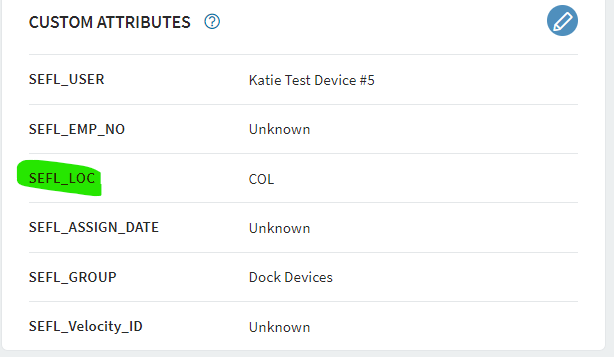
I found this on SOTI portal but not sure how to use it with processing the time zone file that I've synced, instead of just displaying it in the logs. SEFL_LOC is my custom attribute:

var myCustomValue = mobicontrol.agent.getCustomAttribute("SEFL_LOC");

if (myCustomValue != null) {

    mobicontrol.log.info("Custom attribute for key SEFL_LOC: " + myCustomValue);

} else {

    mobicontrol.log.info("Custom attribute for key SEFL_LOC is not found");

}

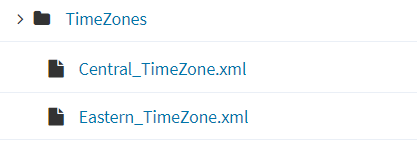
sdcard/Timezones is the path 
a year ago
Android Scripting
ANSWERS
MD
Matt Dermody Diamond Contributor
a year ago

If you already have the Custom Attribute set why not use it as part of a Profile installation filter. You could have. Package for each of the different Time Zones and then a Profile for each of the Packages. For your Central Time Zone Package and Profile you could then set SEFL_LOC = ABC OR SEFL_LOC =XYZ OR... Etc. for each of the SEFL_LOC you want associated with that Profile. I think that may end up being easier to manage than the purely scripting based approach that you're attempting. 

KW
Katie Williams Bronze Contributor
a year ago

Thank you for this! the problem with that is, I don't already have them set. I have it set now because I want to test to make sure I can process the XML time zone file based on whatever gets set for that field.

We are moving to shared device soon and SSO and I hope to get the location attribute pulled in from our 3rd party app IDP (possibly OKTA) when the driver signs in. 

ex. Driver 123 signs into his device, it pulls his role for device group relocation along with LOCATION (and other attributes, name, employee number, etc.) and displays into SOTI details page, based on that location attribute, I will process the right time zone file needed for that device. 

I can't configure the time on the group level because we will have devices from all over being moved into that role when they sign into their device. If there is any other way or an easier way to do this PLEASE let me know! 

MD
Matt Dermody Diamond Contributor
a year ago

Are these drivers using cellular data capable devices? If so they should in theory be able to sync their date and time from their network rather than you forcing the time zone sync to be something delivered by SOTI. 

KW
Katie Williams Bronze Contributor
a year ago

I wish they were Matt! It would make my life a hell of a lot easier lol. These are all on WIFI only. and I'm trying to find the best way to sync the right time with them all being moved into one working group/role when they sign in and are relocated to that role. 

Right now we have folders/groups for every location and configured the time for that group, which i thought about adding the roles to each group that way (to use the time config we already have setup), but we have 90 different centers so that would be 90 different roles to add and then some of them will need multiple roles so that's more groups to add under each location as well. which can be cumbersome to manage when you're talking about setting up role based relocation for shared devices.

Not to mention getting them enrolled in the right home group so it moves back to the right group on sign out. I assume if we kept the 90 groups we would need an enrollment code for each group so it enrolls initially into that group to be considered it's "home group" it moves back to on sign out, to keep the right time configuration for that location.

So the general role/groups is what I believe would be feasible if I could get the time zone synced for each device moving into that general group.

ZC
Zafer Cigdem Platinum Contributor
a year ago

Hi Katie,

I don't get the request yet, can you please help me to understand your request, if possible, please make it more specific.

On your JS, you only get the Custom Attribute from the device and if it's not null then you put a log message that's all, if you share what any example for your need I'll be happy to help. You can use filter for custom attribute or custom data but important note: As far as I know, if the value of Custom Attribute or Custom Data is changed, then the profile that used this value as a filter will be revoked from the devices.

KW
Katie Williams Bronze Contributor
a year ago

Thank you please look above for example!! 

ZC
Zafer Cigdem Platinum Contributor
a year ago

Hi Katie,

For this condition that you mentioned above, I'd look for a way to publish/create a file on the Android device side, and then use Custom data to trigger a script to change the time zone. I hope it helps.

KW
Katie Williams Bronze Contributor
a year ago

Thanks so much Zafer and SOTI community! This does help and I will look into setting something like this up for testing!!

1. This is assuming that the Location is pulled automatically when the user signs in correct? And

2.I'm writing that information to a file on the device and then

3.Creating a custom data to display that information and then

4. Use the custom data field to write a script to sync the time zone?

I could skip step 2 if our 3rd party sign on app is able to pull that inforamtion directly into SOTI "user details" section right? and then write the script using that field?

ZC
Zafer Cigdem Platinum Contributor
a year ago

1. Yes, as this way we can know the location, to set/update the time on device side

2. yes

3. yes, present this information on MobiControl WebConsole via Custom data

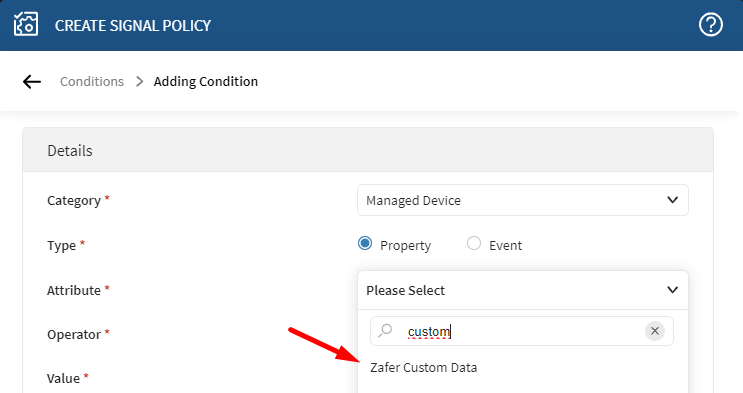
4. By using a custom data = "XYZ" logic, you can use profile/policy to make the process automatic. You may also prefer Profile -> Task Scheduler for periodic checks/actions, if required. Or you can use Policy -> Signal and use custom data to trigger Signal Policy actions.

KW
Katie Williams Bronze Contributor
a year ago

Thank you bunches Zafer!! 

Solution
E
ESMOD@soti
a year ago

Hi Katie,
 
Thanks for posting on SOTI Pulse. Thanks to Matt and Zafer for responding to the post, your expertise and willingness to help are greatly appreciated!
I am glad that your question is answered.
If you have any additional questions or concerns, please don't hesitate to reach out. We're dedicated to providing assistance and support.

Regards,

Technical Support , SOTI | Call Us | SOTI.net | Discussion Forum | Log a Case Online | LinkedIn | Instagram | YouTube