Script for once of day app cache and data clearing on android plus

Script for once of day app cache and data clearing on android plus

Hi Stopi,
Thanks for the post!
Please try following script to clear data of the application -
wipeapplication bundle_id (Bundle ID you can get it from Application tab on the device)
For Example - if you want to clear data for Google
wipeapplication com.google.android.googlequicksearchbox
Please share the outcome if this solution works for you.
Regards,

Please note that the "wipeapplication" script command will clear ALL data associated with your app, essentially to the state when the app has JUST been installed on the device. So, you might lose some useful configuration data if you only want SOME data cached to be cleared to save space.
Thank you for the advice. Everything works fine.
It is possible that this command is provided to all devices a sertain time each day
Is it possible to automatically send this command to all the devices in one group every night at 12:00 ? If it is not possible to automate this process, at least to do it manually once a day, but for the whole group of devices. This is because the devices are a lot - 200 in one group and another 200 in another group. Manually sending the command to one device at a time is extremely time consuming.

Hello all,
@nikolay -> tab rules in mobicontrol , add a rules and add a script and define of course the target and the time
In "Rules" -> "Android Plus" there are the following folders:
Add devices
Application Catalog
File Sync
Device Relocation
Data Collection
Alerts
Telecom Expense Management
I don't find where to add rule in which to add a script?
Hi Nikolay,
If you are looking to schedule this event every night, then I would suggest you to use Task Scheduler under Android profiles.
1. Navigate to Android Profiles > Configurations
2. Under Email tab > Task Schedulers
3. Add New Task Configuration > Schedule Setting & Task Time
4. Click on Manage Scripts under Action tab
5. Add a new script(wipeapplication bundle_id) in this case and save it
6. Select the newly added script from the Actions tab and Save
7. Save and assign the profile to the intended devices.
Note: Please test the script on a test device to understand its working behavior before assigning to a set of devices.
Regards,
@DDMOD
Thank you for the instructions. But when I go to "Menu" in the upper left corner > Configurations > Profiles > Android Plus > Add or edit profile > Configurations > Add > there is no Task Scheduler under the "Email, Contacts and Calendars tab". Our version of Mobicontrol is 14.1.3.1587. On the attached picture you can see how profiles look like.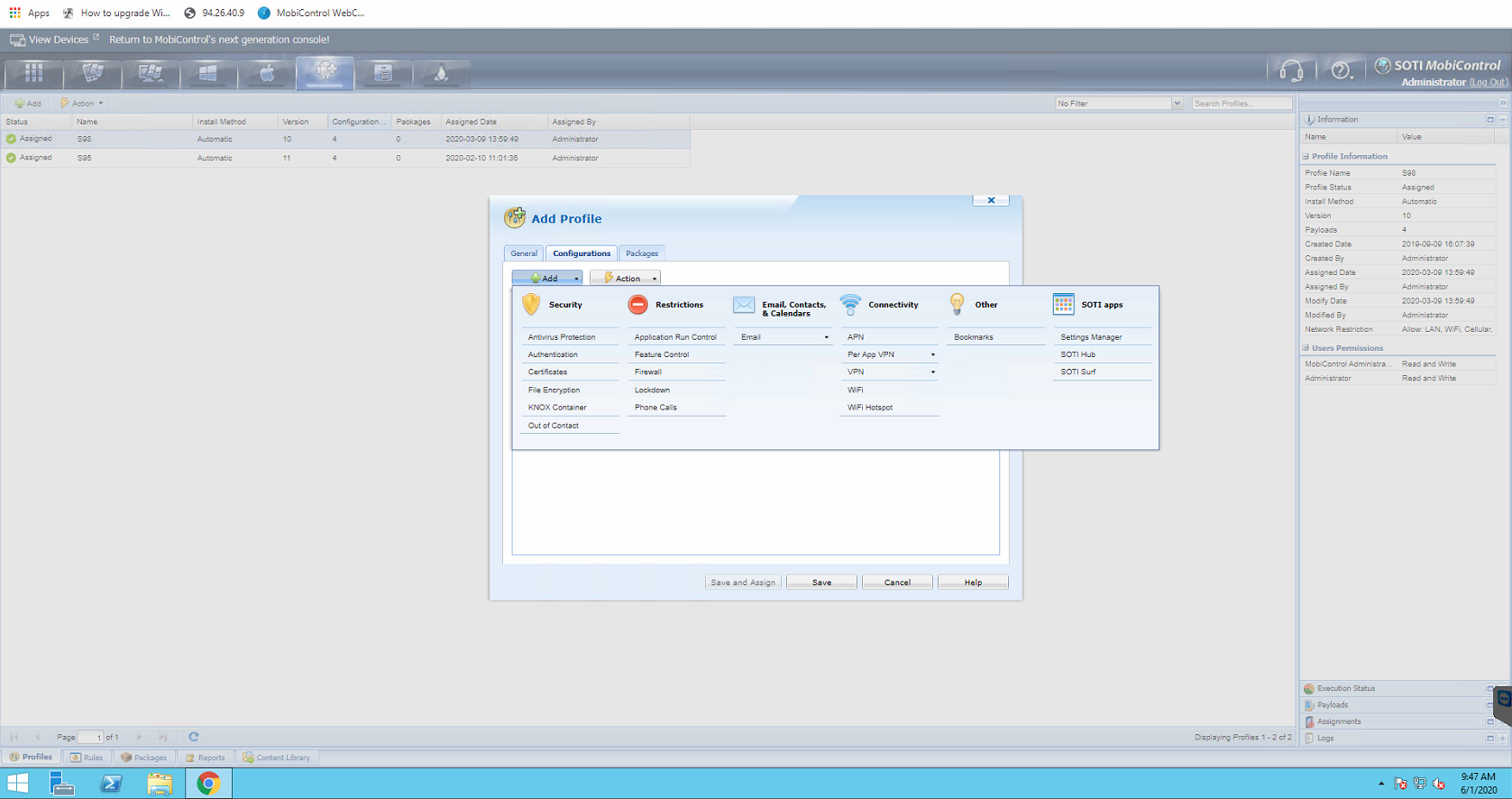
Scheduled task profile payload for Android platform was added for MobiControl v14.3.0 onward.
OK, so there is no Scheduling tasks in Mobicontrol ver. 14.1.3.1587. At least is there a way to manually send script commands to a group of devices, not just to a single device?
Hi Nikolay,
That is relatively easy.
Recent release of MobiControl v14.x supports multiple select of devices with same device-view page, so that the "send-script" action can be sent in one go.
If the targeted devices span across different device groups or across different device-view pages of a device group, but the targeted devices are EXCLUSIVE within a device group or subtree of device-groups, then just choose "send script" action at the group level instead of at the per-device level.
Finally, if the targeted devices are randomly scattered in multiple device groups or follow some well-defined patterns (e.g. all devices of a particular brand, model, firmware versions etc. with device name containing certain sub-string patterns, etc.) or a combination of both, then you can create virtual device-group or virtual device-group sub-tree to manually or automatically (via filter) include devices to be targeted, and then apply the "send-script" action to the virtual device-group or to the top of the virtual device group sub-tree.
Raymond, I think that this is the solution we are looking for. I tried it and it sends the command to all the devices in the group. We'll teach one person to do this action manually and everyone should be happy.
Thank you.
Hi Nikolay,
Thank you for advising us that your post has been solutioned. Please let us know what reply you found to assist you in solving your inquiry so others may benefit from this information by selecting "is solution".
Regards,
Hi Stopi,
Unfortunately there is no script that can clear only the app cache. However many customers have requested and there is a Feature Request created to implement this in the future builds of MobiControl. Please follow the release notes of SOTI MobiControl to get an update on the improvements done on the new release.
https://docs.soti.net/soti-mobicontrol/release-notes/
Regards,
Is there in the meantime a script command that makes it possible to only clear the app cache? If not do you know time any timeline by when this could come?
Regards,
Dirk