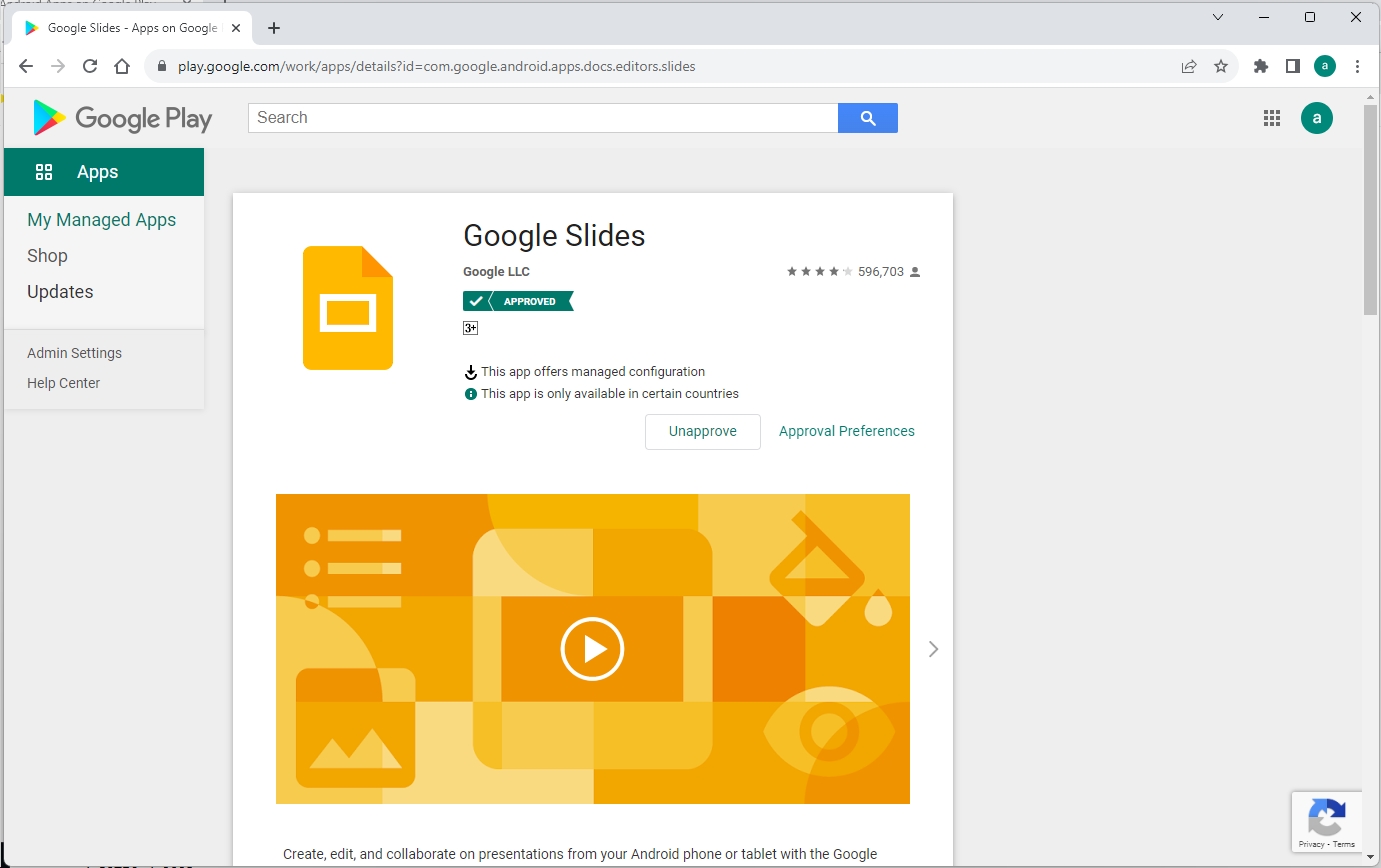
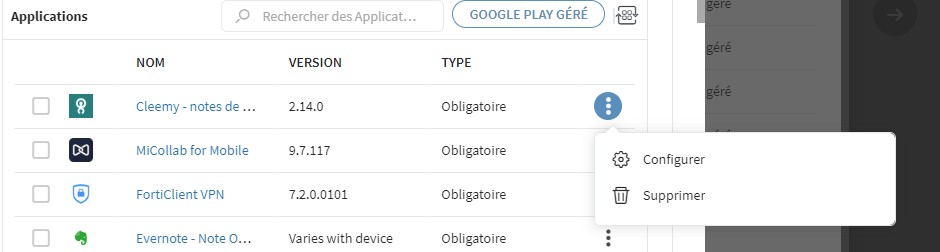
Disable APPs - not possible to select Unapprove

Solved
FB
François B
sotipanoptesfr

Hello,

Customer wants to delete APPs, except apps that the customer wants to remove in the app policy, you don't see in the playstore.
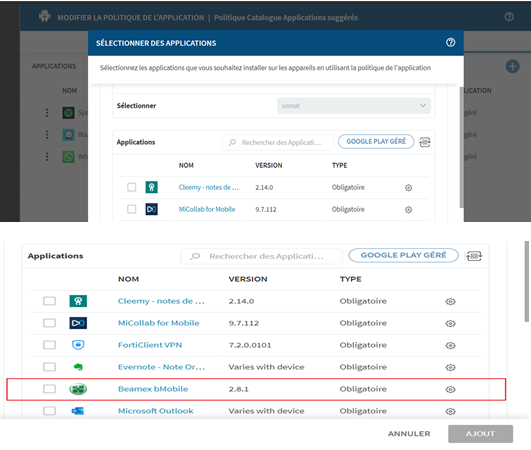
When you go to "managed google play", for example, you don't see the Beamex app (see screenshot above).

Regarding default apps, you can only click on "select", but I don't see "Unapprove".

Can anyone help me, please ?

Thanks a lot,

François 

2 years ago
Android
ANSWERS
RC
Raymond Chan Diamond Contributor
2 years ago

As you circled in red the app in your second screenshot,  I don't understand why you said you cannot find the app entry.

Also, if you want to "remove" an app, why did you ask about "unapprove"?  They   These two operations have different effects and purposes.   There is an "approve/unapprove" operation  for managed app in the managed Google Play store portal, not within MobiControl web-console.   

To access that function,  you cannot just click on the "Managed Google Play"  button above the  "TYPE" column in your second screenshot , but have to start another browser session to https://play.google.com/work  after logging in with the associated managed google play account credential.

FB
François B
2 years ago

Hello,
Yes i'm agree with you about the second comment: To access that function,  you cannot just click on the "Managed Google Play"  button above the  "TYPE" column in your second screenshot , but have to start another browser session to https://play.google.com/work  after logging in with the associated managed google play account credential.
But from customer side when the customer is logged with his google account, he doesn't see any app.

The issue is:
1/ When you are in the APP POLICY => you can see all APPS like Beamex bMobile
2/ But when you go through "managed google play" with customer's google account, you don't see APP like Beamex bMobile.

Is that make sense ?

Thank for your help.

RS
Rafael Schäfer Platinum Contributor
2 years ago

It depends on which Mobicontrol version you are. 

In the past it was possible to unapprove apps in managed playstore directly but got removed (not sure if this was from Google or Soti).
Then it was fixed with 15.6.4 again where you can find it in the "3 dot" menu in the app list when editing an app policy.

RC
Raymond Chan Diamond Contributor
2 years ago

Hi François,

What you said does not make sense, unless the Managed Google Play account logged in is NOT the account associated with the MobiControl app policy.  Please check if there are more than one managed-Google Play account (i.e. AE bindings)  in the MobiControl server instance, and if the wrong MGP account not assoicated with the app-policy binding is used to log into Google's portal to try to perform unapprove operation.

FB
François B
2 years ago

Hi Raymond,

Thank you for your answer but the customer has the right google account.

I suggest to restart from the scratch step by step to underdstand well.

Could you tell me:

-From "APP policy" How do I delete / remove an app like "Beamex bMobile" ?

Thank you,

RS
Rafael Schäfer Platinum Contributor
2 years ago

Have you seen my comment above (~1 week ago)?

Are you on the correct version (i  don't think so because screenshot shows a gear and not 3dots) and now need a guide where to find that menu?

In the correct version you won't have a gear in the app list but a 3 dot menu where you can choose "delete" (bucket) or "configure" (gear).

FB
François B
2 years ago

Hello Rafael,

Yes I saw your last comment.

To clarify I had an internal call with SOTI support, I explained and showed my issue in real time.

They noticed the issue ! and it's seems to be a bug ! Soti support should come to me for next steps.

I can tell you more in private message if you want.

Again thank you,

François 

FB
François B
2 years ago

Saw in logs, there is no connection between the customer google account and the google play store even if you are connected.

RS
Rafael Schäfer Platinum Contributor
2 years ago

Sounds interesting but not relevant for me but thanks for the offer.

Nice that the support saw the bug (that unapprove is not there annymore), we only have had this in an old version and as already said, solved with the latest version then.

But now you seem to have gotten some help directly ;)

M
MPMOD@SOTI Gold Contributor
2 years ago

Hi François,

Thank you for posting on SOTI Pulse! 

Were you able to come to a resolution with Soti Support? Did you upgrade your MobiControl instance?

If not, could you please share the solution with the community?

Kind regards,

Technical Support Specialist | SOTI | +1 905.624.9828 | SOTI.net lDiscussion Forum | Log a Case Online l Facebook l LinkedIn l Twitter 

FB
François B
2 years ago

Hello,

It takes time, it's under investigation when I will the answer I post it.

So at this time you can close this conversation or let it open.

M
MPMOD@SOTI Gold Contributor
2 years ago

Hi François,

Please let us know the solution once you receive an update from Technical Support. We will keep this post open and will continue waiting for your response.

Kind regards,

Technical Support Specialist | SOTI | +1 905.624.9828 | SOTI.net lDiscussion Forum | Log a Case Online l Facebook l LinkedIn l Twitter 

FB
François B
2 years ago

Hi everyone,

This issue is fixed thanks to the version 15.6.5.1018.

I'm able to delete APP from the applications store.

The option "delete" appears.

In the previous version ( 15.6.1) we didn't get this option.

Thanks

Solution