Script to execute my .JS file after syncing the file to the sdcard, use case: velocity file assistant to move my file to necessary Velocity folder for reading

Solved

Use Case: We are wanting our custom attribute to update with the user everytime a new user logs into velocity. 

I have this working manually but trying to automate the js file using file sync. Velocity needs to read in the MAC address for each device. I have the .js script, that when sent manually will create the folder sdcard/com.wavelink.velocity and put the file into it containing the mac address (DeviceInfo.txt). Velocity file assisant will move it from there.

I saved the js in a file (GetMAC.js) and have the file syncing to my device but i am unsure how to execute the file so it will do what I have already done manually. 

How do I execute this file. or is there a better way to do this altogether? should i put this script in the file sync itself? what would i specify for folder paths is there is none?

JSScript:

var folderPath = '/sdcard/com.wavelink.velocity'; var deviceMAC = mobicontrol.device.macAddress; // ----- Folder check with logging ----- var foldercheck = new mobicontrol.io.File(folderPath); if (foldercheck.exists) { mobicontrol.log.info('Folder exists'); } else { mobicontrol.log.info('Folder does not exist, writing folder to sdcard'); new mobicontrol.io.File(folderPath).createDirectory(); }

// ----- Write txt ----- var txtFile = new mobicontrol.io.File(folderPath + '/DeviceInfo.txt'); txtFile.writeText(deviceMAC); mobicontrol.log.info('DeviceInfo.txt written successfully');


5 days ago
SOTI MobiControl
ANSWERS
A
ASBMOD@SOTI
yesterday

Hi @Katie Williams

Thank you for posting on SOTI Pulse.

I would also like to thank Raymond for responding to your post - your expertise and willingness to help are greatly appreciated.

Could you please confirm whether the issue has been resolved after trying the suggested solutions?

If the issue is still ongoing, or if you would like any further assistance from my side, please let me know and I will be happy to help.

We are dedicated to providing assistance and support.

Solution
KW
Katie Williams Silver Contributor
5 days ago

UPDATE: I used a task scheduler, i think this will do what I need!

RC
Raymond Chan Diamond Contributor
4 days ago (edited 4 days ago)

Hi Katie,

If you still want to associate your javascript with your MobiControl file-sync policy, make sure

  1. You enable the post-sync script option as required in your use case in the "SCRIPT" tab of your file-sync policy.
  2. Choose "Custom" script, and paste your javascript file in the script editor window.    Make sure you include the following javascript shebang

    #!/usr/bin/env js

       as the first line of your javascript script file.

The javascript file will be run after a SUCCESSFUL file-sync operation has been completed.


KW
Katie Williams Silver Contributor
4 days ago

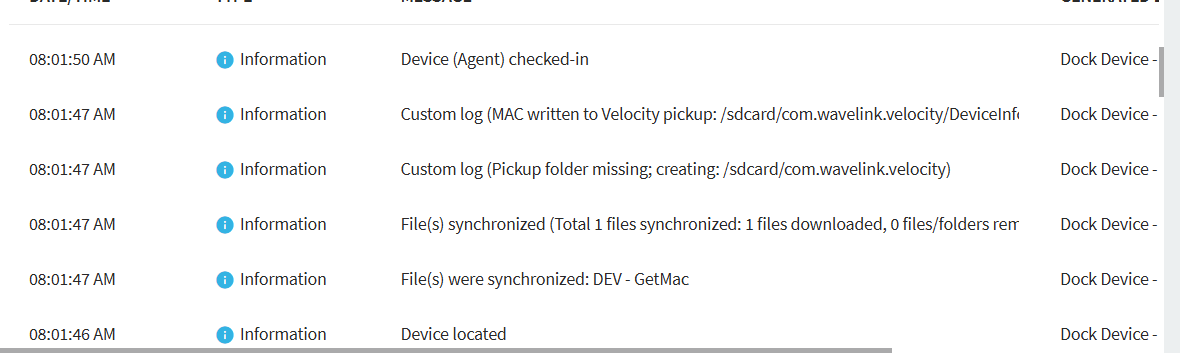
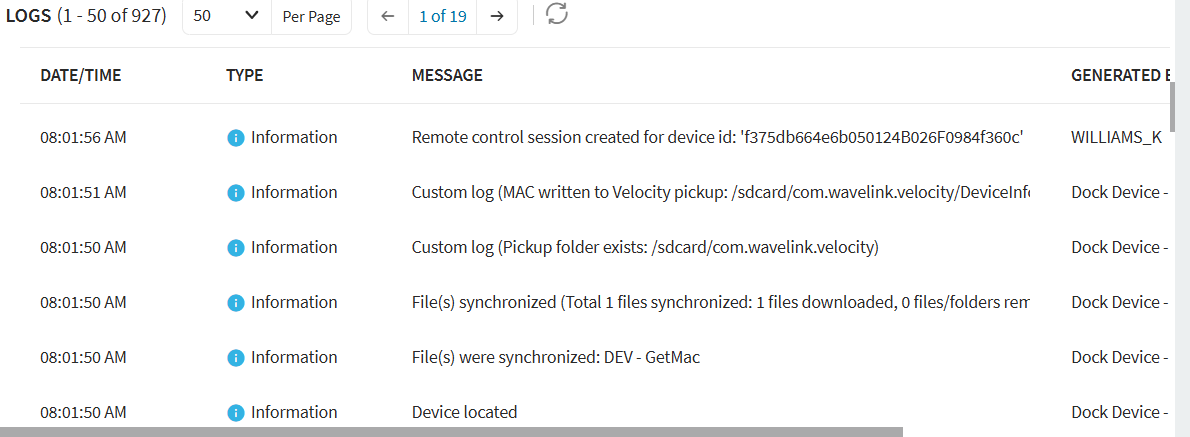
Thank you! So it did execute but it looks like it's running twice. Do I not need to sync it to the sdcard and just run a execute script in the file sync custom script that will execute the synced file? Or use a different custom script in the file sync that will just run the synced file from there? If i dont need the sync filed anymore then what do i choose for device file/folder and server file folder? seems like it would just be holding places. I hope that makes sense.

KW
Katie Williams Silver Contributor
4 days ago

Update: I removed the JS script from the GetMac.js file and left the JS script inside the file sync custom script box. So it is essentially sycing a blank js file to the sdcard and then running the script from the file sync. This gets it to only run once in the logs.