File sync rule or profile & package for resumable large file distribution? Advantages and disadvantages

7
74HCT04
Jersey Post

Background

As I've previously alluded to here https://discussions.soti.net/thread/soti-surf-send-a-url-in-a-script-1-1  I have some specific requirements when it comes to distributing OS update .zip files to several hundred Honeywell devices.

In the context of the following paragraphs, points 4 and 5 from my previous discussion are important. Here they are again:

"4. The download must take place overnight and, ideally be windowed so that I can stop it without having to take down the [connection to the] server, should it overrun. Manually stopping a download is not ideal but is accpetable.

5. In some areas, our WiFi network suffers intermittent connectivity / packet loss meaning downloads may need to resume / restart."

The current challenge

I am now in a position where I need to deploy a smaller incremental update to the devices (216MB) and have been experimenting with uploading the file to our MobiControl cloud instance and testing a file sync rule. The file sync is working well but doesn't cater for windowed downloads - that is to say "download between 12:30am and 4:30am only", for example. I believe I can solve this problem with some Javascipt setting an integer value in an ini file on the device - the integer defining whether the time window is open or closed. Then back in MobiControl's web UI I can use a filter group, based on the custom data from the .ini file defining "window open" as the target of a file sync rule.

However, the above does make me wonder about the resilience of a profile with package payload in terms of restarting incomplete downloads. The windowing functionality is easy to set in the profile's assign options but will MobiControl manage a failed download which was embedded within a package?

Is there a good reason to carry on developing my Javascript or should I switch to the profile-based approach? Previous advice suggests that the file sync is robust but if the profile&package option is equally as robust it makes my window requirement very easy to impliment.

2 years ago
SOTI MobiControl
ANSWERS
RC
Raymond Chan Diamond Contributor
2 years ago

While failed profile and package deployment will be retried automatically by the MobiControl server,  an administrator has virtually no control over parameters used in the retry mechanism.  Comparatively speaking, an administrator can configure file-sync rule parameters such as sync interval, option to sync again when device gets connected tot he server, etc, and thus has some indirect control over the retry mechanism.  

7
74HCT04
2 years ago

Thank you. Those are very good points, Raymond.

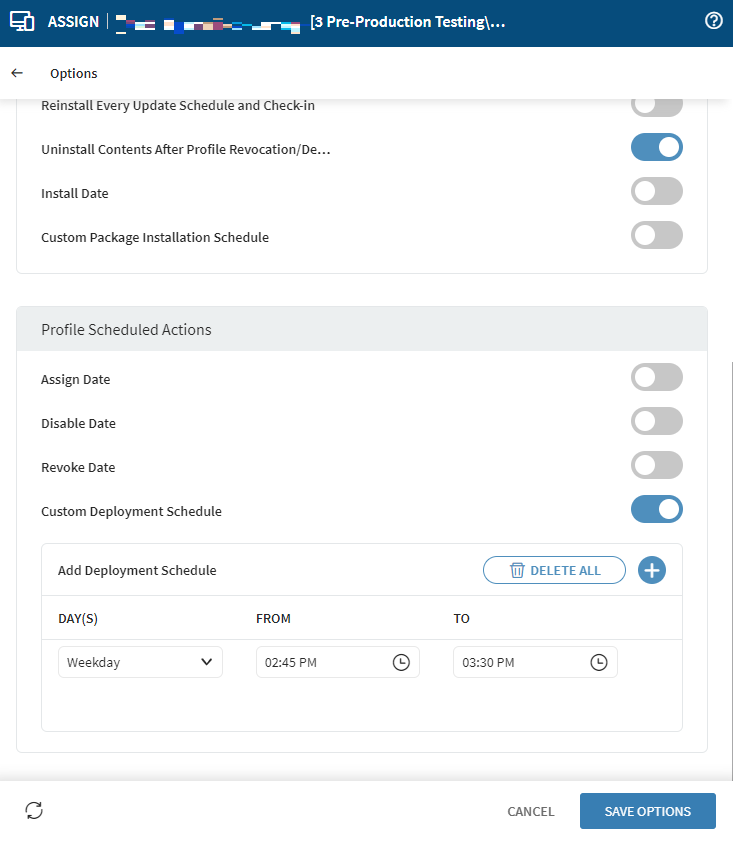
I tested the profile and package version but became impatient waiting for the profile at "pending install". This took so long that the profile was still "pending install" when its window closed. By comparison, file sync starts essentially instantly on my test device.

Edit: this is the test "window" in time that I am referring to:

MD
Matt Dermody Diamond Contributor
2 years ago

I have an idea that recently came to mind for your situation. You can target File Sync rules at Virtual Groups and you can also target Relocation Rules at Virtual Groups. Relocation rules can be setup to activate during a certain time. What you could do in theory is have two Virtual Groups set up with no filter criteria, one for updating the devices and one for staging where the devices don't update. Point your File Sync rule just at the updating Virtual group. Move all the pending devices to update into the staging virtual group and then have a relocation rule that is set up to move them into the update group during your update window at night. Then have an alternate relocation rule that activates at the end of the update window to move them out of the updating group into the staging group automatically. In my experience a File Sync rule that has started on a device will continue on a device to completion even after it is unassigned so any devices in the middle of their download at the end of the window would continue to download the file even after being moved out of the folder. You can interrupt this download however with a restartagent script. 

7
74HCT04
2 years ago

Thank you Matt and Raymond,


Matt, I hope you don’t mind if I break down your reply and address some of the sentences in turn…

“Relocation rules can be setup to activate during a certain time.”

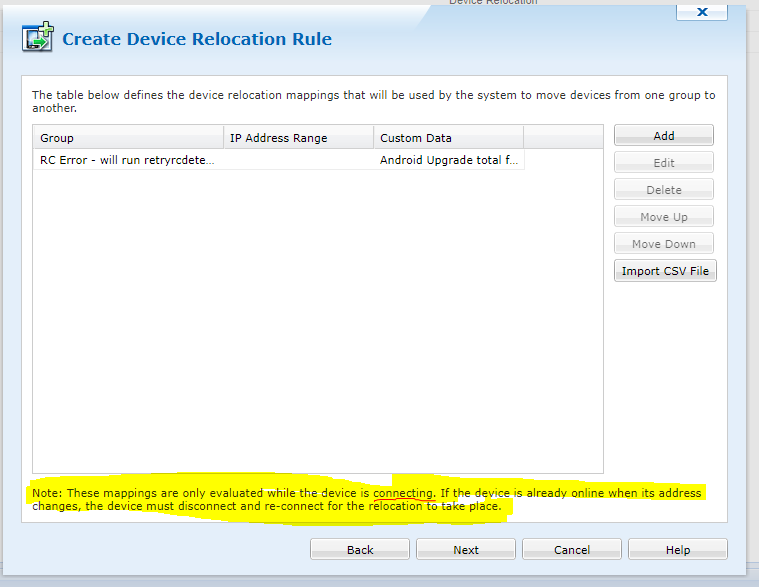
They can but they need a trigger condition in addition to the activation time (which isn't a schedule like "daily at 1am" but is a one-off instead). That trigger condition can be either a change of IP address (no use to me) or a change of custom data – i.e. something that my Javascript could change. Please see the attached screenshot.

The thing that concerns me about the dialogue shown in the screenshot (ignore my "group" and "custom data" details for a moment, contextually they’re nonsense I used solely to create the screenshot) is the statement at the bottom “Note: These mappings are only evaluated while the device is connecting. If the device is already online when its address changes, the device must disconnect and re-connect for the relocation to take place.” Does this note - which is clearly written in the context of IP addresses- also mean that the mappings of custom data are also only evaluated while the device is connecting?

 “What you could do in theory is have two Virtual Groups set up with no filter criteria, one for updating the devices and one for staging where the devices don't update. Point your File Sync rule just at the updating Virtual group. Move all the pending devices to update into the staging virtual group and then have a relocation rule that is set up to move them into the update group during your update window at night. Then have an alternate relocation rule that activates at the end of the update window to move them out of the updating group into the staging group automatically.”

Yes, this could work thank you. But wouldn’t filters on the virtual folders themselves, evaluating my “in upgrade window” or “outside of upgrade window” variable be assessed on every collection of the custom data? (Which, in my experience is normally updated on every check-in, although in another thread I believe that Raymond once warned that that per-checkin custom data collection isn’t guaranteed).

“In my experience a File Sync rule that has started on a device will continue on a device to completion even after it is unassigned so any devices in the middle of their download at the end of the window would continue to download the file even after being moved out of the folder. You can interrupt this download however with a restartagent script.”

Useful to know, thanks again. I've already got the following script saved as part of my toolbox of scripts as it's so useful to have to hand: "restartagent --immediately"

==============================

Next question please. Can MobiControl cope with -or at least manage- several hundred simultaneous downloads each of 200MB? I don’t want to overwhelm the cloud servers. I’d also prefer to avoid the syncing excercise going on for several nights in a row, but could live with that if necessary. I am hoping that one of you is a "vetran" of syncing a similarly sized file to a similar number of devices - theoretically simultaneously!

A
AMMOD@SOTI Bronze Contributor
2 years ago

Hi 74HCT04,

Thanks for posting on SOTI Pulse, Thanks Raymond and Matt for responding to the post.

Have you got a chance to test the suggestion given by Raymond, did it resolve your query?

If you have any additional questions or concerns, please don't hesitate to reach out. We're dedicated to providing assistance and support.

Kindly let us know.

Kind regards,

Technical Support | SOTI Inc. |1.905.624.9828 | support@soti.net | www.soti.net |

Similar Discussions