We are implementing shared device soon and my question is: are the packages getting installed and deleted every time we move between groups?

Solved

when we move a device from the home group to the working group (the apps we want them to see) are the packages (apps) then getting installed at that point for that user? and when we move it back to the home group, the packages get deleted?

Is that how it works?This could cause a delay for the user as some of our packages take a few minutes to install so if it needs to re-install every time that could be a pain. 

a year ago
SOTI MobiControl
ANSWERS

You need to test but as far as i remember if the profile of the package is always the same it will stay but if you have different profiles then they willl of course being installed and uninstalled everytime you move the device.

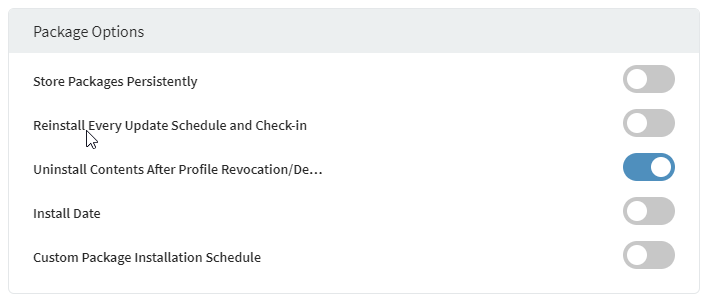
But you can define in the assignment options of the profile if the package itself should stay (here are the default settings):

I would recommend to change the first and third option and test again.
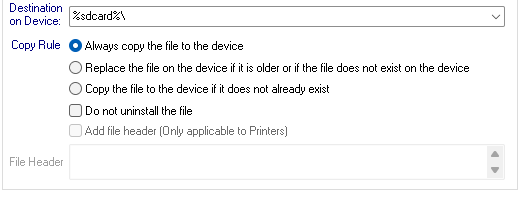
Also when creating the package you can choose for every file you added, the option "Do not uninstall the file":

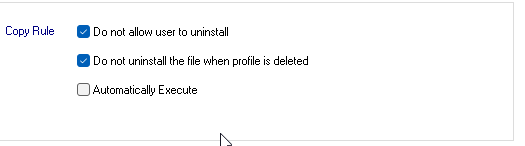
And same for apk files:

Solution
RC
Raymond Chan Diamond Contributor
a year ago

On top of the smart use of package options mentioned in the above post, you can also consider using the following approach.

If your devices have sufficient space to store all the .pcg packages for each of the device groups in a particular shared-mode tree, then you can choose to have all the .pcg packages pre-pushed to a predefined safe directory when in the idle parent device node.  Logging in (with the effect of moving) to each specific child group can have a corresponding policy to run script to install relevant set of apps for that group from the .pcg file archive.   

KW
Katie Williams Bronze Contributor
a year ago

I think i understand, let me say it a different way to be sure i do. I can install all the packages on all the devices that may need ant of those packages at any given time, while they are sitting in the home group waiting for someone to sign in. When they move to the working group based on who signed in, and need say 3/5 of those packages, the lockdown kiosk will only allow them to see the 3 packages they need to see, although they have all 5 installed on the device?

E
ESMOD@soti
a year ago

Hi Katie,

Thank you for posting on SOTI Pulse.

Thanks Rafael and Raymond for helping on this request! 

Glad to see that you came to a resolution for this post. Please feel free to reach out to technical support if you have any other questions.

Kind regards,
Technical Support SOTI| SOTI.netLog a Case Online l Facebook l LinkedIn l Twitter