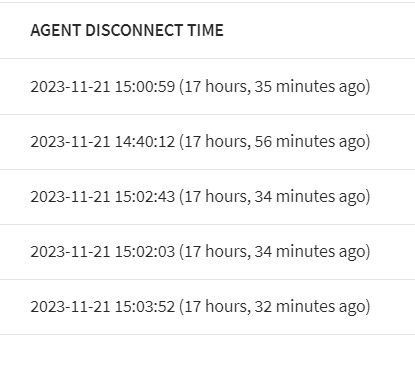
After exporting a device list with " agent disconnect time" in it, it's alomst impossible to transfer it to Excel.
Did anyone succeed to transfer this list to Excel and normally sort on dates or create a pivot table?
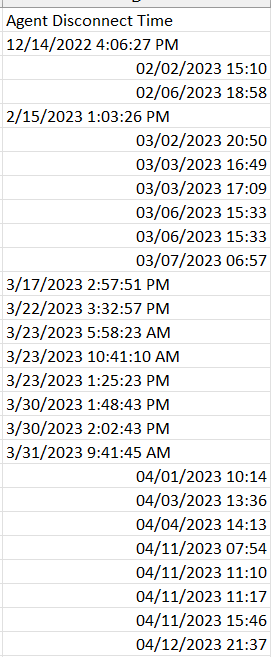

After exporting a device list with " agent disconnect time" in it, it's alomst impossible to transfer it to Excel.
Did anyone succeed to transfer this list to Excel and normally sort on dates or create a pivot table?
I want to simply sort on devices which haven' t connected with SOTI for a while, but the way this report was build it's almost not possible. Even inside 1 column there are different types of format. When you want to change the format of these cells to " Date" then nothing is happening.

Hi Willem,
You can directly use Agent connect time filter on WebConsole and then you can export ready devices report, if it's what you need. For example below shows devices which have not been connected for 10+ days. I hope it helps.
Hi Willem,
Thank you for posting on SOTI Pulse!
Was the suggestion presented by Zafer able to assist with your issue? Please feel free to mark it as a solution if so.
We were able to replicate this inquiry on our end and it looks to be working as expected, so do let us know if the issue is persisting and we can investigate further.
Kind regards,
Technical Support Specialist | SOTI | +1 905.624.9828 | SOTI.net lDiscussion Forum | Log a Case Online l LinkedIn