
Hi,
when an apk is imported with the enterprise app method, regardles of upload or url import.
How to retrieve or download the apk that exists now in mobicontrol database?
i dont want to install it on a device, i need the imported apk.
thanks

Need help fast? Ask Pulse AI and get instant support.
Hi,
when an apk is imported with the enterprise app method, regardles of upload or url import.
How to retrieve or download the apk that exists now in mobicontrol database?
i dont want to install it on a device, i need the imported apk.
thanks

Afaik there is no way to do this from console side but maybe ask Soti if you can do this from DB side.
Thats also a reason why we always have an apk repository as a "backup".

In SOTI MC 2026.1.1 it is possible to download the imported apk.
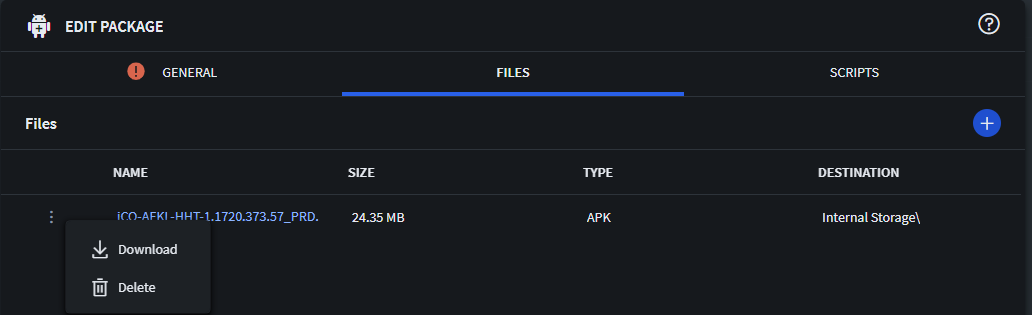
Select [Device Resources] [Packages] Search for the package you need to download.
Right Click package and select [Edit] in Edit package click the 3 dots and select Download.
@Onno SmitWhere do you find that for the requested enterprise app store?
I checked our test server (2026.1.3) and there's no download option for the uploaded apps:
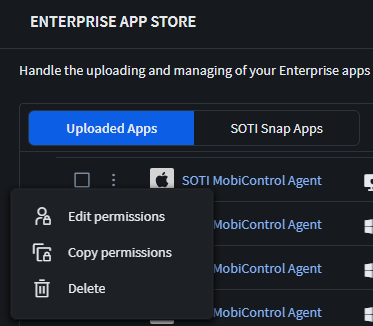
Only in the packages area (which is completely different thing than enterprise app store) you can download but only get (as @Radim Kadlec mentioned correctly) the *.pcg file, not the original apk file.
@Rafael Schäfer You're right, my bad.
Did not think of the Enterprise Appstore as we distribute most of our internal Enterprise Apps by importing them into Packages and distributing them by Profiles.
@Onno SmitWe moved those to enterprise app store since it's there because of easier managed app config and to split app deployment from general setting deployment, having a clean environment.
But no matter which way of those, we ever had a seperate repository of (apk) files even for packages per version so have every single used file available.