Is there a way to assign remote control skin based on model?

AF
Allen Foster
Koch Business Solutions

I would like to find a way without building a folder for each device model to apply the remote control skin to it.  With our Zebra MC3300's the Auto Skin works but with Samsung devices the auto skin does not work.  I looked at doing a virtual group but you cannot apply a skin to a virtual group.  We currently have a lot of Samsung Tab Active 2 and Samsung Tab active pro devices and they all reside in the same folders within site groups.  It would be nice if there was either a way to get Auto Skin updates or to be able to assign a skin based on device model.  

5 years ago
SOTI MobiControl
ANSWERS
D
DDMOD@SOTI Platinum Contributor
5 years ago

Hi Allen,

Thanks for the post!

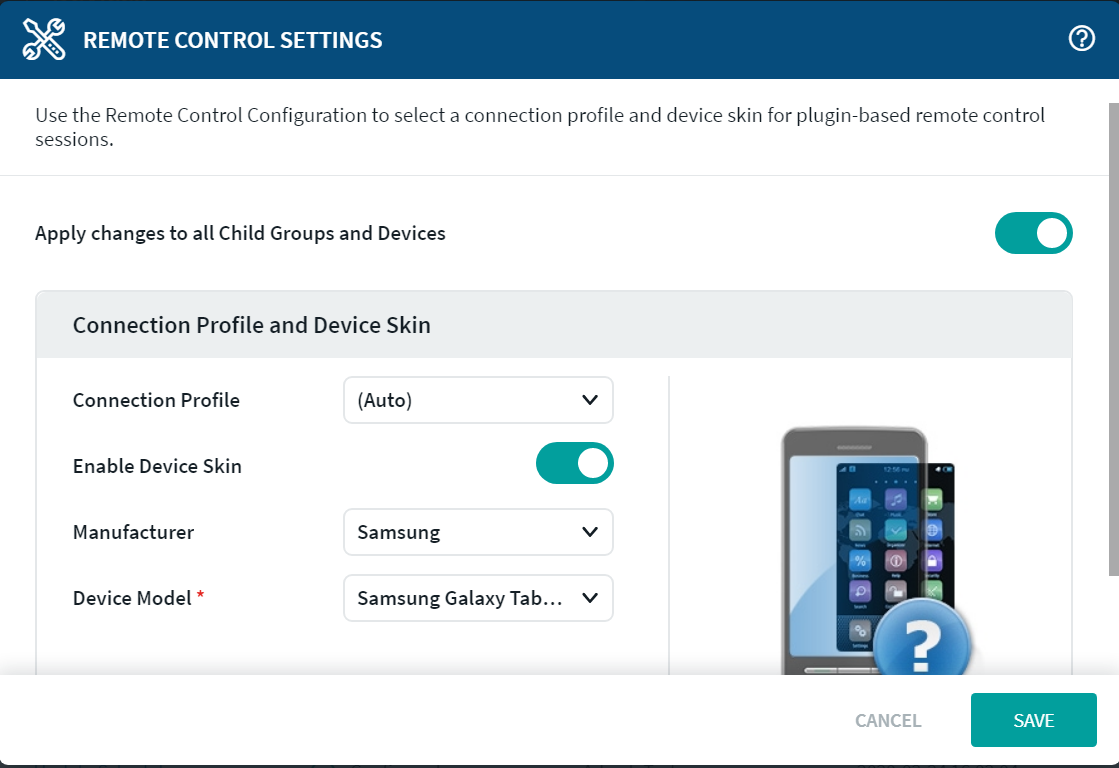
The option to add a device skin to the device during plugin-based remote control sessions is available under Remote Control Settings.  Select a device manufacturer from the dropdown list. A new dropdown list, Device Model, will appear where you can choose a specific device model to use as the device skin.


This specific setting is available either on a device level or group level, not on a virtual group. If this feature is enabled, then on every skin update, the Remote skin of the assigned device auto-updates.

Regards,

AF
Allen Foster
5 years ago

But there is not a way to apply the skin to only a particular model of device?  The reason I ask is on our 14.4 instance the auto skin is not working for Samsung devices.  That 14.4 instance has been updated from a 13.3 instance.  Now we are testing 15.1 in a demo instance and the auto skin does work.  What I might need to do is open a ticket with Soti Support to look at why our auto skins are not working in 14.

D
DDMOD@SOTI Platinum Contributor
5 years ago

Hey Allen,

Can you please try clearing the cache of your web browser. I have included instructions below on how to do this. So, please follow the instructions below and after that please try remote controlling your test device and see if the skin appears while also configured to automatically get the skin. I also included screenshots the web developer kindly provided below the instructions. Let me know how you get on!

  • Remote Control the device
  • Once in the Remote Control view, click the 3 dots on the top right of chrome, then go to more tools, and select developer tools
  • Once you have selected the Developer Tools, you’ll see something popup either on your right of your screen or below
  • Then you’ll want to follow the attached image and go to Application and then delete all the keys you that see listed by selecting the icon 
  • Once you have completed the above step, just refresh your browser

User-added image

User-added image

Regards,

RC
Raymond Chan Diamond Contributor
5 years ago

In the last few years, I've never relied on the "auto" skin selection for MobiControl v11+   There were just too many new device brands/models coming out all the time and I often need to intelligently select functional alternative skin for devices that did not have any canned skin available, thus avoiding the effort and waiting time for a new skin request.

If Soti confirms to you that there won't be any fix for v14 in the near future, a possible workaound is to create different device subgroup for each model and have the right skin set for each device sub-group.  

AF
Allen Foster
5 years ago

I know I can do device specific groups and that has been what we have done for ages with windows mobile but we are trying to move away from that with Android.  Especially if they are running the same profiles on all the device models.  And as I mentioned it is working fine in our Soti 15.1 demo instance just not in our 14.4 productions instance.  But thanks for the suggestion.

AF
Allen Foster
5 years ago

I could see this as an issue if I were using the Web-Based remote and not the msi remote control.  Plus if it were a case of my browser not recognizing the proper skin to use then it should work when I remote from a clean browser on another computer.  Or if anyone else tried to log in.  Plus with the same browser session I can remote control to a test device on our 15.1 demo instance and the skin is recognized.  I have tried Chrome, Edge, IE, and firefox.  It is not a browser issue.  I am sure it is probably a database issue since we have been upgraded several times from version 12 to 13 to 14.4.  And if we upgrade to 15.1 it may fix itself or the issue may persist.  I have a meeting tomorrow with our account manager.  I will bring it up during that meeting.

RC
Raymond Chan Diamond Contributor
5 years ago

Hi Allen,

Thanks for sharing your successful test result on MobiControl v15.1,   I will try it out there and see how smart the auto mechanism is, especially when there are so many new Android device models that do not have a valid skin available.  I won't expect perfect result and is likely to continue using manual setting instead.  After all, manually changing the per-device skin choice only need to be done once on any enrolled device the first time a remote session is needed, and the extra 1-2 minutes to manually pick the best skin is no big deal comparing with the much long time to be spent on any subsequent remote-control sessions on the same device. 

Similar Discussions