Good day
What is the most effective way to enroll the Chainway C71 device onto MobiControl?
I don't see any device agent available on the website.
Regards

Good day
What is the most effective way to enroll the Chainway C71 device onto MobiControl?
I don't see any device agent available on the website.
Regards
Good day
1 Factory reset the devices
2 Create a google account
3 Enroll devices by using the AFW# token when required for a gmail account
4 Upgraded my console to version 13.4

Based on the unofficial on-line catalog of Android-Enterprise ompatible device at https://androidenterprisepartners.withgoogle.com/devices/#!?manufacturer=chainway
Chainway C71 should run fine on Android-Enterprise platform.
So, you can use Android-Enterprise device agent either from Google Play store or downloadable from https://docs.soti.net/mobicontrolagentdownloads/
Please check other posts on this forum or Soti documentations on how to enrol your device to either
1. Managed-Device (also called Device_Owner) mode, or
2 Work-Profile (BYOD / containerized) mode
using the same devcie agent mentioned abvoe.
Hi Raymond
I have managed to enrol the device via the afw#mobicontrol method. The plugin was imported and i have selected android for work as the profile type. Problem i'm having now is that the work profile doesn't have all the configurations available whereas as android plus got the lockdown, APN etc. My biggest concern is i need to have the devices loackdown
Vincent
Did you perform factory reset befoe enrolling the device with the afw#mobicontrol hash tag? What are the active MDM api's reported for your enrolled device?
Lockdown menu is supported for all Android-Enterprise devices in Managed-Device (also called Device-Owner) mode. The configuration payload is called "Kiosk Mode" instead. If your AE device is enrolled into "Work Profile" mode, it won't support lockdown or kiosk mode.
Hi Raymond
I see that the kiosk payload is working fine on AE under the work profile.
How do i go about getting the APN configuration for AE under the work profile?
Regards
Vincent
I'm not sure whether you just casually used the term "work profile" to refer to Android-Enterprise, or you really meant the "work-profile mode" in Google's Android-Enteprise platform.
Before talking about APN, could you please first confirm what are the active MDM api's reported by the device agent on your enrolled device?
Advanced Android Plus 1.0, Android Plus 1.16 Work Managed Device, RC+ (1.16.0.100)
So your deice is actually in "managed-device" mode, and not "work-profile" mode. There is support for APN configuration profile payload in Android Enterrpise platform to configure APN on your device. Did you encounter any difficulty using it?
As your device is currently in managed-device mode, you have to first perform a devce factory reset, and avoid using the afw#mobicontrol when being prompted for a Google account. Have the MobiControl device agent downloaded from personal Google Play store or apk downloaded from Soti web-site, and input the enrollment ID as usual. After successful enrollment, the device agent will show "work-profile" mode in the active MDM api fileld.
Please note that many policies available in managed-device mode is no longer supported in work-profile mode.
So I have tried the work profile mode - the only challenge is do i need to create a new profile with Android plus
I don't see the APN settings when using the Android Enterprise method
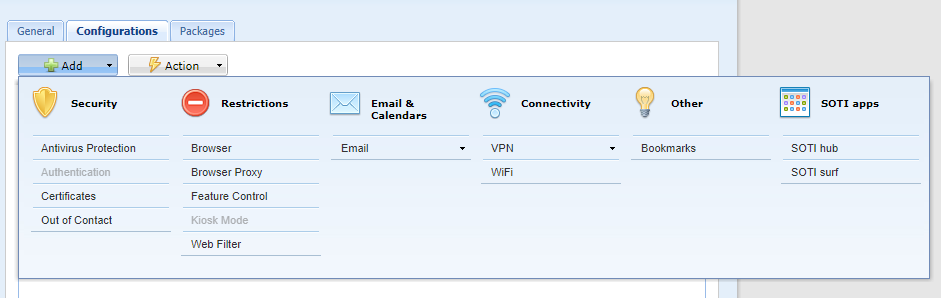
There is support for APN configuration profile payload in Android Enterrpise platform to configure APN on your device. Did you encounter any difficulty using it? I need this part to be working

Hello Vincent,
Following up on this thread, were you able to resolve the issue? If yes, I would like to know what were the steps taken to resolve the issue and I can mark that as a Solution.
Regards,