Cisco AnyConnect App

Solved
JK
Jason Klotz Bronze Contributor
Mediacom Communications Corporation

Good Evening,

Anyone using Cisco Anyconnect as their VPN clients on their mobile devices with an Enterprise Profile vs Android Plus profile? I am seeing that once you you leave the elm agent you can no longer add profiles thru SOTI which then leaves it up to the employee to configure.

6 years ago
Android
ANSWERS
RC
Raymond Chan Diamond Contributor
6 years ago (edited 6 years ago)

While I personally haven't got involved deeply with customers using Cisco AnyConnect VPN on Android Enterprise platform,   I think it is worthwhile for you to know the following:

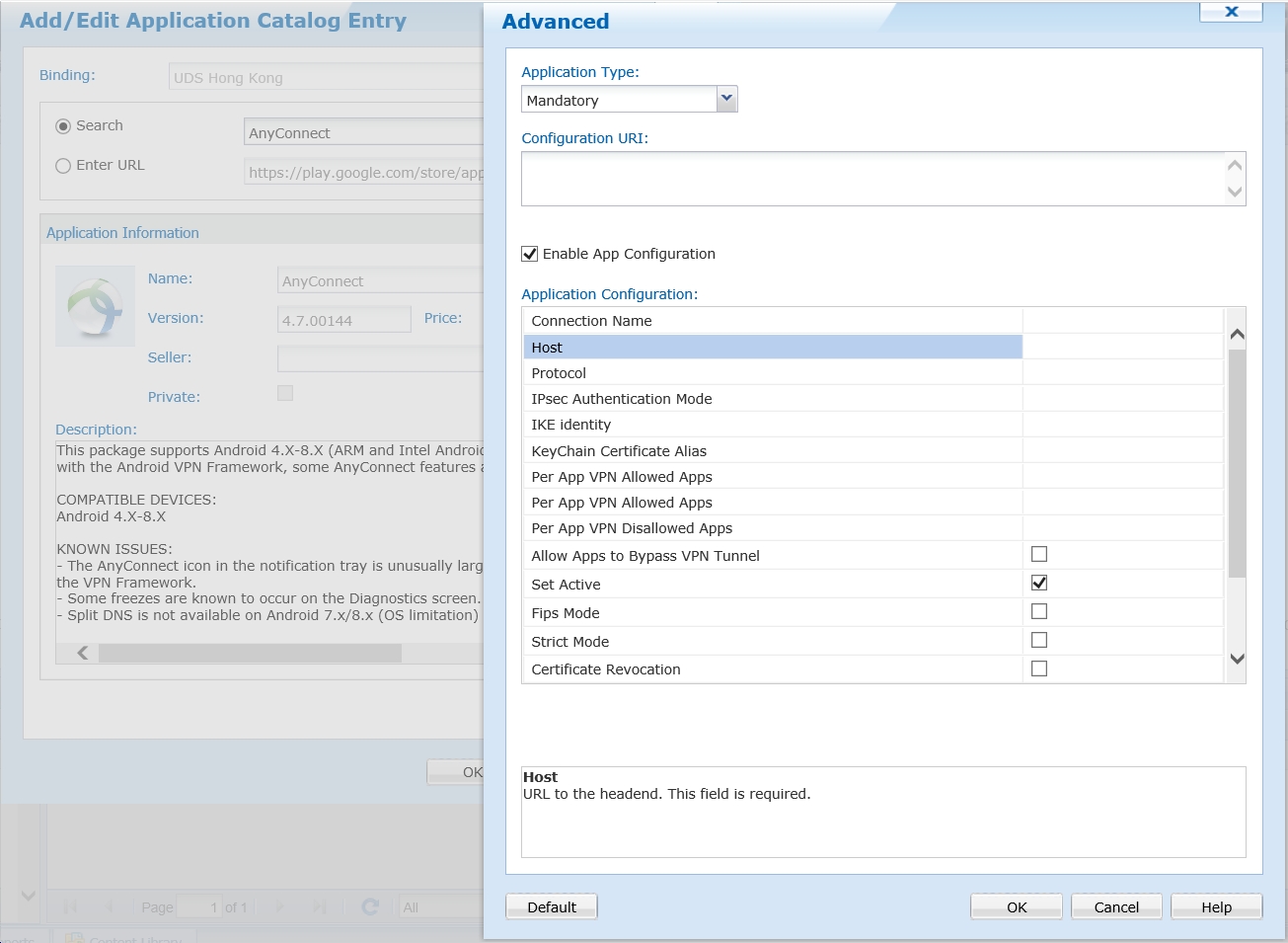
1. Just like most other VPN client apps from top VPN vendors, the Cisco AnyConnect client app from managed Google Play store (at https://play.google.com/work/apps/details?id=com.cisco.anyconnect.vpn.android.avf) supports AppConfig configuration.  In other words,  configurations are set in the advanced configuration tab of the app item in your App-Catalog rule (see screenshot below) rather than set in a VPN profile.

You have to check if the parameters configurable are sufficient for your use, and the app is compatible with your MobiControl server and AnyConnect software.

2. If your existing devices are to be switched from Android+ to Android Enterprise platform, the migration cannot be securely done over-the-air.  It is best that all devices be recalled because a device factory reset is required.   The existing Android+ agent should be unenrolled/deleted.  Then the device should be factory reset, and then enrolled to Android Enterprise platform (via afw#mobicontrol tag, QR code, NFC bump, etc.) to force it into Managed-Device Mode.  The VPN client app, together with the required VPN configurations, can then be pushed over-the-air onto the device by MobiControl.  You have to create and deploy Android-Enterprise profile(s) that cover as much as possible the policies originally defined by your original Android Plus profiles. 

Solution
R
RKMOD@SOTI
6 years ago

Hey Jason,

In order to understand more about your requirement, kindly confirm if you're using an Enterprise profile or Android Plus profile?
If it is an Enterprise enrollment, I'd like you to know that Cisco Anyconnect VPN is not available in case of Android Enterprise.

If you're enrolling an Android Plus device using Samsung ELM agent, you should be able to push Cisco Anyconnect VPN profile to the device.

Now, when you say that you leave the elm agent, do you mean that you're removing the MobiControl ELM agent from the device? If so, then I would like you to understand that your device will get unenrolled if you remove the agent from the device and you would not be able to push any profiles on the device and users will have to manually configure the VPN.

I'd highly appreciate if you could provide more detailed information about your requirement.

Thanks & Regards

JK
Jason Klotz Bronze Contributor
6 years ago

Thank you Raymond. Forgot all about the app config in the Play Store for Work. 

JK
Jason Klotz Bronze Contributor
6 years ago

RK - I did reach out to my Sales Manager to have him submit a feature request in the future that has the config option for Cisco built in for Enterprise enrollments.

D
daniel
5 years ago (edited 5 years ago)

Hello, is the Cisco AnyConnect VPN for Android Enterprise available for Work Profile AND Work Managed Devices? Or only one of them? Focussed on Samsung devices.