How can I enable unknown sources?

How can I enable unknown sources?

Hi,
You'll need to enable "Allow installation from unknown sources" in the feature control profile. You'll then need to enable it from the settings specifically for Chrome or any other apps.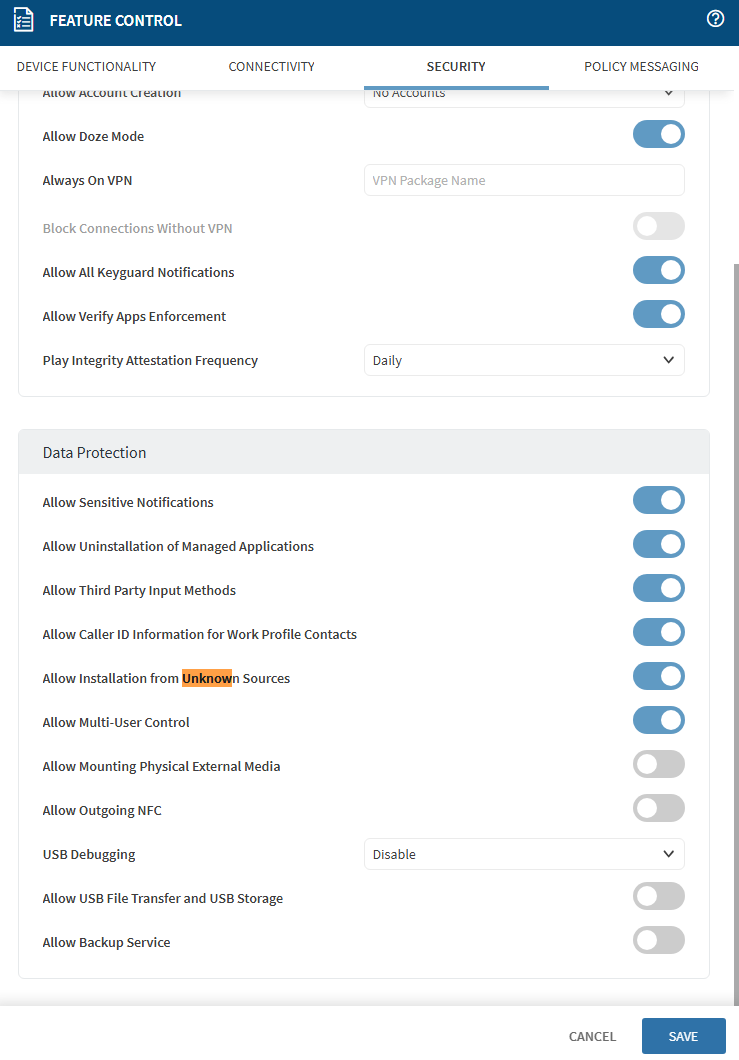
Hello Darius,
Thank you for your reply. I tried that, but it didn't work. I need to grant permission on an app-by-app basis.

Maybe the issue comes from somewhere else and we can solve this better than the currently expected way.
Why do you need to install form unknown sources when using the device?
We enabled all settings on the kiosk. That's how we solved the problem. Zebra has removed this support. It was asking for this permission when trying to install the app as an apk.
If you install it via package or enterprise app policy it should work just fine.
Never see such issues when using those functionalities and i think @Matt Dermodymentioned in another post already as well.

Hi IK,
Please confirm if this has been resolved on your end or you have any questions or concerns regarding the same.
Additionally, please let me know if you have raised the Support ticket or would you like me to create a ticket for you.
Thank you for choosing SOTI.
Regards,
Technical Support | SOTI Inc. |1.905.624.9828 | support@soti.net | www.soti.net
