Looking to be able to wipe a device from the Soti MobiControl portal. Can someone point me in the right direction.

Looking to be able to wipe a device from the Soti MobiControl portal. Can someone point me in the right direction.

Hello Michelle
Greetings
Thanks for requesting an answer from Soti!!
Kindly let me know if you have tested with below mentioned scripts for your windows mobile devices If not then Kindly try to test with mainly reset /W to check with your test device and let us know outcome.
I am also mentioning some other scripts combinations for your reference which can be used with reset.
reset
Performs a soft or hard reset of the device. |
reset [/S | /H | /W | /E] [/delay]
Where
|
Regards
Thank you for this info, but can I ask how and where you do the scripts in MobiControl?
Hello Michelle
Greetings
Thanks for your feedback.
Kindly follow instructions on the below mentioned link to assist with your query.
https://www.soti.net/mc/help/v15.0/en/console/other/sending_scripts.html
Also, if any post has helped you in solving your inquiry, I would request you to mark the particular comment as "is solution", so others may benefit from this information
Regards
I noticed that when I went into the Send a Script for the device that there was a drop down, so I should be able to use this correct?
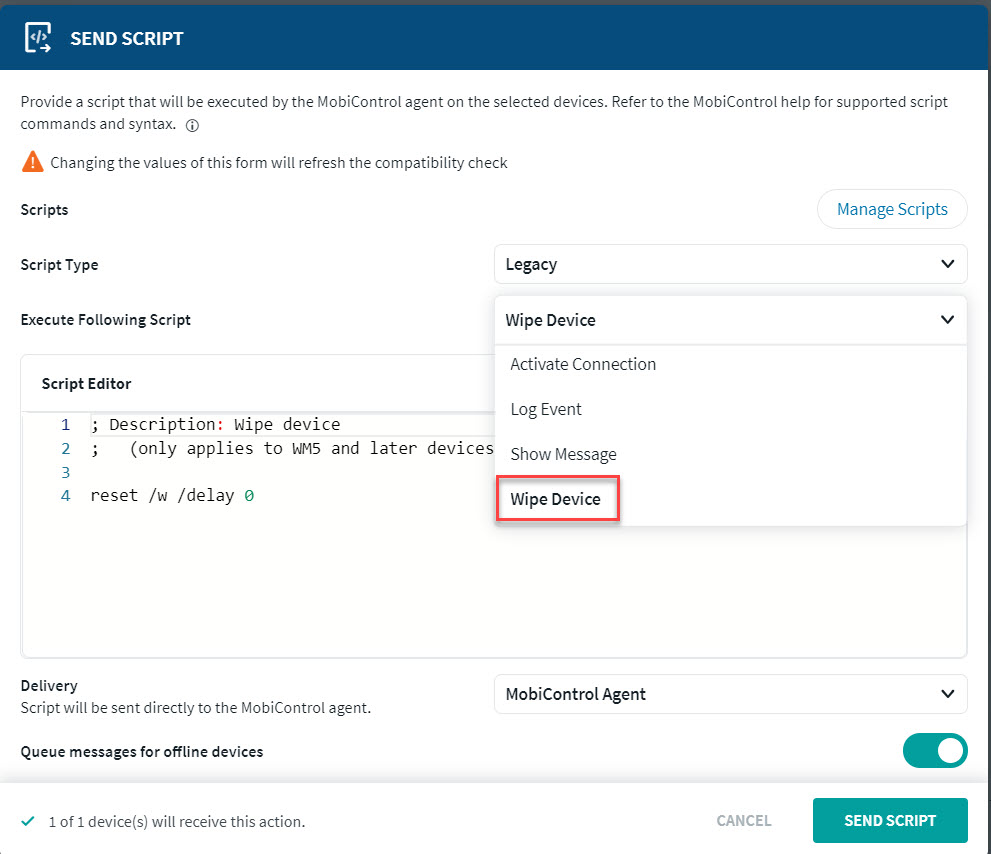
Hello Michelle
Greetings
Thanks for your feedback!!
You are absolutely right over here and you can use this dropdown to select required script and send it on selected device.
Regards
This does not seem to work for Windows Laptop wipe, only Windows mobile wipe. Can you help direct me to a script that will wipe a Windows Laptop device?
Hello Michelle
Greetings
Thanks for your feedback!!
In that case, kindly confirm os version of your window laptop device and also confirm if it enrolled as windows modern device in Soti?
Regards
The devices are all Windows 10 version enrolled as Windows Desktop Classic
Thank you for your response. I wish someone had explained that to me when I got started. I am going to switch enrollment as you mention and contact Support if I have issues.
Again Thank YOu!