MobiControl not starting in background when Samsung Tablet is restarted

Hi,

I am having an issue where when a Samsung tablet restarts (Enterprise Work Managed, Android Version 11 to 13) it shows lock screen and until someone actually unlocks device, the device is not seen by MobiControl. It's like MobiControl agent only runs when the screen is unlocked the first time.

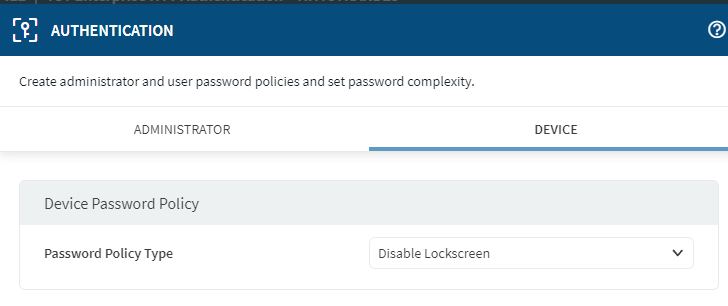
I tried to disable lockscreen in Authentication Profile, but it did not make a difference, the lock screen persist.
This causes a problem in that I lose access/control of the device unless someone logs them in. Device reboot sometimes when they get an update from Know E-Fota.

if MobiControl is an admin for the device, why doesn't it load at startup? I confirmed MobiControl is a device admin.

I tried OEMCONFIG through the Samsung plugin but it didn't have anything to set/disable the lock screen.

Any thoughts or ideas? 

Thanks,

2 years ago
SOTI MobiControl
ANSWERS
MD
Matt Dermody Diamond Contributor
2 years ago

Is it affecting A11 and A13 devices the same? In A13 File Based Encryption (FBE) becomes mandatory and as part of that Direct Boot mode kicks in which keeps access to the file system encrypted until the device is unlocked. This could be what's affecting the MobiControl agent from running fully until the device is unlocked. If your A11 devices are already using File Based Encryption as well then they may be affected by the same. 

C
Chad
2 years ago

Hi,

Thanks. Yeah it does happen for A11 and A13. in A11, I can see under device status "Encrypted: Yes". so you might be right.

Ok, so it is what it is and there is nothing that can be done. This behavior is not good for an MDM. As all units get new versions of android I can see this as an issue.

Thanks.

MD
Matt Dermody Diamond Contributor
2 years ago

Agreed that it would be problematic and hopefully something that a DO agent could overcome. But I'm not sure. I have only limited experience with A13 devices with FBE in SOTI so far and I have not noticed this particular behavior yet but will need to perform some more testing. The A11 devices that I manage are all still using FDE. 

MD
Matt Dermody Diamond Contributor
2 years ago

For what its worth I just tested with an A13 Zebra device and the device will connect to the MobiControl server and is accessible from Remote Control even when the screen is in a locked state. 

RS
Rafael Schäfer Platinum Contributor
2 years ago

We can confirm that behaviour as well. If a device is rebooted the lockscreen needs to be unlocked once to Mobicontrol being able to connect.

We asked Soti about that (if they can maybe as an MDM also get the ability to use direct boot support) and my last information is that they get into contact with google about that.

I mean it may not make sense for BYOD or work profile but for fully managed it would be nice because we would like to reboot entire fleet during night which is impossible because of this behaviour right now.

We only recognized our Zebra devices seem to behave different when an OS-Update is triggered but those i know from are on Android 8, so maybe it's because of this.

LC
Leon Callsen Bronze Contributor
2 years ago

Hi Rafael, 

I am used to this issue aswell. 
With the experience I got I can say that only Samsung devices are affected. 
Devices from Honeywell,Zebra and many more do not have this kind of issue. 
Maybe this belongs to the additional manufacturer plugins. 

JD
John Doe Platinum Contributor
2 years ago

Since Android 11 this is normal behaviour, for anything other then system to run you have to enter the pin first.

The only Solution is if the manufacturer implemented this in the device firmware itself (from matts post, looks like zebra did).

for Honeywell i.e. i can say this is still not implemented.

C
Chad
2 years ago

Agreed with all comments. Thank you.

Hope Samsung will work with Mobi to get this working in the future.

Thanks,

G
GPMOD@SOTI Bronze Contributor
2 years ago

Hi Chad

Thanks for posting on SOTI Pulse and thanks to everyone for responding to the post. 

Please let us know if you need any official answers, as I can see your question has been already answered. 

If that resolves your query, please mark this conversation as a solution. 

Kind regards,

Technical Support | SOTI Inc. |1.905.624.9828 | support@soti.net | www.soti.net |

C
Chad
2 years ago

Hi,

only official comment from Soti is if there are plans to work with Samsung to fix the isue mentioned above with the new Android OSs. 

Thanks,

A
AMMOD@SOTI Bronze Contributor
2 years ago

Hi Chad,

I want to express my gratitude for your post on SOTI Pulse. I'd like to extend my thanks to Matt, Rafael, and John for their valuable contributions

Please consider this our official solution to address your concern.

As part of Android's commitment to data protection, the platform employs robust security measures to safeguard user data. Android provides a range of tools and services to ensure the confidentiality, integrity, and accessibility of user information.

Encryption plays a pivotal role in Android's security framework, acting as a protective barrier for user data, especially in cases of device loss or theft. Android utilizes two primary encryption methods: file-based encryption (FBE) and legacy full-disk encryption.

File-Based Encryption (FBE):

FBE significantly bolsters data security by enabling distinct keys to encrypt specific storage areas. This feature has been integrated into Android devices since Android 7. For devices running Android 10 and newer, FBE is the default encryption method.

Here's how FBE works in simple terms:

  1. Device Encrypted (DE) Storage: This storage is accessible as soon as the device boots, even before user authentication. DE storage benefits from a combination of hardware-based encryption and software security measures, including Verified Boot verification.
  1. Credential Encrypted (CE) Storage: This storage is only accessible after the user unlocks the device. In addition to the security features applied to DE storage, CE storage keys can only be derived after the device is unlocked. It incorporates hardware-based protections against brute-force attacks.

So, in simple terms, FBE is like a guardian that uses different keys to lock up your stuff in two different places.

When you turn on your device, you first unlock it at the lock screen, and then everything is ready to use!

These encryption methods are integral to Android's mission to safeguard user data and ensure privacy.

In Android 11 and later, a new security feature called "Direct Boot" comes into play with the mandatory File-Based Encryption (FBE).

This feature keeps the file system encrypted until the device is unlocked. Consequently, it may impact the functionality of the MobiControl agent, delaying its full operation until the user unlocks the device.

It's worth noting that the manufacturer's implementation of this feature in device firmware plays a crucial role. So, it solely depends on the manufacturers whether they want to bypass this feature or not.

Consequently, we (SOTI) cannot request manufacturers like Samsung or Honeywell to bypass this feature since it's the default behavior of Android devices running OS versions above 10.

If you have any further questions or concerns, please feel free to contact us. We are dedicated to providing assistance and support.

Kind regards,

Technical Support | SOTI Inc. |1.905.624.9828 | support@soti.net | www.soti.net |