MobiControl Remote Control Not working

Solved
E
Evan
DataWorks Plus

I'm having trouble getting the web-based remote control working on MobiControl

Whenever you try to connect with HTML, the navigator goes to the login page of the WebConsole. If I try to login, the cicle keeps spinning but it never logs or shows an error.

I have installed SOTI Assist version 3.0 and am running MobiControl 15.2

I have checked the following in this file <SA Install folder>/Server/Config/RestAPI.config --> MobiControl Rest API URL and it matches my FQDN

I have checked the "SOTI assist server" URL in the Global settings of my web console and it matches my FQDN as well

Any suggestions on what to try next?

4 years ago
SOTI MobiControl
ANSWERS
E
Evan
4 years ago

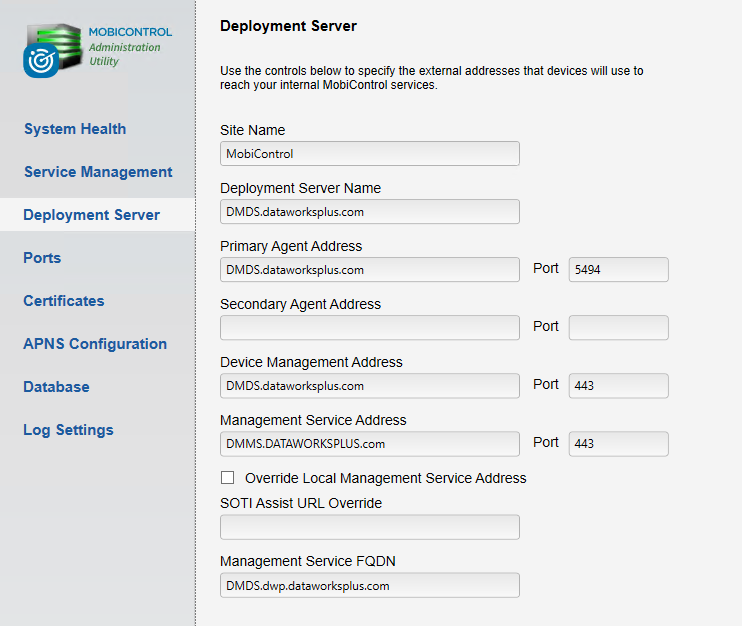
I found the solution: the FQDN URL for the management service and the deployment server were not the same. I uninstalled SOTI Assist, changed these to be the same, and re-installed SOTI assist. I was then able to get the remote control working as expected.


Thank you for your assistnace with this

Solution
A
ANKMOD@SOTI Silver Contributor
4 years ago

Hello Evan

Greetings

Thanks for Posting to Soti Central !!

Though you have already checked in Soti Assist installation folder  but can you  also confirm On your MCadmin utility , does management server address is similar to  server fqdn or it is different. 

Regards

E
Evan
4 years ago

Hello,

I can confirm that the management server address is the same as the FQDN

A
ANKMOD@SOTI Silver Contributor
4 years ago

Hello Evan

Greetings

Thanks for your response on Soti Central!!

Kindly confirm if the issue is still exisisting?

Just to make sure is  it possible for you to share the screen shot of your deployment server  section from your mc admin utility section showing management service address and also your management service fqdn.

In case of any other query, please feel free to ask.

Regards!!

E
Evan
4 years ago

Hello,

This is still a problem. Please see the screenshot as requested

A
ANKMOD@SOTI Silver Contributor
4 years ago (edited 4 years ago)

Hello Evan

Greetings for the day!!

Hope you are doing great. It seems that soti assist is still poinitng to wrong url and just by changing the url on global settings and in restapi configuration does not apply the changes sometimes  so here are the following possible test you can try 

1. For a quick fix , you can make sure your MobiControl restapi url (in soti assist installation folder ), soti assist url (inside global settings) , management service fqdn (in mcadmin utility ) is similar to your management service address mentioned in your mcadmin utility'. then after that try to restart soti assist and see if it works.

2. You can also try to  uninstall the soti assist and  install it again by using a following document link listed below 

https://www.soti.net/sotiassist/help/v3.0/en/setup/installing.html

Firstly if its a fresh installation  of soti assist then you can create a new database for it by using a new name in database prefix field in step 8(from  above installation guide) other wise you can leave that field blank and point to old database name and modify it.

Secondly verify steps 9 ,10 and 13 from  above mentioned link for installation guide , while installation.

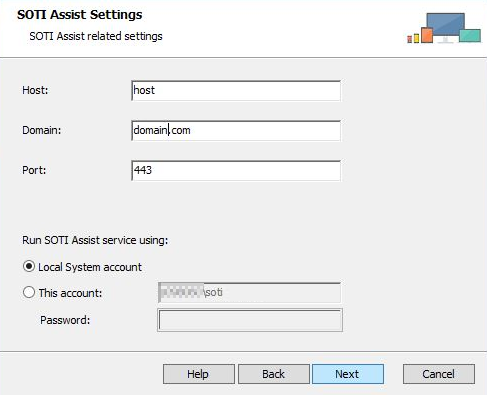
eg. In Step 9 :see in soti assist settings , use host and domain name  similar to  your host and domain name included in  your web console url .if your management service address for mobi control is https://mdm.domain.com:443/Mobicontrol/ then your soti assist url also should be similar to this one such as https://mdm.domain.com:443/sotiassist ((if both soti assist and management server are on same instance)

SOTI Assist installer network account screen

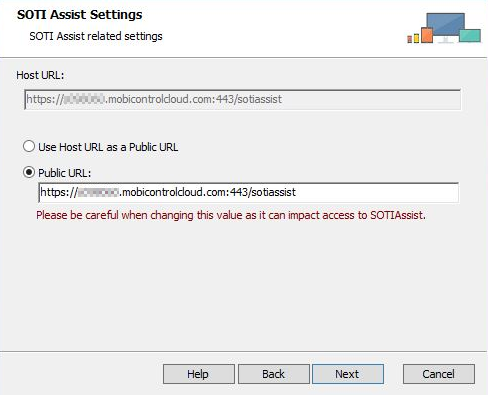
In Step 10:You can verify the complete host url of soti assist and as i mentioned , it should be matching with your web console url (if both soti assist and management server are on same instance)

SOTI Assist installer host URL screen

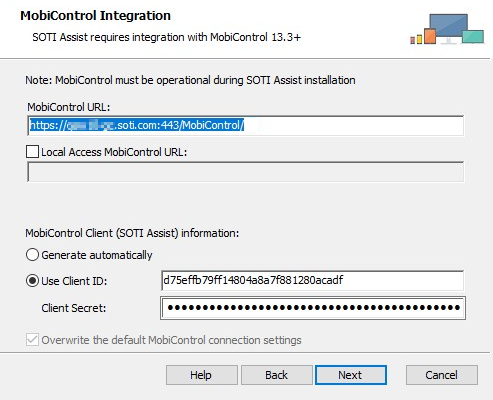
In Step 13 : You can enter and verify your  mobi control web console url for soti assist integreation.

SOTI Assist installer SOTI MobiControl integration screen

3. Once installation finished , you can try to remote control and see if it works

4. In last , if nothing will work ,  you can try to upgrade or install a new version of soti assist which soti assist 3.0.1 from (https://downloads.soti.net/SotiAssist/SetupSOTIAssist-3.0.1.15.msi) as per above mentioned link and let us know.

Before running any installation or any change on server side, i will recommend you to perform the snapshot of your server so that it can be restored back .

In case of any other query, please feel free to ask.

Regards

A
ANKMOD@SOTI Silver Contributor
4 years ago

Hello Evan

Greetings 

kindly confirm if your issue has been resolved or not.

If its resolved and above mentioned troubleshooting steps helped you in resolving, I would request you to mark that particular comment as "is solution", so others may benefit from this information.

Regards!!

E
Evan
4 years ago

Hello,

This issue is still not resolved.

A
ANKMOD@SOTI Silver Contributor
4 years ago

Hello Evan

Greetings

Hope you are doing great. Thanks for your response on Soti Central!!

If you have already tried to reinstall Soti assist as per my above mentioned post from step 2 onwards and still you are facing the same so kindly confirm if your management service address (web console url) is similar to your soti assist url (available in global settings)as both services installed on same server.

Regards