
Custom Data For System App Verison

BE

Looking to find a way to either configure a custom data field or generate a report that gives me a breakdown of a specific system app version across my entire fleet of Zebra devices only; I have never messed with Custom Data configurations nor any reporting and what I have seen only gives a brief overview of how to pull the config file once created, but how do I create that custom data file in the first place and how to I make it collect the information I need?

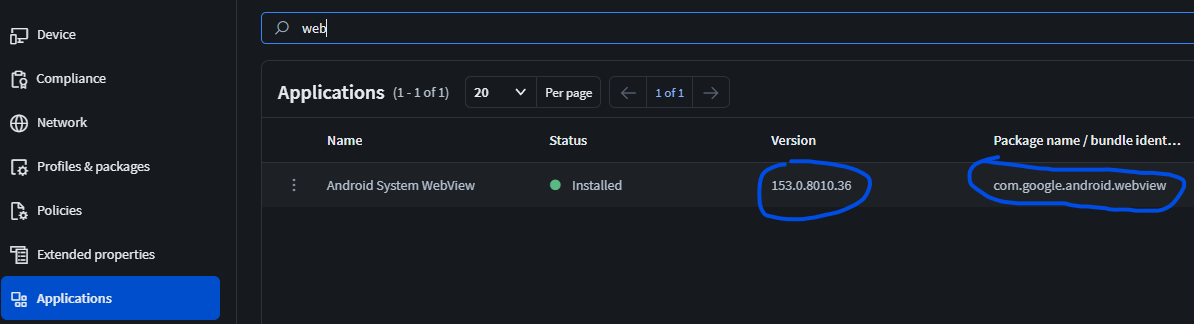
Specifically I am looking to collect the verison of the Android System WebView application as its version is going to negatively impact a custom application and need to see what devices I need to rollback the OS on.

14 hours ago
SOTI MobiControl
ANSWERS
M
MiKe
11 hours ago (edited 11 hours ago)

Hi,


Custom Data is for what is not part of the informations available on the device or Soti Mobicontrol (but can be used if you wan't to display it in the table of the devices - Pulse | Community Support ). Applications version are reported also for system apps. I think Reports or maybe Filtered groups ( Pulse | Community Support ) is what you are looking for

BE
Ben Eastburn
10 hours ago

Thank you so much for responding so quickly Mike! I tried the filter groups and at first thought it was going to workout for me; but the results don't seem to change at all, Firstly I set the application bundle ID to the com.google.android.webview which is what I am looking for then an AND for the Verison ID to be greater than 154 since the problem versions are 155 and 156.

But it grabs everything in my fleet since it is a system app and is installed on al my devices regardless of the app version:

App Bundle ID and Version

Filter criteria

I adjusted the filter to a different app that I know is only a handful of devices then saved and it still showed all my devices; I apologize if this seems dumb as I have never used this before and am probably doing this incorrectly?