Custom data-Oreo

Solved Locked
WJ
Walid Jaballah
thebarcodewarehousesnapinstance

I am using SOTI 14.2 and i want to implement Custom Data for application version on my Zebra TC77 device running on Andorid 8.1.0

I have double check the ini file name , name and value however i am keep having a blank space under the app version.

I am using plugin https://www.soti.net/files/apks/AE/Zebra_Hawkeye_RC_AE_1.6.0.102.pcg (I believe it is the latest version)

Device Agent : 13.6.0.1662

Is there anything need setting up different for Oreo devices ?

Kind Regards,  

6 years ago
SOTI MobiControl
ANSWERS
RC
Raymond Chan Diamond Contributor
6 years ago (edited 6 years ago)

Set the collection interval to 2 minutes and add battery-level while are testing/debugging.  You can restore it to your desired value when everything is OK.  If you can't even read battery level,  there is something wrong with the device agent and/or the device firmware.

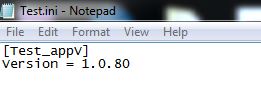
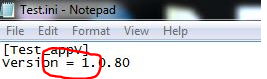
You don't need the opening and closing square bracket in your custom data expression.  Also, there shouldn't be any space before and after the equal sign in the file Test.ini.

If you still can't read any value, you probably have to check if your file Test.ini  is really located at /sdcard/Testfolder in your device.  The directory may be on a different mount-point.  You have to check it out yourself as I don't have any TC77 with me.

Solution
RC
Raymond Chan Diamond Contributor
6 years ago (edited 6 years ago)

Could you show the content of your ini file and how you define your custom data?

Have you added any data collection rule that include the custom data field(s) you create?

If so, what is the collection schedule/interval set in the rule?  How long have you waited?

WJ
Walid Jaballah
6 years ago

I was under the impression i don't need data collection rule need setting up to pull app version using SOTI 14.2 ?

Anyway, I have created one now with 30 min interval ,waited roughly around 15 min,also I've done device checking however i am still unable to see the data on the console.

Expression :INI:///sdcard/Testfolder/Test.ini?SC=[Test_appV]&NM=Version

MD
Matt Dermody Diamond Contributor
6 years ago

I have Oreo VC80x devices populating Custom Data in a 14.2.2 environment right now and my Expression looks like:

INI:///sdcard/patchver.ini?SC=Zebra&NM=PATCH_VERSION

The Section Name in your Expression doesn't need the brackets. Try using this:

INI:///sdcard/Testfolder/Test.ini?SC=Test_appV&NM=Version

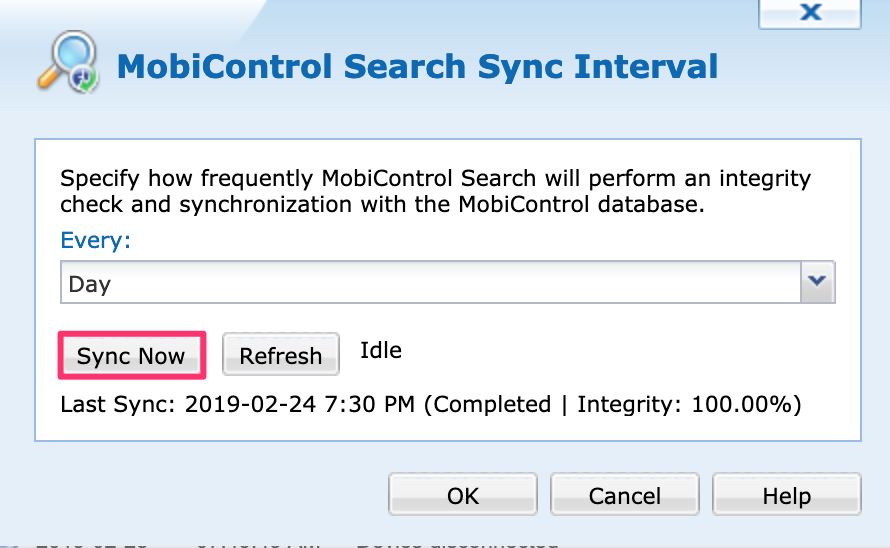
Also, given that its a 14.x instance you might just have a Search Sync issue. Try to refresh the console view with this option under Global Settings. 

A
ARMOD@SOTI
6 years ago

Hello Walid,

Were you able to test the solutions provided by Raymond and Matt?

Thank you,

WJ
Walid Jaballah
6 years ago

Hi All, 

Getting ready of the two spaces on my ini file have resolved my issue.

Thank you all for your help,

RC
Raymond Chan Diamond Contributor
6 years ago (edited 6 years ago)

Haven't you also changed your custom data expression from

   INI:///sdcard/Testfolder/Test.ini?SC=[Test_appV]&NM=Version

to

  Expression :INI:///sdcard/Testfolder/Test.ini?SC=Test_appV&NM=Version

in order to make the whole mechanism work?   I would be surprised if you tell me you leaving the square brackets in the expression and it still work.

In any case, I believe the title of your post is not appropriate, as the problem has nothing to do with Android version "Oreo".

WJ
Walid Jaballah
6 years ago

Hi Ray, 

The expression i am currently using is : 

INI://%sdcard%Testfolder/Test.ini?SC=Test_appV&NM=Version