Hi SOTI team
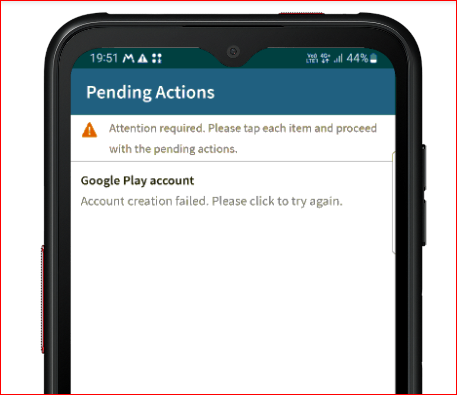
i have problem ' I want to clear pending action "Action creation failed"
i close app, but i have been shown repaeat,


Hi SOTI team
i have problem ' I want to clear pending action "Action creation failed"
i close app, but i have been shown repaeat,
Hi,
Please follow these steps to check and complete the enterprise binding process on your console:
Navigate to Enterprise Binding:
Access Android Settings:
Initiate Enterprise Binding:
Add Google Domain Account:
Verify Completion:
If you encounter any issues or have questions, feel free to reach out. Let me know if this resolves your concern.

Hi Rathasatekun,
If your problem persists, you can check various server log files (DS, DSE & MS) for any entries related to the account creation process.
Hi ,
i had this issue only one time then the Ports to Google had been blocked on the Device Network side.
Hi Rathasatekun,
Thank you for posting on SOTI Pulse.
I also want to express my thanks to Ramukumar, Raymond and Marcus for their valuable contributions and willingness to assist.
Could you please confirm if you are still encountering any issues?
Should you have any additional questions or concerns, please do not hesitate to contact us. Our team is here to provide dedicated support and assistance.
Kind regards,
Technical Support | SOTI Inc. |1.905.624.9828 | support@soti.net | www.soti.net |