Is there any way at all to reset or resync KSP? I cannot get the existing policy to apply my changes and once KSP is installed it cannot be uninstalled w/o factory resetting the device.

I am struggling with this KSP app policy when trying to modify the profile and apply the changes on existing devices with the profile applied. The policy is not syncing to the device that is already enrolled. However when I enroll a brand new device that has not had KSP on it yet and apply the same exact profile it takes it and make the changes. I have not tried to make any further changes to the KSP profile because I want to get both devices on the same page. The existing device is still not working but the new device applied all the changes with no issues in a matter of minutes. 

a year ago
SOTI MobiControl
ANSWERS
RC
Raymond Chan Diamond Contributor
a year ago

What are the Android firmware version and brand/model of your problematic device(s)?  Have you tried out on device of different model and/or different firmware version.

What about the version and build numbers of your MobiControl server and device agent?

What are the active MDM API's reported in the device detail view?

Are you using only free features? Or also use premium feature together with an installed  license key obtained from Samsung? 

Have you checked server log files for any warning/error message(s) related to such app policy update attempt?

KW
Katie Williams Bronze Contributor
a year ago

Raymond, 

I was able to get the policy to apply after realizing I had an OEM SOTI Config and KSP app policy applied to the same group. The issue I am running into now is that the policy is not applying to all the devices. For example i have 10 devices in one group and the policy applied to just a few of them with no issues. I have done the comparisons and they are all OS 13, agent version: 2024.1.3.110 , same OEM firmware:TP1A.220624.014.G736U1UEU5CWL1. SOnot sure why it's applying on some and not on others. I have done several check ins and reboots and it is not applying. The one I watched it apply on happened within minutes and I only had to do a check in.

 
RC
Raymond Chan Diamond Contributor
a year ago

Hi Katie,

KSP app deployed with AppConfig managed configuration parameters should be updated almost instantly when the associated device gets check-in.  I have never encountered similar problems with KSP app as yours.  I am not sure if any of your configured parameter(s) with KSP cause the app to be locked in a certain state not capable of being reconfigured or uninstalled.  The problem can also be related to subtle bug(s) in the particular firmware version of your problematic device model.

Thus. for the Samsung device model you are working on, I suggest you to use only Samsung OEMConfig profile payload alone. Do thorough tests to confirm that it functions consistently in all devices tested and works stably from each clean installation and any subsequent parameter changes.  

For those problematic devices with KSP app previously installed & configured,  if there is really no way to uninstall the app from the web-console, then the worst case is to factory reset the device and use only Samsung OEMConfig profile for this model/firmware version.

KW
Katie Williams Bronze Contributor
a year ago

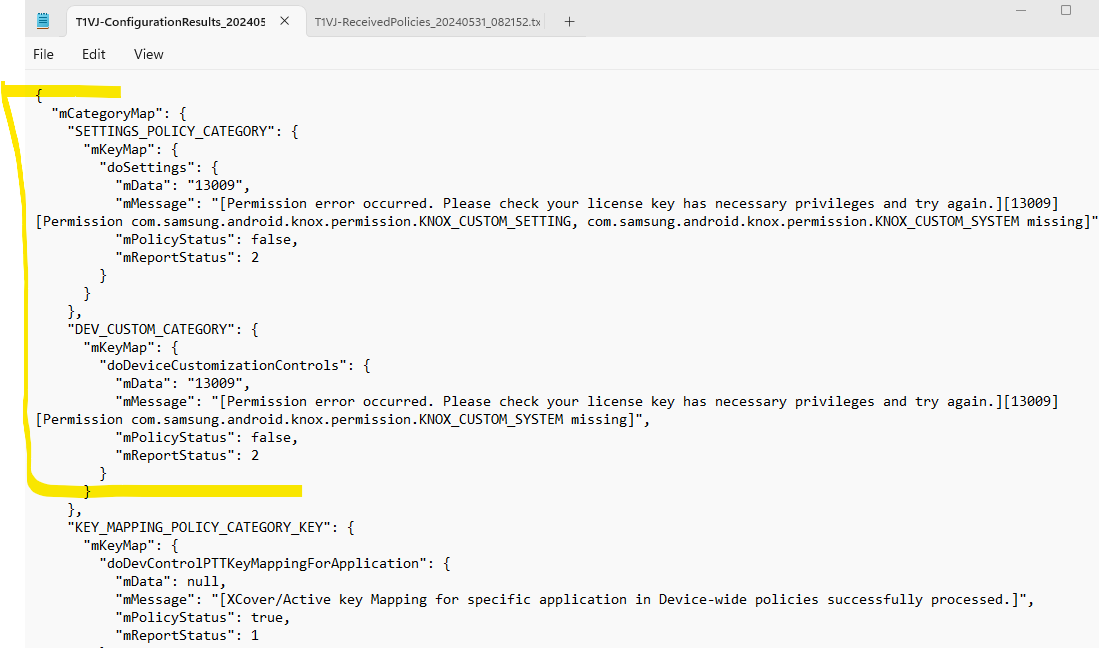
Thanks for the feedback, I have found for the few devices that are having issues it is showing this error in the logs, i have sent to Samsung for further investigation as I'm not sure what this means.

A
AGMOD@soti
a year ago

Hi Katie Williams

Thanks for posting on SOTI Pulse. Thanks Raymond for responding to the post, your expertise and willingness to help are greatly appreciated!

Have you had an opportunity to test the suggestions from Raymond ? If yes, has it successfully addressed your query?

If not, or If you have any additional questions or concerns, please don't hesitate to reach out. We're dedicated to providing assistance and support.