Hi community
Is there an easy way to find package name of an installed application ?
Script command ?
What I need is to know the package name of an application.
Thx.
steve

Hi community
Is there an easy way to find package name of an installed application ?
Script command ?
What I need is to know the package name of an application.
Thx.
steve

All of the Package Names for enabled applications should be listed under the Applications tab for a device:
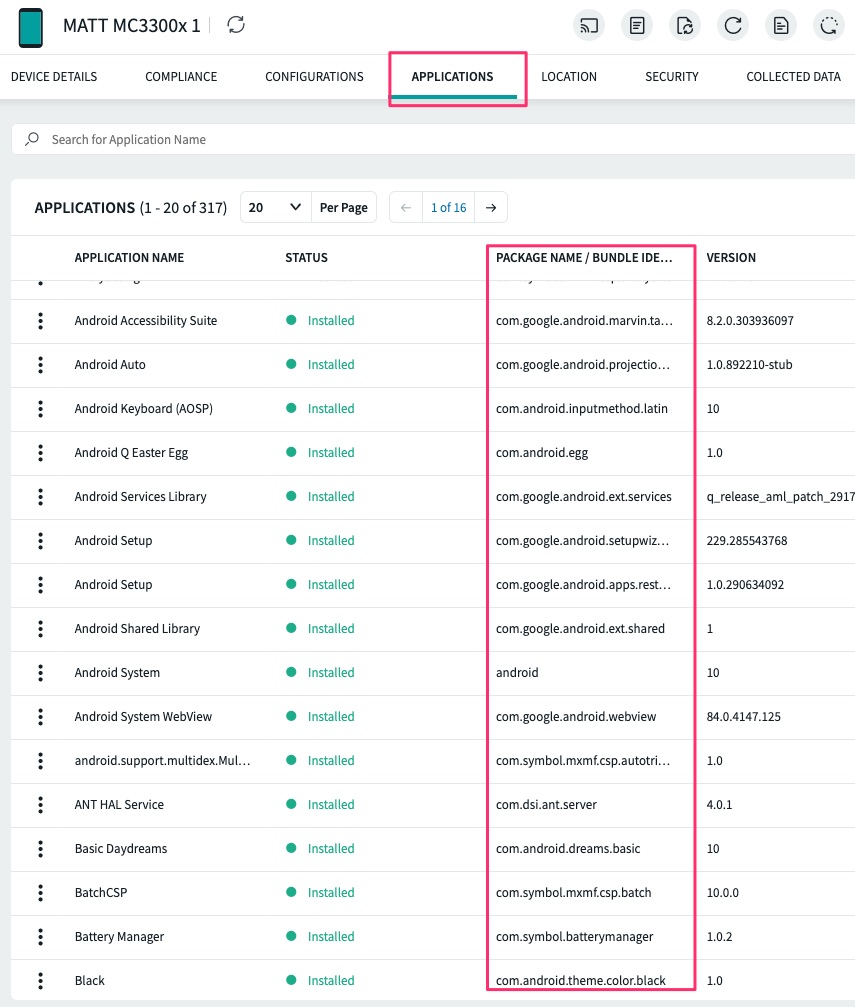
There also is the identify_activity script that you can run while an app is in the foreground in order to identify the package name and activity name.
Thx but this is not sufficient.
I'm confugring a Unitech device.
I need the package name of the camera app on the device.
No application installed contains word like camera, photo or other to be identifgied.
So having the possibility to run an app and use a script to retrieve specif package name of this app should be very nice !
steve

Run the camera in the foreground, and then send identify_activity script command to the device. You can see the app/activity name in the logs tab for the device in your web-console.
Device has been enrolled in Device Owner Mode (using afw#mobicontrol).
so some system app are disabled like the camera app.
So I can't laucnh camera app to use identify command
If there is an Android+ device agent for your device, you can enrol your device in Android+ mode and use the identify_activity script command approach mentioned in my previous post. Alternatively, many free third-party utility app can be used to show the app/activity name of all applications installed/bundled on a device.
I see 3-4 different methods to get it:
Hi
Can you explain how/where you configure the "leave system app = true" feature ?
Thx.
Steve
That parameter is called a DPC Extra and it is typically included within the enrollment configuration for the QR or NFC based AEDO enrollment methods. If you enroll the device using the DPC identifier / "hash tag method" (afw#mobicontrol in SOTI's case) then you cannot specify the DPC extras and you are left with the default enrollment behavior. To enroll the device with the system apps enabled by default you can factory reset it and then enroll it using the MobiControl Stage Programmer android app available in the Play Store. Note that you'll have to use a separate device, perhaps an Android phone if you have one, to help stage the devices with this app.
This is explained more at the following link:
https://support.google.com/work/android/thread/57151724?hl=en
Hi tested with Stage Programmer and ok... Btu Stage Programmer usage reqauires the need to manually enable all authorizations !
Thx.