
Display Full Notification Details on Lock Screen

Solved
ÖC
Ömercan C.
Spital STS AG

Hello everyone,
I’m looking for a script to change the notification display on the lock screen. Currently, only icons are shown, but I would like all details to be displayed. Is there a script for this? The manual procedure is attached.
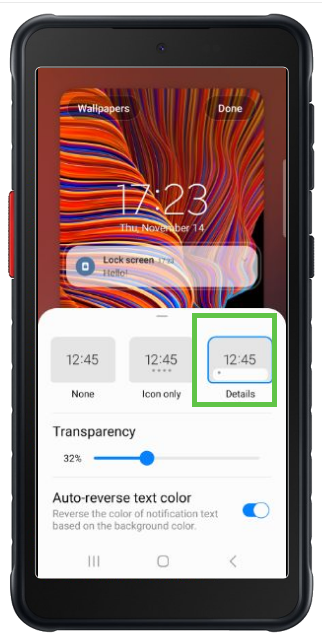
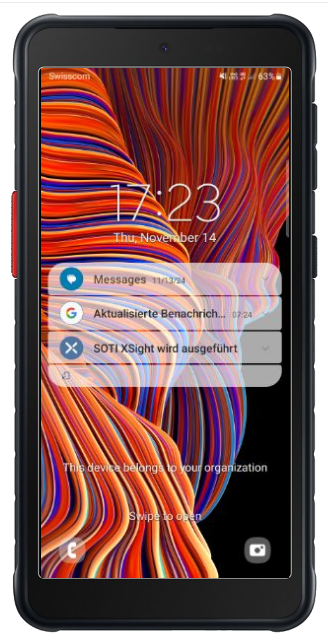
Device: Samsung Galaxy XCover 5


Thank you!

a year ago
Android Scripting
ANSWERS

Take a look into KSP (Knox service plugin), depending on your Mobicontrol version you provide the app by app policy and the config (ideally) via profile.

There you can find "Device and Settings customization profile" -> "Configure values in settings menu" -> "+".
Some settings available are for the Lock Screen and for Notifications which sound interesting.
The only thing is, i guess you need to provide a custom value and depending on the guide here: https://docs.samsungknox.com/admin/knox-platform-for-enterprise/knox-service-plugin/configure-advanced-policies/deep-settings-customization/

I would guess to provide:

Lock Screen > Notifications > View style to 0 (Detailed)
Lock Screen > Notifications > Hide content to False

Solution
ÖC
Ömercan C.
a year ago

Hi Rafael,

Thank you very much for your detailed explanation. The Knox Service Plugin sounds really helpful. I tried it out, but unfortunately, it didn’t work. I have the feeling that the plugin isn’t applying the configuration. Do you have any idea what the reason could be? The plugin is installed.

Several possibilities:

- It can be an issue with the plugin on that specific model (then reach out to Samsung).
- It can be a missing configuration in the Plugin (for example not providing a license key which is required for this premium feature)
- It can be related that you provide the plugin without a configuration or other way around

So, my best guess would be point 2. So did you enter a license key at the very top in the settings (Knox License key(Knox Suite, DualDAR, etc))?
If not, login to your Knox Portal and goto https://www2.samsungknox.com/en/dashboard/license-keys/others there you should be able to create such license key for free.

ÖC
Ömercan C.
a year ago


Thank you for your suggestions! Yes, the second point was indeed not set up. I adjusted it afterward, but unfortunately, it’s still not working. I’m sure the two settings you mentioned are exactly what I need, but the Knox plugin doesn’t seem to configure them correctly. I also tried it with another device model, but the issue persists.

I have one more question: We are already using v2025. I assume you would prefer the profile variant with plugin installation via the app policy, or is the plugin not needed at all since I’m distributing it as a Soti profile?

I prefer to split up configuration and app providing (since they provide oem config in profiles for some of them).

And yes, in addition to the oem config profile you always need to provide the app seperately (I would prefer (enterprise) app policy without any managed configuration).

The benefit is, if you need to update the app, you don't need to touch the configuration and also can provide different app versions with same config (for example for testing purposes).

Maybe for debgging enable the debug in oem config and look on the device the logs if there's something seen why it doesn't apply. Even those logs could be helpfull/required from Samsung support if you contact them because of it.

ÖC
Ömercan C.
a year ago

I configured it exactly as you suggested, but unfortunately, it still doesn't work. The Samsung plugin settings are not being applied. I’ll do some more research and debug the issue. If needed, I’ll reach out to Soti or Samsung support. I’m confident that your suggestion is the solution. Thank you again for your time!