Stagenow under Android 11

Solved

Hello,

I have a Lockdown profile where I add "Scannow" via the configuration with

Launch: com.symbol.tool.stagenow

That works fine on my Android 8 devices, but now I have new Android 11 ones and there the icon on the lockscreen says "not installed".

Scannow as such is installed and can be started manually. So I assume there is now a different way to start it, can me someone tell, how?

Thank you

3 years ago
Android
ANSWERS
MD
Matt Dermody Diamond Contributor
3 years ago

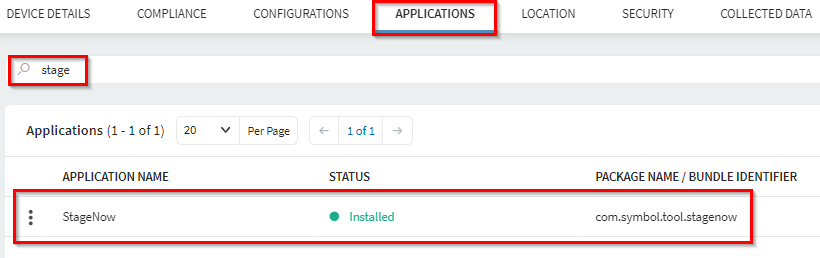
The Bundle ID of StageNow has changed in Android 11. You will need to point to the new Bundle ID. You can verify the Bundle ID by looking at StageNow in the list of Applications on the device info page in SOTI.

Solution
JS
jag singh
3 years ago

I use mobicontrol and send a script to enable stage now when the icon disappears or app is not prsent - 

enable_system_app com.zebra.devicemanager

MD
Matt Dermody Diamond Contributor
3 years ago

That should only be the case if you are enrolling the devices with an AE method like DPC identifier (afw#mobicontrol) or QR if you don't leave system apps enabled. If you use StageNow for your SOTI enrollment all system apps will remain enabled through enrollment so they don't have to be manually re-enabled. 

That is at least however the right Bundle ID that the lockdown would need to be updated with in order for the shortcut to work on A11. 

C
Chris
3 years ago

On Android 11 StageNow starts with: com.symbol.tool.stagenow

You can find this here:

Select an Android 11 device

Goto Applications and search for "stage"

RD
Robert Deppe
3 years ago

I got slightly the same issue as Oliver described. StageNow is installed and was reenabled after the afw enrollment. I can see it in Admin mode and on the lockscreen. It also shows with the correct picture. When I open it in Admin mode, it does normal. If I open it in user mode, from the lockdown screen, it is restricted and won't open. The lockscreen seems to overlay it right away as it is swiping for a second. It is not shown in recent apps after that so. No error is showing either.
Any idea?

UPDATE:

It wouldn't let me go, so I searched further. As usual you start to do the most stupid things after a while. Out of ignorance I added both, StageNow (com.symbol.tool.stagenow) and DeviceManager (com.zebra.devicemanager) to the lockscreen. While DeviceManager just shows "Package not found", StageNow opens properly now. 
Thanks to the moron that had the idea to rename something the whole world was used to for years. That first wouldn't let me do OS updates and now I had this.