

Hello DanT,
Thank you for your post, please share the screenshot of the profile.
Regards,
Hi JVMOD,
Please see below;
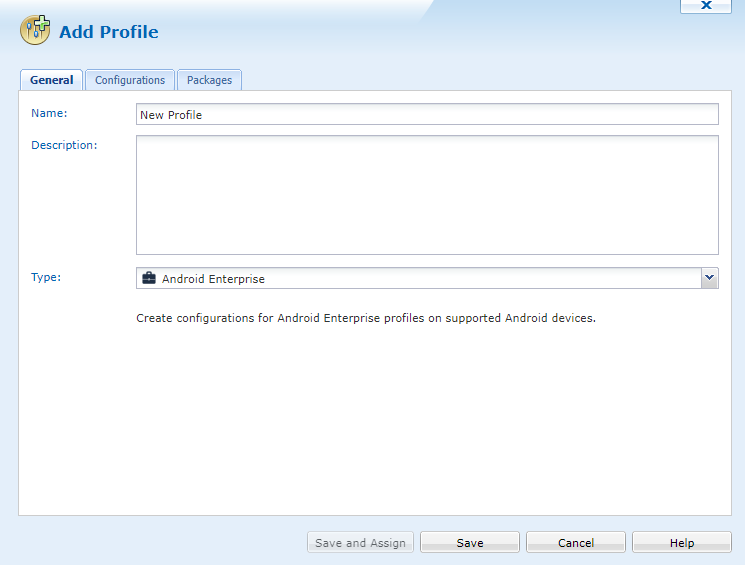
- Create new profile - Type = Android Enterprise
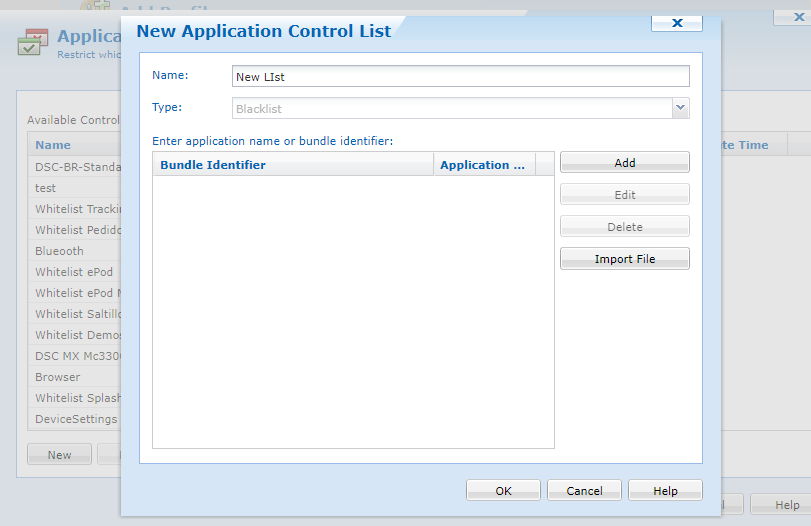
- Add Application Run Control - New
As you can see it defaults to Blacklist and greyed out.

Thanks
Hello DanT,
Thank you for your prompt response, we do not have Whitelist applications option for Android Enterprise devices.
Please try to use following script - enable_system_apps <bundle_id>
Regards,

Hi Dan,
As I am not from Google or Soti, the following is just my educated guess why ARC whitelist is not available on Android Enteprise platform.
All apps available on the device are effectively allowed (or whitelisted) by the administrator as either
1. mandatory enterprise app (with .apk) silently pushed with .pcg package defined in one or more profiles
2. mandatory/optional third-party app from Managed Google Play store defined in one or more app catalog rules
3 bunlded (freely with the device) app explicity unhidden by enable_system_apps script command
The above assumes that the "Disable Installation from Unknown Source" and "Disable Google Account Creation" feature-control options are enabled to disallow installation of any app from apk file on the device or from personal (i.e. non-managed) Google Play Store with personal Google ID.
However, with ever increasing complexity use cases that need to allow personal Google account(s) on an enterprise device in managed-device mode, the need of having ARC whitelist with finer control is becoming more and more apparent. One possible workaround is probably to use an enterprise device in the newly introduced COPE mode rather than the maanged-device or work-profile modes.
Hi Raymond,
Thanks for your view.
Without obviously fully understanding the whitelisting configuration i was trying to implement it for a different purpose.
We have a internally developed suite of applications accessed via a 'container app', if you wish. Once opened, it provides access to a larger number of in-house android applications.
We can push the container app to the devices and install it. Launching any of the apps within this app are classed as untrusted\unknown sources and therefore will not install. Our default build is to not allow untrusted\unknown sources.
Therefore my thought was I could use the whitelisting configuration to allow the apps via the bundle ID's, which might have over-ridden the untrusted\unknown sources restriction.
While we could acquire and push each app individually it just adds to the complexity or the environment.
Thanks
Hi Dan,
I couldn't clearly understand your requirements and problems from your last post.
Is the "container" app a launcher -like app that start other apps installed on the device? Or are the other apps actually modules (i.e. different activities) in this container app?
Also, if you can successfully deployed your apps and have the "Disable Installation from Unknown Source" and "Disable Google Account Creation" feature-control options enabled, all apps on the device should be trusted. So , what factor(s) caused any trust problem? Will the use of kiosk mode solve the trust issue?
Hi Raymond,
Think of it like the Google play store. You open the play store to select and install additional apps. The same concept has been developed for our internally developed apps that are not publicly published.
The source of the installation is and on-prem environment and therefore not a known source. Our mobicontrol managed devices cannot install applications from unknown sources, therefore cannot be installed by the end user.
Probably to summarise my query , Is there anyway to remotely enable\disable\override the "Disable Installation from Unknown Source" configuration based on a Mobicontrol instruction?
Hope that is a little cleaer.
I've got a feeling the answer is No, but thanks for your input :)
Hi ,
Can you provide an example of how the script enable_system_apps <bundle_id> is applied please?
Thank you,
Kieran
Hello Kieran,
Following is the example, enable_system_app com.android.providers.calendar
Please let me know if this works for you.
Regards,
Hi Dan,
Is there any way to remotely enable\disable\override the "Disable Installation from Unknown Source" configuration based on a Mobicontrol instruction?
The answer depends on how, when and who make the change in your use case. Could you please elaborate your requirements in more details?

Hi DanT,
Following up on this thread, Please let us know if you got a chance to test all the mentioned solutions in the previous posts.
