
Custom Data - Managed Google Apps

ÖC
Ömercan C.
Spital STS AG

Hi

I have a question about passing custom data to a Managed Google Play app. The data is stored in a JSON file and is accessed using custom data settings. This works perfectly within Soti (e.g., Lockdown, CustomMessage, etc.).

However, as soon as we try to pass these values to a Managed Google app, it doesn’t work. I’ve learned that Soti plans to support this in v2026.

Do you have any ideas for how we could implement a temporary workaround?

Here’s an example to give you a better idea:
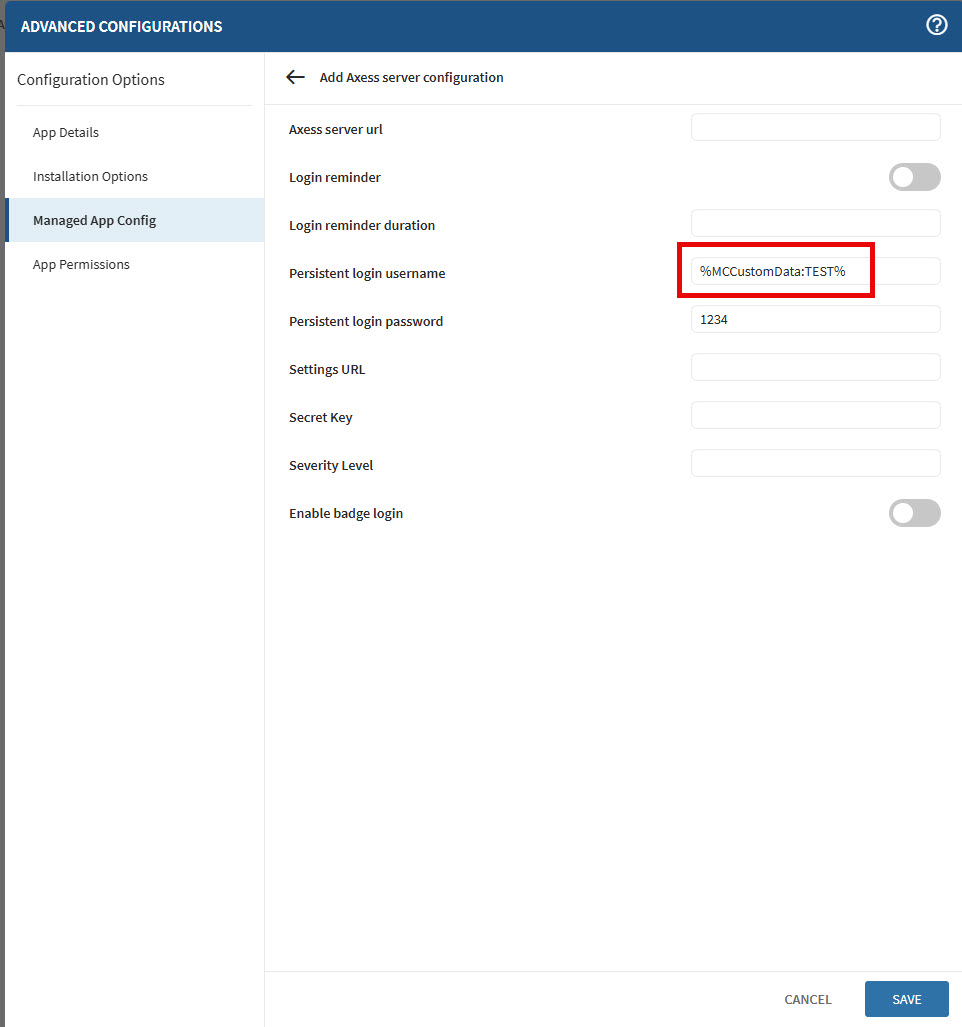
Thank you!

Best regards

Ömercan

11 months ago
SOTI MobiControl
ANSWERS
RS
Rafael Schäfer
10 months ago

Hmm, never tried with custom data yet.
Ever thought of (if possible) using custom attribute instead?

We use it to provide device/location specific data to app config like %CustomAttr:Country% and it works fine.

Also keep in mind that if you create/provide the json file to be read by the agent and then data provided to the console during enrollment may take more time than the app to deploy.
So, maybe you need to provide the entire process time and check later again.

1. Json provided/created to/on the device (custom data in the console still empty)
2. Json read by the Mobicontrol agent to custom data locally (custom data in the console still empty)
3. custom data provided to the console (after next check-in)
4. custom data provided to the app
    *somewhere between the app could have been already being deployed without data (as it was still empty)

ÖC
Ömercan C.
10 months ago

Thank you very much for your feedback.

Of course, I tried what you mentioned, but only the macros specific to Soti MobiControl (%DEVICENAME%, %MODEL% etc) are passed to managed Google apps and unfortunately, custom data is not transmitted.

If I understood the suggestion with %CustomAttr:xxx% correctly, this value would need to be set manually. However, since we have several hundred devices and each device has a different value, wouldn't that mean that all the data would have to be entered manually when using the custom attribute option?

RS
Rafael Schäfer
10 months ago

Depends.

If this value is device specific, you need to set this value when device arrives at the console (manually or via API).

If this value is group specific, you can define it for a device group once (manually or via API) it gets created and gets inherited to all assigned devices.

We use this to both, we create groups via API setting also their group specific attributes with following API calls.
And we have device specific attributes, where an API cron-job is running, checking for new devices, filtering for something specific, only pointing to new devices and then setting the relevant attributes for these device(s).

RS
Rafael Schäfer
3 months ago

Hey there, I think i ran into the same issue now (custom attribute seem to work but custom data doesn't). 

Did you have any solution to it @Ömercan C.?

ÖC
Ömercan C.
3 months ago

Hi Rafael

Yes, I have a solution, but it’s not very efficient if you need different custom values per device. You can create a signal policy that converts/copies custom data into custom attributes. I have implemented this solution on several hundred devices and it has been working flawlessly for several months.

ÖC
Ömercan C.
3 months ago

Conditions

Category: Managed Device

Type: Property

Attribute: Custom Data


Actions

Set Custom Attribute

RS
Rafael Schäfer
3 months ago

@Ömercan C.How do you copy the data from the custom data field? The normal macro %MCCustomData:URL% seem not to work but taken 1:1?

ÖC
Ömercan C.
3 months ago

It is defined which data is delivered from the custom data. These values are configured in the signal policy and are simply mapped to custom attributes, which are then forwarded to the application.

For example, if you want to read the zipcode, you define "1000" as the custom data zipcode in the signal policy and map it to the custom attribute with the value "1000".

%CustomAttr:zipcode%

RS
Rafael Schäfer
2 months ago

@Ömercan C.Hmm, but you define the custom attribute with the data from thge custom data i thought...

So, you grab for example the custom data "zipcode" (to stay with your example) from the device for ex. ini file with the data 1000.
And with your workaround put this into a custom attribute field.

But i tried it and it didn't work. Means:
The trigger worked fine for the signal policy but i setup to define the custom attribute with the data of the custom data (%MCCustomData:zipcode%) but it took the exact string instead of it's data, so the macro here seem not to work.

But i see you used it without the "MC" in it? Is that correct? But tested both without success.

And yes, i know how to acess the custom attribute by macro but the value is not set correctly as stated above.

We are on 2025.0.3, not sure if this might make a difference.

ÖC
Ömercan C.
2 months ago

I did not solve this using a macro, but by defining, for example:

  • Custom Data value "1000" = Custom Attribute "1000"

If you have 10 zipcodes, you need 10 signal policies. I couldn’t find another way to solve this.

We are on version 2025.1.2.

Hopefully this already helps you move forward.

RS
Rafael Schäfer
2 months ago

Ah, ok that then makes it worse.

I guess in that case i stay with the partial manual handling as otherwise i would need to setup ~30 signal policies just for this.

But thanks for letting me know.