RMA device need to reenroll it in our environment

Solved
AR

How do I delete the previous occurrence of a TC-58 S/N within our MobiControl environment so a license is available for the device to be able to enroll again?

Where exactly is the path on the MobiControl portal to delete a device? I have looked around and have been unable to find? Could someone please provide a step by step?


Thank you!

a year ago
SOTI MobiControl
ANSWERS
EG
Edgar Gomez Platinum Contributor
a year ago

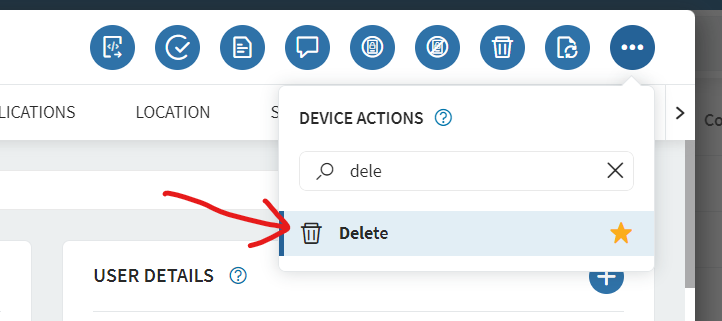
Click in the device name, then select the Delete action:

Solution
AR
Albertus Rowan
a year ago

This is the correct solution. It is important to note the reason why I was unable to find this option is because I was selecting the device from a filtered view. 

EG
Edgar Gomez Platinum Contributor
a year ago

Hello Albertus,

You can you search the S/N in Mobicontro, then select the device and delete it.

AR
Albertus Rowan
a year ago

Where exactly is the path on the MobiControl portal to delete a device? I have looked around and have been unable to find? Could someone please provide a step by step?

MD
Matt Dermody Diamond Contributor
a year ago

It is one of the device actions available at the bottom of the screen. New environments also support a right click on the device in the inventory view. If you don't see those options maybe your user account in MobiControl has restricted permissions.

S
SKMOD@SOTI
a year ago


Hi Albertus Rowan,

Thank you for posting on SOTI Pulse.
 
I'd like to extend my gratitude to Edgar Gomez for his valuable contribution and willingness to assist.
 
Could you please confirm if you have tried the solution provided by Edgar Gomez.
 
If you have any more questions or concerns, feel free to reach out. Our team is dedicated to providing support and assistance.
 
Kind regards,

Technical Support | SOTI Inc. |1.905.624.9828 | support@soti.net | www.soti.net |