Remote controlling the camera app in lockdown

RP
Ricky Palmer
Breezemount UK Limited

I have a multiple button lockdown on a Honeywell EDA51 and one of the buttons opens the camera using Launch://net.sourceforge.opencamera. When using Downloadable Plugin (Legacy) for RC and the camera button is pressed the RC screen goes horizontal. Once finished with the camera and back on the lockdown the RC screen stays horizontal but the lockdown reverts to vertical so half the screen can no longer be seen. Very strange behaviour!!

4 years ago
Android
ANSWERS
A
ANKMOD@SOTI Silver Contributor
4 years ago (edited 4 years ago)

Hello Ricky

 Thanks for your Post on Soti Central!

  • Can you confirm , if the issue is happening  only while opening  cam app or any app inside the lockdown?
  • Is this issue happening on multiple device with same model ?
  • I will also recommend you to capture the activity after opening camera app via sending a script 'Identify_Activity' to see the activity in device log section , and try to launch that activity in lockdown and test it.
  • Have you tried to remote control the device  by using Soti assist ?
  • You can also try to test by using script _resetfailedrcdetectionflag restartagent(in next line) and try to reproduce    
  • Try to use script mention in this link https://discussions.soti.net/thread/remote-control-view-inverted/ as per  model 
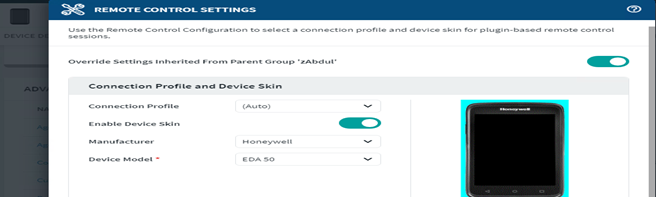
  • Can you try to check remote control setting  under configuration /advanceconfigurtion section and test by disabling and enabling skin option.
  • Kindly share the device os version and enrollment type (if it is android oem or android enterprise) and agent and plugin version , firmware details and  if its not latest one , i will also recommend you to upgrade the agent and firmware   to one of your test device for testing.

      In case of any other query, please feel free to ask

      Regards

RC
Raymond Chan Diamond Contributor
4 years ago (edited 4 years ago)

What is the Android version of your device?  

What about the version and build numbers of your MobiControl device agent and server?

Do you have exactly the same problem if you use device agent of different version/build numbers?

RP
Ricky Palmer
4 years ago

Hi

This is using agent version 14.4.6.1001 OS version 8.1.0 on 15.1.0.3416. I have tried different agent versions but always the same problem. I have also used auto skin selecting the manufactures skin and no skin. If the device is moved vertically while in RC the screen reverts correctly.

Thanks

A
ANKMOD@SOTI Silver Contributor
4 years ago

Hello Ricky

Greetings for the day!!

Thanks for posting to soti central!!

Can you confirm , device is on updated firmware version and if possible , to test by updating it.

Secondly if you already have tried all the troubleshooting mentioned above in my previous  thread so I will recommend you to please raise a support case(click here) or call SOTI Support team(click here) to  to grab logs mainly from device and server end while performing troubleshooting and also may create a development ticket if need.

Regards!!

RC
Raymond Chan Diamond Contributor
4 years ago

Hi Ricky,

As you experience the same problem with different agent versions,  it is highly likely that the problem stems from your device firmware.  You likely need to open a support ticket with Soti, go through some log-collection and debug process to confirm that the problem is from the firmware.  If Soti cannot provide some simple workarounds (e.g. in the form of some script command with special parameters), Honeywell support team need to be notified to work on a firmware fix.