
Success pop up

Solved
E
EdSed
RMS Omega Technologies

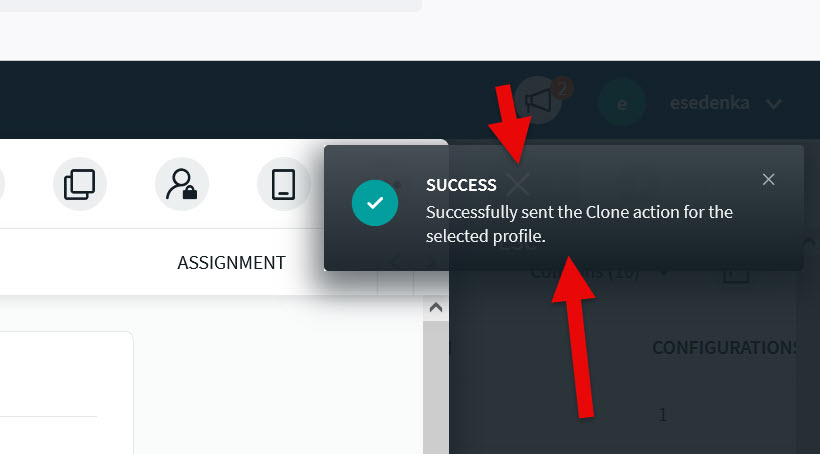
Is anyone else bothered by the SUCCESS box in the upper right every time you apply something?

It annoys me as it blocks the X needed to close the window and move on. It would be nice to have it smaller and out of the way or to turn it off altogether. Maybe only show a pop-up if it was not successful.
a year ago
SOTI MobiControl
ANSWERS

To be honest, i really "need" this message as i know then that the command/script was send to the device(s).
It's bad if you don't know if the action you send to the device was really send or not.

And you can just X the message (top right) and then X the device details.

The only possibility would be to make this an option to set in global settings but maybe better on user perspective. This would be something i guess you need to request to Soti as a feature request.

But maybe it would be better to make it less wide, so not hiding the X for closing the device details but keep the message.

And i have another small hint for you: If you click outside the device details in the greyed out area, the device details will be closed without using the X. Maybe this will help you without a feature request.

Solution
E
ENMod Bronze Contributor
a year ago

Hi EdSed,

Thank you for posting on SOTI Pulse. Thanks Rafael Schäfer for responding to the post, your expertise and willingness to help is greatly appreciated.

Has your query been resolved? As Rafael mentioned the pop up is crucial as it servers in delivering us with important notification of device actions and other changes made in the console. There is a small workaround you can follow thou. You can play around with the zoom level of the browser (ctrl +/-) and you can see the pop up won't interfere. 

But this clearly depends on the screen size of the device you're using and may affect the font size. Additionally as Rafael mentioned you can request for a Feature Request by opening a SOTI Support (support@soti.net) case with us. Thank you!!

Kind Regards,

Technical Support | SOTI Inc. |1.905.624.9828 | support@soti.net | www.soti.net |

J
JCMOD@SOTI Platinum Contributor
a year ago

Hi EdSed,

You can use a browser plugin such as uBlock Origin to block elements of websites.

After a quick attempt, it now looks like this after sending a check-in request for example:


I would also suggest you raise that Feature Request to customise this further without having to use browser plugins.

Regards,

Technical Support | SOTI Inc. |1.905.624.9828 | support@soti.net | www.soti.net
