I have a customer who cannot use SOTI Surf as it looks like it is acting in desktop mode instead of mobile mode.
Is there a configuration option to force it to work in mobile mode, like for example Google Chrome?

I have a customer who cannot use SOTI Surf as it looks like it is acting in desktop mode instead of mobile mode.
Is there a configuration option to force it to work in mobile mode, like for example Google Chrome?

Hi Henk,
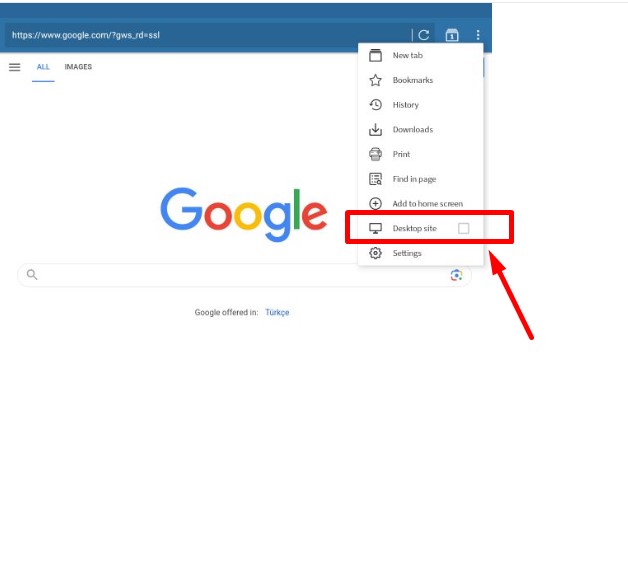
Do you mean below section? I'm just wondering, as default this could be mobile site option (not a desktop one) already, for your case, even if user does not select Desktop site option, is it not mobile selection?
Either way when they click on it one more time, they can back to the mobile site option well manually, right?
Zafer

What did you mean by desktop mode? What differences are there with your so called mobile mode?
Hi Henk,
Thank you for posting on SOTI Pulse!
I wanted to inquire if this issue is occurring when you navigate to a specific web page or is Surf in desktop mode by default.
Zafer's post above is a viable option to manually toggle between both views. Let us know if this can work for you.
Kind regards,
Technical Support Specialist | SOTI | +1 905.624.9828 | SOTI.net lDiscussion Forum | Log a Case Online l Facebook l LinkedIn l Twitter
Hi Henk,
I have marked the relevant post as a solution. If this post did not assist you in resolving the issue and you have additional questions, please do not hesitate to reach out.
Kind regards,
Technical Support Specialist | SOTI | +1 905.624.9828 | SOTI.net l Discussion Forum | Log a Case Online l Facebook l LinkedIn l Twitter