possibilty to kill application due inactivity

A customer uses an Enterprise browser solution of honewell android devices (VM1A and CK65). After an certain time, the backend will drop the user session when it's inactive for approx an hour.

There are some problems with the frontend, which thinks that de session is still active. Is there a solution that we can trigger an application kill when a device hits the inactivy treshold?


a year ago
Android
ANSWERS
RC
Raymond Chan Diamond Contributor
a year ago

If you know there are problems with the frontend, why don't to contact developer/support of the front-end and ask them to fix them.

Could you give some definite criterion on how to determine if the app is inactive?   If you can define any, don't you think you are asking too much for MDM or any system software to make the decision on when to kill the app?  Will your end-user complain if the app is killed when the he/she is using the app?

If the device of interest is running in lockdown-menu/kiosk-mode, then one possible workaround is probably to include an item that call relevant script to kill the app UNCONDITIONALLY.  

P
PMMOD@SOTI Bronze Contributor
a year ago

Hi Pieter Hoogerdijk,

Thank you for your post on SOTI Pulse

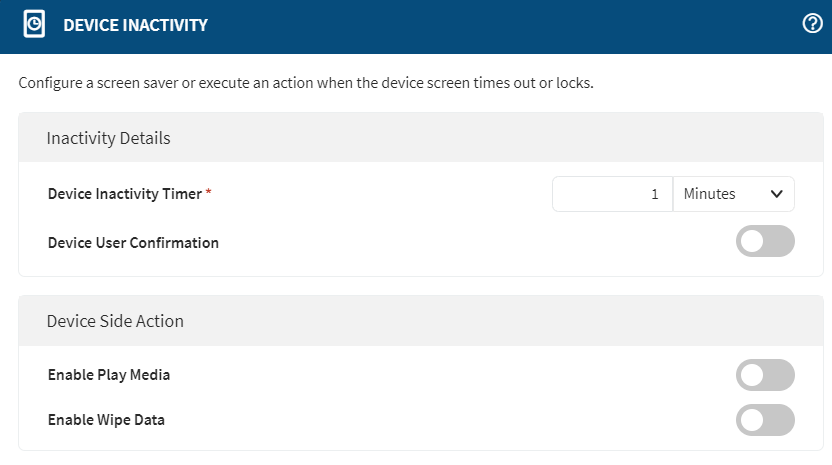
We observed that you want to kill an application when it's inactivity. We have the option on the latest 2024 MC version to control the device inactivity instead of application inactivity. Please find the details below:-

Open MobiControl --> Navigate to Profiles --> Work Managed --> Configurations --> Under Emails & Others  --> Device Inactivity

To kill the application on work-managed devices you can use a script like kill_application <bundleId>

Please get back to us whether the above information is useful for you or if you require some more information from us.

PH

Pavan,

Thanks, that's a start in the direction i wanted. But how can i trigger a scrip when it  ends the inactivy message? I tried it with wipe data with the specific app. (honeywell enterprise browser) but that's a little bit to much

P
PMMOD@SOTI Bronze Contributor
a year ago

Hi Pieter Hoogerdijk,


Thank you for your response, 


As mentioned in the earlier post, we have limited options to disrupt the device inactivity to normal mode. Please find the below image to check the available options you can use on the device.

Please visit the provided link to learn more about the Device Inactivity profile:-https://soti.net/mc/help/v2024.1/en/console/configurations/profiles/configurations/categories/other/tsk_device_inactivity.html


We want to make sure this information is helpful. Please let us know if you have any questions or need anything further.