Non-GMS Enterprise work owned with MX14

E
Eduard
wacker

Hello,

until now we used the barcode from this thread Pulse | Community Support to enroll non-GMS Zebra devices in China, which worked well. However, with MX14 it does not work anymore. Is there a new code or is there a describe how to create one by ourselves?

We tried to create one following WS50: Registrierung bei SOTI MobiControl mit StageNow, but still does not work.

Best regards,

Eduard

a month ago
SOTI MobiControl
ANSWERS
A
ASMOD@SOTI
a month ago

Hi Eduard,

Thank you for posting on SOTI Pulse.

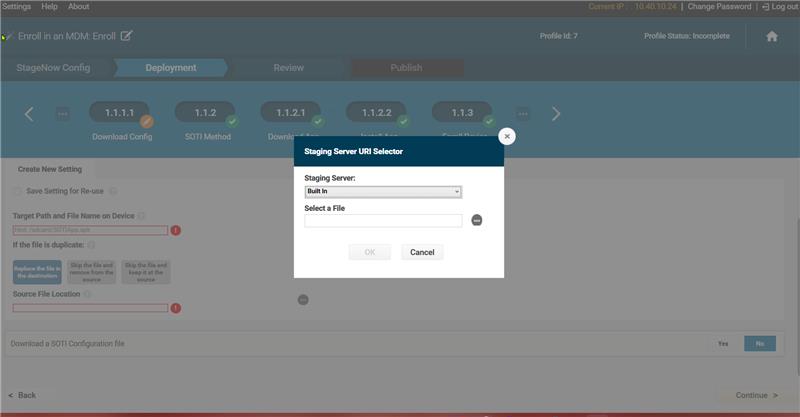
For non-GMS devices, the enrollment process requires using the Built-in Staging Server rather than the External Server during deployment, after specifying the Target Path and Source File location.

Additionally, please ensure that you are connected to the same network zone while performing both the configuration and the enrollment process, as this is required for the staging server to function correctly.


If this post did not assist you in resolving the issue completely and you have additional questions, please do not hesitate to reach out or you can contact SOTI Support (support@soti.net) to open a new case and one of our support engineer will be there to assist you.

Kind Regards,

Technical Support | SOTI Inc. | Call Us | SOTI.net | Discussion Forum | Log a Case Online

E
Eduard
a month ago

Hello,

unfortunately, this cannot be the solution as

  1. we have to provide a solution that works world-wide and we cannot have StageNow installed on the PCs everywhere as only trained technicians would be able to do it
  2. There is no common network were non-managed devices and computers with StageNow installed share the same IP range. One reason of the management of the devices is to bring them in our coporate network that uses several security mechanisms that can be only installed on managed devices.

As I wrote before, in the past there was the solution with the pre-generated barcode mentioned in the other SOTI Pulse thread. However, this seems not to work anymore with MX14.

Best,

Eduard

R
RRMOD@SOTI
18 days ago

Hi @Eduard

Thank you for bringing this to our attention.

Could you please let us know the exact error message or code displayed on the device during the enrollment attempt.

I look forward to your response. If you have any further queries, please reach out to us, we are here to help.

kind regards,

Technical Support | SOTI Inc. | Call Us | SOTI.net | Discussion Forum | Log a Case Online

J
Josef
18 days ago

Hello,
The scanner says "Inavalid barcode scanned - you are stagging older barcodes/bin. please generate JS barcode/bin from the SN TOOL and stage" with NO GMS barcode from Pulse | Community Support
Thanks,
Josef