wldep file Velocity

Solved
M
Mark
Novartis Pharma AG

Hi

We look for a solution but not really find one.

Device: Zebra MC 9300, OS: Android 11, Browser Velocity 2.1.34, SOTI MobiControl 2024.0.0.1075.

The Browser Package "Velocity 2.1.34" we can distribute from the SOTI MobiControl. All works fine. Also we not need to give the permission this works also fine.. 

But we cant find really a solution to send the the settings (wldep file). Did you have maybe a better workaorund as to work with the stage now or manually copy. By the way, how we can delete the demo profile that is as standard installed? I see that is possible with a script??

Many thanks...

a year ago
SOTI MobiControl
ANSWERS
AW
Adam Williams
a year ago

Hi Mark,

Youll need to install VelocityFileAssistant as well. You can then place your wldep at sdcard/com.wavelink.velocity and this helper app will copy them to Velocitys inaccessible folder.

As for removing old sessions, try legacy script  wipeapplication com.wavelink.velocity. But this may remove permissions. I haven't tested this in a while.

MD
Matt Dermody Diamond Contributor
a year ago

I would personally recommend moving toward A13 if you're just now starting your A11 journey. The MC9300 is shipping from the factory and repair with A13 now so you will be dealing with it sooner or later. The scoped storage restrictions introduced in A11 still apply to A13 however so you will still need to use Velocity File Assistant for merging in the .wldep config files

https://discussions.soti.net/thread/startactiviy-intent-for-velocity-file-assistant

A
ABMOD@SOTI
a year ago

Hi Mark,

Thanks for posting on SOTI Pulse, Thanks Adam Williams, and Matt Dermody for responding to the post, your expertise and willingness to help are greatly appreciated!

Have you had an opportunity to test the suggested solutions by Adam Williams and Matt Dermody, and has it successfully addressed your query?

If not, or If you have any additional questions or concerns, please don't hesitate to reach out. We're dedicated to providing assistance and support.

M
Mark
a year ago

Hi everyone,


Thanks for the fast reply.. 
I try to do that but but somewhere i had a mistake.
In the first instance (at the onboarding) i send  the VelocityFileAssistant to the device..
Second instance i send them the current Velocity browser 2.1.34 because std. is the version 2.1.17 installed. 
In the third instance is the lockdown.  
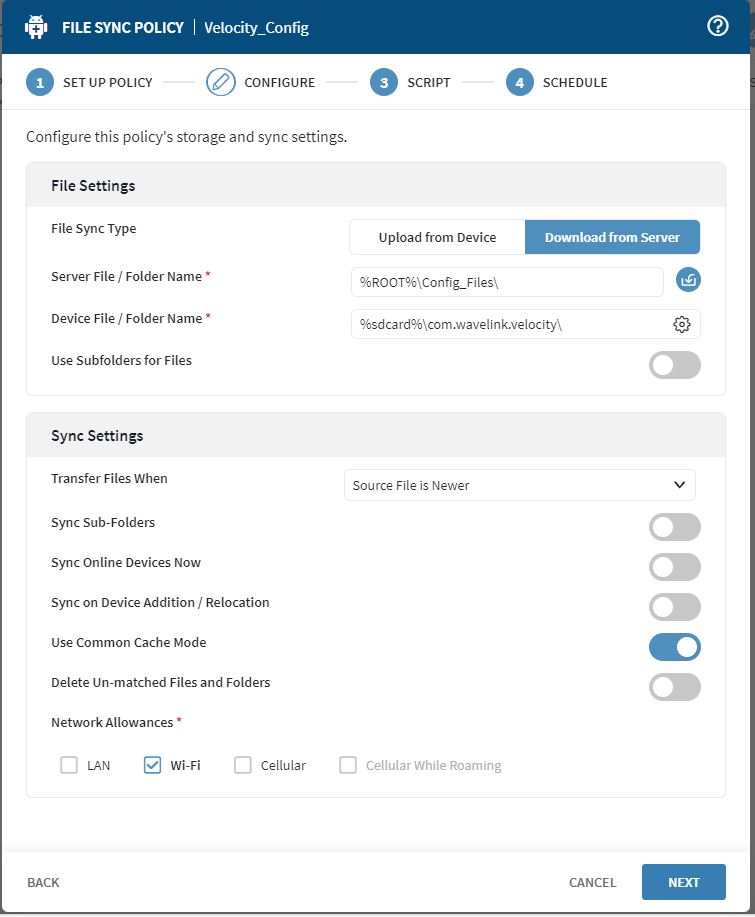
The config files (wldep) i try to send over the "File Sync". 

M
Mark
a year ago

OS
Onno Smit
a year ago

I think it might be the common mistake with the 'slash', looked at a similar file-sync rule on my side and it reads.

%sdcard%/com.wavelink.velocity - so with a forward slash.

Hope this helps.

M
Mark
a year ago

Thanks.. I will check..

Can be that i have a permission problem? Because i try now just to send the file to a another folder but doesn`t work.. Must we need to send also a pre script or something?

Many Thanks..

OS
Onno Smit
a year ago

The file that you want to sync to the device must be placed in the com.wavelink.velocity folder on the device.

Otherwise VelocityFileAssistant will NOT copy this to the hidden scoped storage location on the device

Solution
A
ABMOD@SOTI
a year ago

Thanks Onno Smit for responding to the post, your expertise and willingness to help are greatly appreciated!

Mark have you had an opportunity to test the suggested solutions by Onno Smit, and has it successfully addressed your query?

A
ABMOD@SOTI
a year ago

I am glad that your question is answered now.