SOTI Shared Device - Device not returning to Pre-Lockdown group

N

Hello,

We are piloting the Shared Device mode in SOTI

The device group has Shared Device configuration enabled.
It is set to Move to the Post-Lockdown Group, and when signed out it returns to the Pre-lockdown group.
Timeout for logged in user is 13 hours (After which the user is forced logout).
Timeout for inactivity is set to 4 hours (After which the user is forced logout).
Data to clear on signout.

This is generally working fine

However have noticed the following:
Somehow, the user on the device is logged out, but the device did not move back to the Pre-lockdown group. The device is still in the Post-Lockdown group which means its showing the main app screen, not signed in, no PIN (cleared). Allowing anyone to walk by and use the device.

How can this happen if the configuration specifies that, when logged out, it should return to the Pre-Lockdown folder?

Restarting the device does not move it back.
Log Out Shared Device device action does nothing becaue there is no logged in user.

The only way to solve this, is if I manually move the device back into the Pre-Lockdown folder. 

We have a lot of devices and this seems like it will become a bigger issue down the line.

I have raised a case with SOTI support, but though I might reachout here also to see if there is anything else I can do from my end.

10 days ago
SOTI MobiControl
ANSWERS
RC
Raymond Chan Diamond Contributor
9 days ago

Have you collected data (e.g. server log files, device agent log files, entries in the device's logs tab & from data-collection policies, etc.) to find out if there were any unexpected events (.e.g  forced powered off or reset, lost connection, etc.)  happening when the problematic device got logged out? 


What are the version and build numbers of your MobiControl server and device agents?  What about tha device firmware version, enrollment mode/active MDM API's of the problematic device?  Do you have similar incident for a second or more device(s)?


N
Nick
8 days ago

Hi Raymond,

SOTI Support are going to be checking the logs etc. - We just need the issue to occur again, which Ive found it hard to replicate.

The device can not be manually powered off in the Post-Lockdown group. Ive disabled this. The user has to sign out first then once it moves back to Pre-Lockdown the ability to turn off the device is allowed. - The only way it can turn off in the post-lockdown group is if it runs out of power.

I have tested the lost connection by removing the SIM card from the device and leaving it for about an hour. Once SIM was reinserted the device was still in a logged in state so I was able to logout as normal.

Here are the versions
MobiControl version: 2025.0.3.1026
Agent Version: 2026.0.1.1158

Device OS version is 13
Samsung Active Tab 3

Enrolment is using the EntraID handshake. It registeres the device in Entra as a shared device.
So far ive seen it happen to 2 devices. 


TM
Tomas Malich
9 days ago

Sup mate,

I had the same issue with Samsung devices, so if you are using them too, this will be usefull to you.
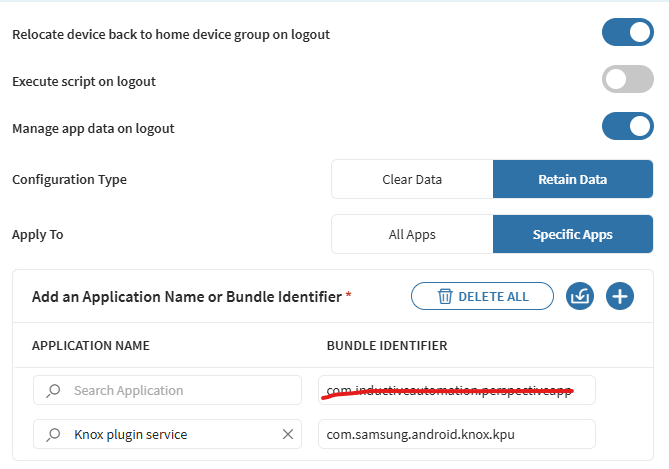
On log-out select to "retain data" for "com.samsung.android.knox.kpu".


To verify if this case. You would be receive error message while logging out on the bottom of the screen and also if you push action to the device "Troubleshoot shared device" it will actually fix the issue for once. (at least in my case)

Hope this helps.

N
Nick
8 days ago

Hi Tomas

Currently I have it setup to Clear Data > Specific apps

The Knox Plugin Service data should not be clearing as it is not listed as a specific app to be cleared.

Its setup this way because I want to make sure the Office365 apps such as Outlook, Teams, Edge are all cleared on signout. Ready for the next user when they sign in. I also have a few other apps to clear such as their Training app etc.

Unless the knox plugin serivce is being cleared anyway? not sure, maybe I can get SOTI to check in the logs.

A
ASMOD@SOTI
9 days ago

Dear Nick,

Thank you for posting on SOTI Pulse.

Many thanks Raymond and Tomas  for your valuable inputs.

It is  usually due to profile conflicts, agent issues, or incomplete profile deployment, often requiring checking profile assignment, force-reassigning the relevant lockdown/un-lockdown profiles, checking agent logs, or potentially re-enrolling the device for a clean slate

If you have any additional questions or concerns, please don't hesitate to reach out or you can contact us at  support@soti.net  

We're dedicated to providing assistance and support Also, if this post has helped you in solving your inquiry, I would request you to mark the particular comment as "is solution", so others may benefit from this information.

 Kind regards,

     SOTI