How do I script Zebra TC8300 OS Update with File Sync?

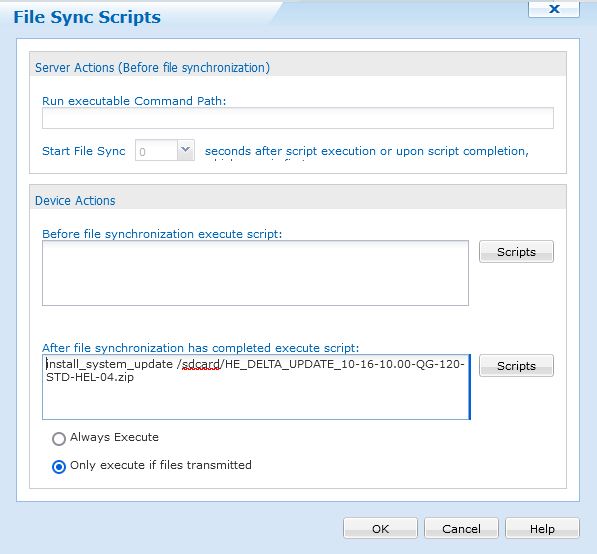
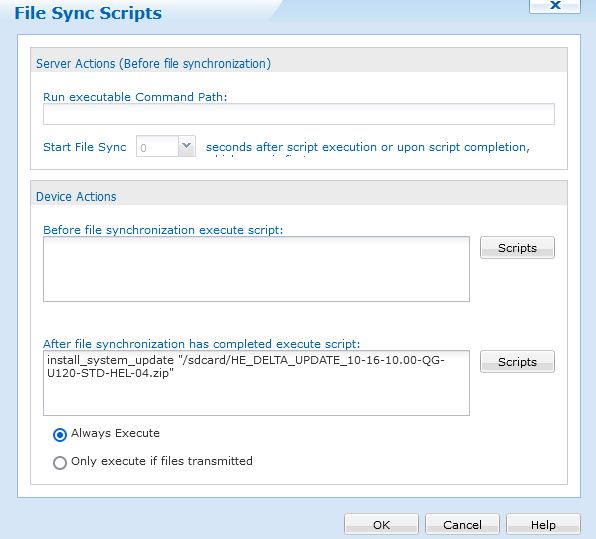
New SOTI customer here. I have enrolled a few Zebra TC8300 Android mobile computers and I'm trying to push OS Updates to them with file sync and then run post script:

install_system_update /sdcard/HE_DELTA_UPDATE_10-16-10.00-QG-U120-STD-HEL-04.zip

The file is transferred, but the script doesn't install the update.

The same script works if I just "send script" afterwards like this: 
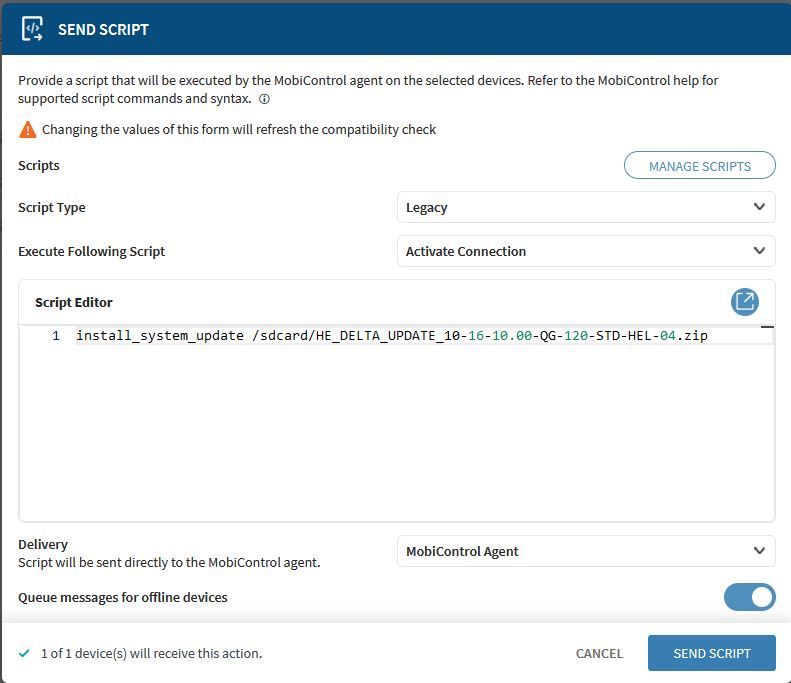
.

What am I doing wrong?

3 years ago
Android Scripting
ANSWERS
MD
Matt Dermody Diamond Contributor
3 years ago

The formatting looks correct. Do you see any errors in the device logs in SOTI after the Sync is complete? What OS version are you upgrading devices from? Are you going from base A10 BSP 10-16 U00 to LG120?

LB
Larry B
3 years ago

I'm upgrading from 10-16-10.00-QG-U106-STD-HEL-04.


The logs just say "Sync Files requested".

LB
Larry B
3 years ago

3 minutes later the logs say "Files Synchronized"

No mention of script.

LB
Larry B
3 years ago

Now it shows: Custom Log (MxOTA failed: /sdcard/HE_DELTA_UPDATE_10-16-10.00-UG-120-STD-H...

LB
Larry B
3 years ago

The file was sent to the device.

ST
Shawn T Bronze Contributor
3 years ago

Try inserting a "sleep 20" line in your post-sync script before "install_system_update" to allow file sync to process. This is assuming that the devices are currently on the 10-16-10 BSP for Android 10 and can receive the lifeguard 120 update. 

LB
Larry B
3 years ago

Shawn, I'm not in the office today, but I will certainly give that a try Monday. Thanks.

LB
Larry B
3 years ago

"sleep 20" did not work.

What finally worked was to put quotes around the path & file name.

MD
Matt Dermody Diamond Contributor
3 years ago

This should do the trick. The script is likely executing slightly before the .ZIP file has fully downloaded and is ready to be processed. A slight delay put in before execution of the script should get the job done. 

RS
Rafael Schäfer Platinum Contributor
3 years ago

i recommend to use profiles instead of filesync. 

Those work much better, you can define better which devices should get it (filters) and you have version history.

Does the device you try this OSupdate on, have maybe the same or newer OS-Version than you try to install on?

I'm pretty sure you use wrong OS Update File. You try to update a "QG" firmware to "UG" via Delta update. This shouldn't be possible.

Your postings are very irritating (Screenshot Filename is different you have written regarding error message). Please clearly say from which firmware you try to flash which update file.

 Or is this just a typing error by you before?

And, please correct me if I'm wrong, wasn't it the case that starting with A10 you have to do every single delta update, so if you start from 106, try the 111 first, then from 111 to 114 and so on. I was wrong, this was starting with A11.

LB
Larry B
3 years ago

Rafael, the device is currently running 10-16-10.00-QG-U106-STD-HEL-04. I'm trying to upgrade to 10-16-10.00-QG-U120-STD-HEL-04. The "UG" was a typo. The file transfers to the device, but the post script does not install it. If I do a "send script" using the same script as used in the file sync post script it installs the new version. I tried to explain that above. The first screenshot shows the send script that works. The second screenshot shows the file sync post script that does not work.

The devices will take the upgrade. I've done it with the "file sync" and then the "send script" commands using SOTI MobiControl. I've also done it with Zebra StageNow. 

RS
Rafael Schäfer Platinum Contributor
3 years ago

Hmm, ok.

But i still think doing that with a profile instead of file sync will work much better.

And if your problem is really what you said, the tip from Shawn could work (even maybe with a bit bigger amount, depends on many factors).

MD
Matt Dermody Diamond Contributor
3 years ago

File Sync is the method we have been consistently using for Zebra Firmware updates after an extensive review of the available options. Package based delivery has a few issues. For one, Packages are stored in the MC Database and you can quickly fill that up and impact performance with multiple OS Update based Packages that are 1GB+ in size. File Sync rules leverage files that are in the server file system outside of the database and therefore you don't have to worry about filling up the DB.

Also, from our experimentation with Packages vs. File Syncs we noticed that File Syncs are more robust relative to restarting the sync where it left off in the event of a disruption. When you are downloading a 1GB+ file to a device there are a lot of opportunities for disruption (device going to sleep, losing power, disconnecting from the network, etc) and therefore its desirable to leverage a sync function that can handle that disruption. It seemed that Packages would restart the download process if interrupted which led to very long download times for the OS Updates since they would restart multiple times before completing in some cases. File Sync rules also have the benefit of placing the .tmp download directly in the public file system so that you can observe the progress of the download as it is happening. Packages on the other hand first download the files into a private internal storage to the SOTI agent before moving the file to the final directory at the end of the download. In that sense you have no visibility to the progress of the download of a large file when using Packages vs. File Sync. 

And finally, File Syncs carry the advantage of being able to be targeted at Virtual Groups, which Package based Profiles do not. Virtual Groups are highly effective for firmware updates as you can be very explicit with the filter criteria applied to the group so that you can update the very specific devices that meet all of the pre-requisites that you want to upgrade (eg. Model number + OS level + battery level check).

RS
Rafael Schäfer Platinum Contributor
3 years ago

Ok, our experiences are in final very different but interesting to read that you made exactly different experences. Especially regarding the problem described here (scripts executed after (large) filetransfer) worked much better in packages than in file sync for us.

And Filtering is also possible for profiles with no need to set up a visible filter group.

But it was just from me something able to test if it works better for them using a package (it was in our case in the past).

And in final they have to decide which works better for them, just wanted to show up.

JD
John Doe Platinum Contributor
3 years ago

Like Matt already said, i also think that FileSync should be the GoTo-Method for updating Devices.

It saves you so much time in comparison using a package. Our goal was and is it to have a branch of devices all on the latest fully tested firmware. So i dont really get the idea of a needed version history there. When using incremental updates you dont even get the functionality with the package to do a fast rollback.

LB
Larry B
3 years ago

Yes, file sync worked perfectly for my needs. I have a Test/Admin group that I did first to get it working and tested. I setup file sync to send to those devices only. After I was satisfied, I set it up to sync with the other groups like Shipping, Receiving, Inventory, Traffic, and so on.  I right clicked each group one at a time and sync'd the groups individually until all 90 devices were completed. I only had a couple that would not install due to low battery. Had to wait until they came online with a better charge level. I could also set it up to sync those devices the next time they connected.  This beats the heck out of finding all the devices and scanning StageNow barcodes :)

T
THMOD@SOTI
3 years ago

Hi Larry,

Thank you for posting on SOTI Central and thanks everyone for responding to the post.

It seems this post is solutioned.

Would you please help to put this post as Solved if you think you have a solution in this post?

Thanks.

Kind regards,

Technical Support | SOTI Inc. |1.905.624.9828 | support@soti.net | www.soti.net |