Windows SO Image

P
Parreira
Fs Rental

Hi,

I have a problem with Mobicontrol. We use SOTI Mobicontrol as the default installation on all our laptops. My company needs to replicate operating system images on hundreds of laptops simultaneously, as we always prepare equipment in batches. We have a problem with Mobicontrol, because when replicating the images the equipment is overlapping instead of recognizing the different serial numbers. When we replicate hundreds of devices, they all appear as just one in the portal. How can I solve this problem?

3 years ago
SOTI MobiControl
ANSWERS
RC
Raymond Chan Diamond Contributor
3 years ago

Have you successfully enrolled any of your Windows device(s) onto your MobiControl server yet?   Are you using Windows Notification Services (WNS)?   Please provide more details about your deployment flow.

In prinicple, I believe you don't need to include anything about MobiControl in your Windows Image.   The first-time user of each booted device then need to input domain/user name to get the device enrolled onto your MobiControl server.

P
Parreira
3 years ago
Good evening!

Raymond Chan and DJMOD@SOTI thanks for the replies.

Yes. I have already registered thousands of Windows devices in Mobicontrol. And yes, I use WINS.

My company rents equipment to other companies. Our equipment is all with Windows PRO, but none of them are in domains. All are activated with local user with admin profile.

My current process is done due to my difficulty with the images in Mobicontrol, but it's the only way I found. Today the process is.
I apply the Windows image without Mobicontrol on hundreds of laptops simultaneously. We do it this way, because we need to optimize preparation time and with the image, I have hundreds of equipment ready in minutes. After finishing this process, my employees turn on the laptops, one by one, to do the NNF (Next Next Finish) installation and enrollment/activation in Mobicontrol. This second part of my process wastes a lot of time.

What I need is to have a ready image already containing Mobicontrol installed available on my replication server. Replicate the images and have my equipment ready.
When I try to do the ideal process for me, the error occurs, because Mobicontrol does not recognize that they are different equipment and therefore cannot make the inscriptions, being in a loop on the laptop and without appearing on the portal.


Thanks

D
DJMOD@SOTI Bronze Contributor
3 years ago

Hi Parreira,

Thanks for requesting a response from SOTI Support Staff, As Raymond suggested could you provide more details on deployment.
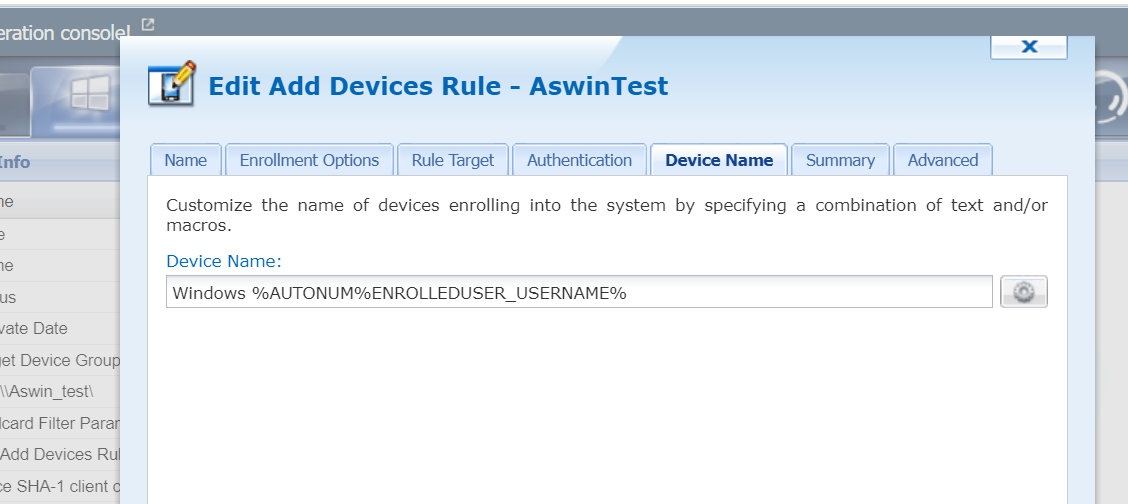
Also, Could you try to edit your add device rule and select a unique identifier for the device name like enrolleduser_username.

P
Parreira
3 years ago
Good evening!

Raymond Chan and DJMOD@SOTI thanks for the replies.

Yes. I have already registered thousands of Windows devices in Mobicontrol. And yes, I use WINS.

My company rents equipment to other companies. Our equipment is all with Windows PRO, but none of them are in domains. All are activated with local user with admin profile.

My current process is done due to my difficulty with the images in Mobicontrol, but it's the only way I found. Today the process is.
I apply the Windows image without Mobicontrol on hundreds of laptops simultaneously. We do it this way, because we need to optimize preparation time and with the image, I have hundreds of equipment ready in minutes. After finishing this process, my employees turn on the laptops, one by one, to do the NNF (Next Next Finish) installation and enrollment/activation in Mobicontrol. This second part of my process wastes a lot of time.

What I need is to have a ready image already containing Mobicontrol installed available on my replication server. Replicate the images and have my equipment ready.
When I try to do the ideal process for me, the error occurs, because Mobicontrol does not recognize that they are different equipment and therefore cannot make the inscriptions, being in a loop on the laptop and without appearing on the portal.


Thanks

E
Evan
3 years ago

Parreira,

there is a device ID  that is referenced in the Windows Registry. The following registry key will be on your image if you image the device when it is already enrolled in MobiControl

HKEY_LOCAL_MACHINE\SOFTWARE\Microsoft\Provisioning\OMADM\MDMDeviceID

Once this is deleted, the device can then be enrolled and show up as a new device.

You cannot have a device enrolled in MobiControl, capture an image, and then deploy it to other devices without first deleting that registry key

D
DJMOD@SOTI Bronze Contributor
3 years ago

Hi Parreira,

As Evan mentioned, You cannot have a image of a device that is already enrolled and deploy it on another machine.