Status bar & navigation bar disappears after Soti Client installation

FU
Frankie Urban
Procurant USA LLC

Using a Samsung A7 lite (SM-T220) running Android 13(tiramisu).After installing mobi control client 15.3.3.1 with a basic lockdown Profile, the top status bar disappears, and the bottom navagation keys also disappear as soon as the lock down

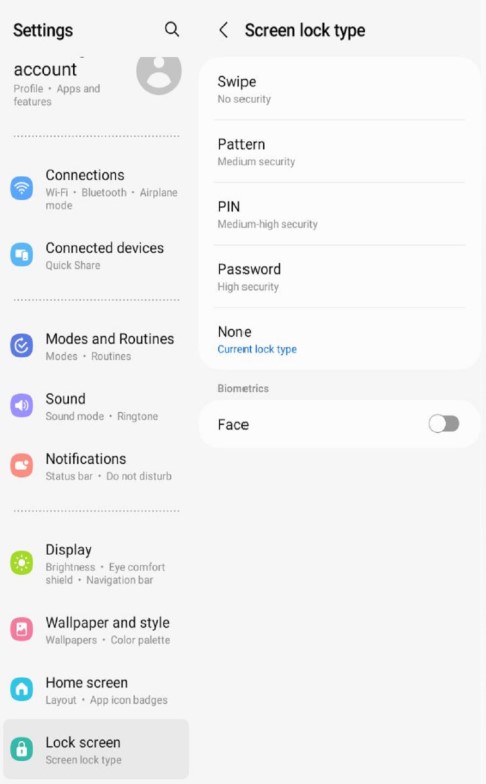
what we have found was if the "Lock screen type is set to anything other than "none" it causes the device to hide the status bar and navigation keys when the MC HTML page activates.

Changing the Lock screen type seemed to have resolved the issue on the samsung device

2 years ago
Android
ANSWERS
M
MPMOD@SOTI Gold Contributor
2 years ago

Hi Frankie,

Thank you for posting on SOTI Pulse! 

Just to get a better understanding of the situation, can you confirm the MobiControl version you are running? 

Is the agent that you are using android enterprise or a classic agent? 

What is the method of enrollment you are using for your device?

From my testing on a Galaxy S22 Ultra with OS 13, I was unable to reproduce the issue. I am also working with another associate who has your device to see if we can test if this is reproducible.

Kind regards,

Technical Support Specialist | SOTI | +1 905.624.9828 | SOTI.net lDiscussion Forum | Log a Case Online l Facebook l LinkedIn l Twitter 

FU
Frankie Urban
2 years ago

• Mobi control version 15.3.0.6711   
• Android 15.3.3.1069 Classic agent
• Manual method of enrollment

M
MPMOD@SOTI Gold Contributor
2 years ago

Hi Frankie,

Thank you for providing those details. I would recommend opening up a support case with us to further investigate this issue. We can open up a developers ticket to take a deeper look into the issue from there.

From my testing, even with the same device model, OS, and agent version, we were unable to reproduce the issue.

Kind regards,

Technical Support Specialist | SOTI | +1 905.624.9828 | SOTI.net lDiscussion Forum | Log a Case Online l Facebook l LinkedIn l Twitter