Dear Team
i want the export the Mac address for Enrolled devices soti flatform

Dear Team
i want the export the Mac address for Enrolled devices soti flatform

set up your dasboard showing the mac address as a column and then do the csv eport of it

Using the approach mentioned by Rafael is a simple workaround to get custom report for subsequent import to Excel or other tools to do report, analysis, visualization, etc.
The only shortcoming is that the current maximum number of items per page is still 250, so that if there are a lot of devices involved there is a need to export CSV multiple times for subsequent merging back into a single spreadsheet/database.
No, i exported our entire environment and got the export for all of them in the csv.
Not limited to the page count (Console on 15.6.5).
But if you want to have regular report, which he was not mentioning here, setting up a (scheduled) report could make sense.

Hi Kaushik Joshi,
Thank you for your post on SOTI Pulse.
I understand you would like to export the MAC addresses of all devices. You can obtain all the device MAC addresses using the Report session. Please follow the steps below to proceed:
1. Navigate to the Hamburger menu
2. Go to Reports.
3. Select Device Reports (Flat View).
4. Choose Device Information.
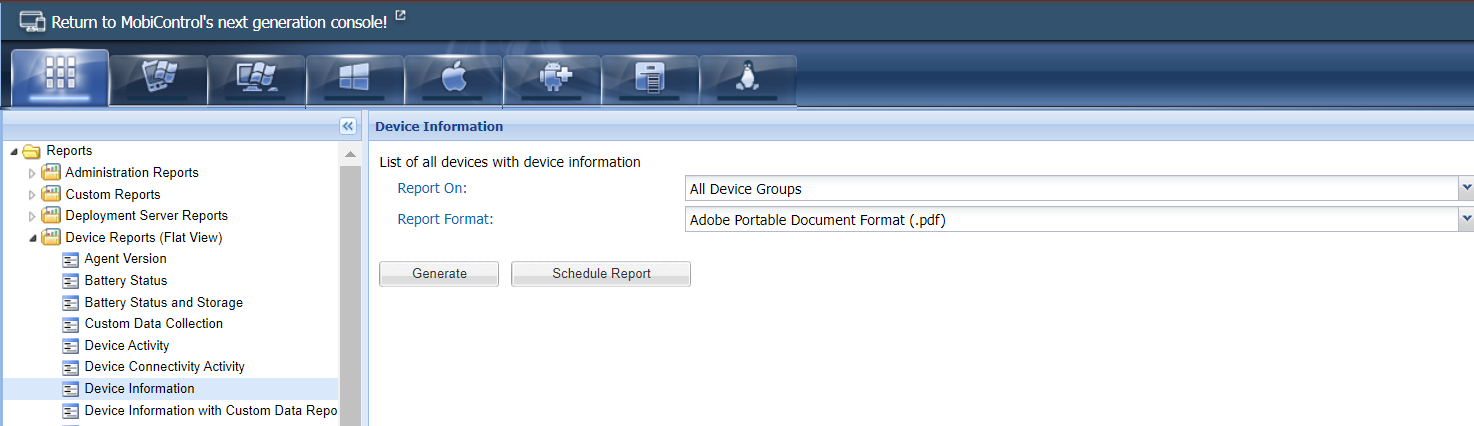
Please use the above information to generate the report, You can select all device groups or specific device groups from the list
Please get back to us whether the above information is useful for you or if still you require some more information from us.