
Agent Upgrade

Solved
DP
Daniel Palmeira
Novozymes A/S

We recently upgrade to MobiControl Version: 2024.0.1.1020, and I was hoping that this would finally fix the issue with sending agent upgrade to the devices using the web console tool, but the "Upgrade Agent" button doesn't show.
This page SOTI Discussion Forum describes that it would only show if device is not in the latest version which is my case as I have a mix of agents around...
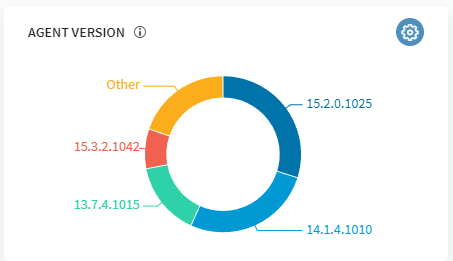
Then I was going to just update with package, but when I go to download the agent APK in the server, it shows only version 15.2.0.1025 as the latest for Zebra.
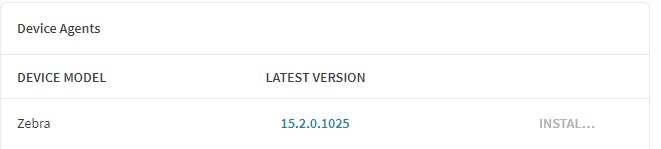
Yet I have many devices that have version 2024.0.4.1056 already on them, that was installed while we had the old server version - which was thru the web console "upgrade" button.

Is there something here I'm missing? Could be the versioning got lost during server upgrade?
We have Zebra TC77 A8.1 and A11, as well Zebra TC8000 on A5.1.1 if makes any difference for the topic.

a year ago
SOTI MobiControl
ANSWERS
MD
Matt Dermody Diamond Contributor
a year ago

Android Enterprise managed devices such as any Zebra Android device in SOTI on A8 or higher will not be using a manufacturer specific agent. Your Zebra TC77s would be using the generic Android Enterprise agent and not a Zebra one. You may have a separate manufacturer specific plugin installed as well, but the agent is universal across manufacturers in Android Enterprise. The TC8000 may be using the legacy manufacturer specific agent if those were enrolled under DA. 

Solution
DP

Hi Matt, thanks, this explains the version thing - so now I can download it and update with a profile.

Then I assume the "Upgrade button" thing is an on going issue that was never really solved by SOTI? Because there are post from 2021 and I never found a solution for it. I could see that there was an upgrade option on the group folders advanced settings, but that didn't work also.