Find out which action is disabled

Solved Locked
C
Chris
Landgenossenschaft Ennstal eGen

We are installing HCL Verse (https://play.google.com/store/apps/details?id=com.lotus.sync.traveler&hl=de) on Android 9 devices using the managed Play Store.

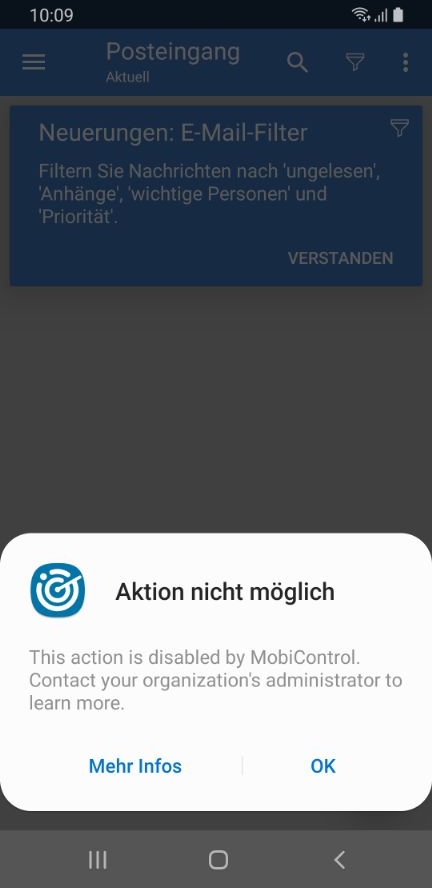
After the app is configured and opened, the following message appears:

"This action is disabled by MobiControl"

I can confirm the message and the App works, but its annoying, because the message appears each time the app is opened.

How can I find out which action is disabled and enable it?

6 years ago
Android
ANSWERS
J
JCMOD@SOTI Platinum Contributor
5 years ago

Hi Ayman,

Try setting "Disable Account Creation" Feature Control to "None"

Regards,

Solution
MD
Matt Dermody Diamond Contributor
6 years ago

That app requests the following rather extensive list of permissions. I would verify if you have any sort of Feature Control enabled that might conflict with one of these permissions. 

This app has access to:
Wi-Fi connection information
  • view Wi-Fi connections
Photos/Media/Files
  • modify or delete the contents of your USB storage
  • read the contents of your USB storage
Identity
  • find accounts on the device
  • add or remove accounts
Calendar
  • add or modify calendar events and send email to guests without owners' knowledge
  • read calendar events plus confidential information
Phone
  • directly call phone numbers
  • read phone status and identity
Device ID & call information
  • read phone status and identity
Contacts
  • read your contacts
  • find accounts on the device
  • modify your contacts
Device & app history
  • retrieve running apps
Storage
  • modify or delete the contents of your USB storage
  • read the contents of your USB storage
 
Other
  • close other apps
  • receive data from Internet
  • view network connections
  • run at startup
  • prevent device from sleeping
  • control vibration
  • toggle sync on and off
  • create accounts and set passwords
  • full network access
  • connect and disconnect from Wi-Fi
  • read sync settings
C
Chris
6 years ago (edited 6 years ago)

Hi,

thank you for your answer!

I created a new group in MobiControl which has no Feature Control or other restrictions, but the error still appears.

RC
Raymond Chan Diamond Contributor
6 years ago

For android Enterprise platform, some feature control options are enabled by default if no feature-control profile payload is deployed to a device.  So, maybe you should try to deploy a feature-control profile with only one option (say disable camera ) enabled, and see if you get the same warning.

You might also need to check Settings->App Manager and see if all requested app permissions associated with the app has been granted.

C
Chris
6 years ago

Hi,

I've tried booth solutions, but no success so far :(

A
Ayman
5 years ago

Hi

Are there any other suggestions we could try.  I am having a similar issue at app startup "This action is disabled by mobicontrol. Contact your organization’s administrator to learn more" and unable to progress any further.  I tried your suggested workarounds but no change.

Android Enterprise device setup

Device: CAT S41

App downloaded and installed on device via rule - Source: Google Play

https://play.google.com/store/apps/details?id=com.salesforce.fieldservice.app&hl=en 

C
Chris
5 years ago

In my case it was indeed the "Disable Account Creation" Feature Control setting.