
Change Notification Popup Style via MobiControl

MP
Michael Pitzer
Ramsauer Verkehrsbetriebe Gesellschaft m.b.H

Hi there!

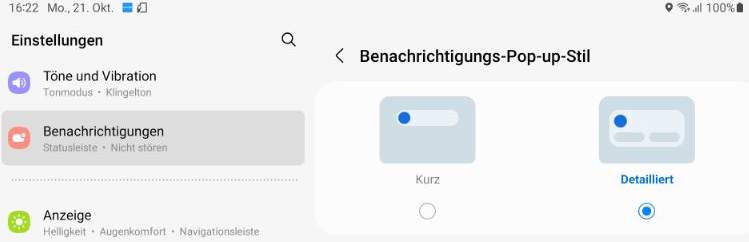
We're managing a large number of Samsung Galaxy Tab Active3 devices using SOTI MobiControl. Is there any way to change the Popup Style of Notifications via Script or similar for a large numer of devices?

The setting is found under Notifications > Popup Style, here's a Screenshot from the device (german). We want it changed from "Kurz" (Short) to "Detailliert" (Detailed).
a year ago
SOTI MobiControl
ANSWERS
A
ABMOD@SOTI Silver Contributor
a year ago

Hi Michael Pitzer,

Thanks for posting on SOTI Pulse!

Try using this script on a test device to apply different notification styles:

setnotificationstyle <style>

Send it as a legacy script with your desired style. Here are the typical Android notification styles available:

  • Basic: Standard format with title and text.
  • Big Text: Larger text area for more detailed info.
  • Inbox: Multi-line messages, great for messaging apps.
  • Big Picture: Includes a large image, ideal for media.
  • Messaging: Chat-style format for message threads.

Let me know if this works for you!

MP
Michael Pitzer
a year ago

Unfortunately it says "Script command not supported by device (setnotificationstyle)" in the logs, so I guess we're out of luck. Tried on a Galaxy Tab Active 3 and Galaxy Tab Active 5, same result.

A
ABMOD@SOTI Silver Contributor
a year ago

Hi Michael Pitzer,

For this particular issue we need to investigate further.

We request you to please raise a support case at log a case so that our agent can work on your query as quickly as possible.