MobiControl Installation Issues

Solved
LC
Leon Callsen Bronze Contributor
Taneri Consulting GmbH (TCG Global)

Hi Everyone, 

I did an installation of MobiControl OnPremise v15.6.4
After the Installation I am running into some issues. 
I installed the components like this: 
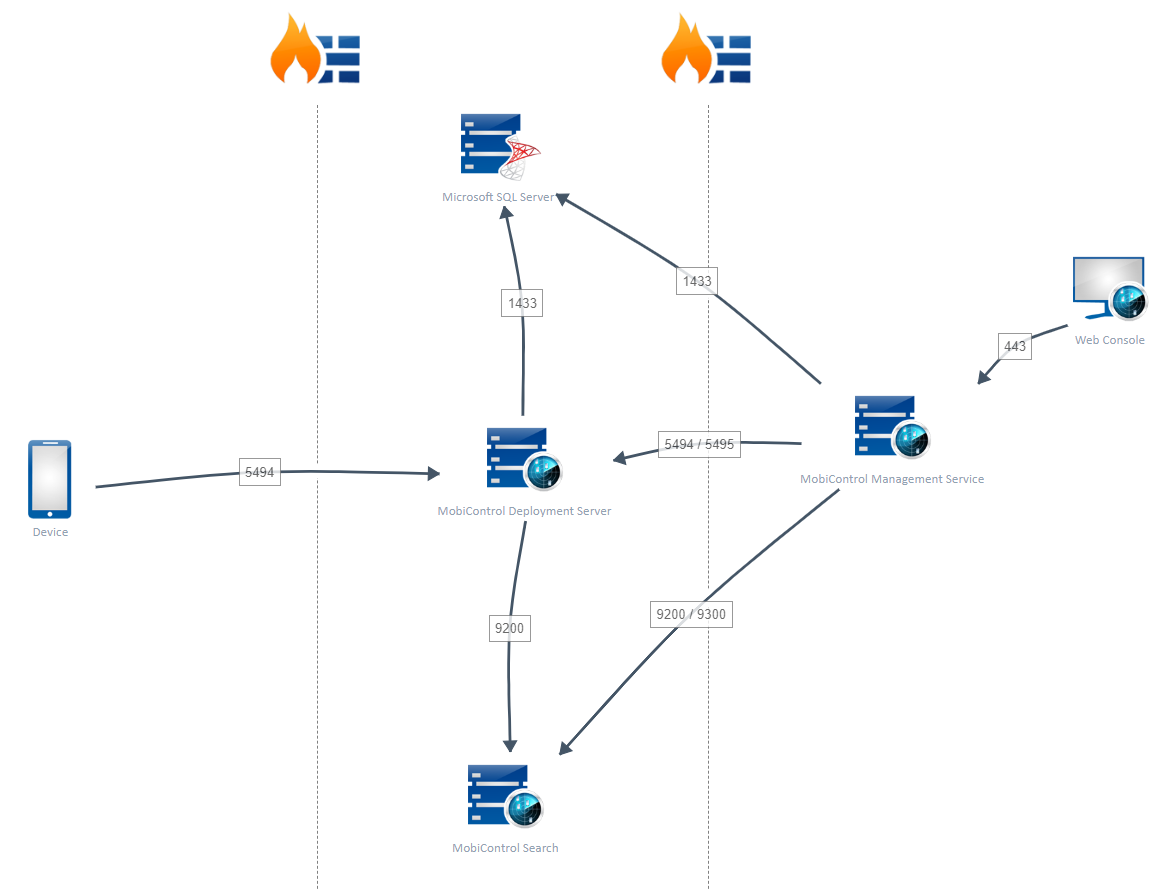
The Management Service is installed on a server in the LAN. 
Database and Deployment Server are running on a server in the DMZ. 

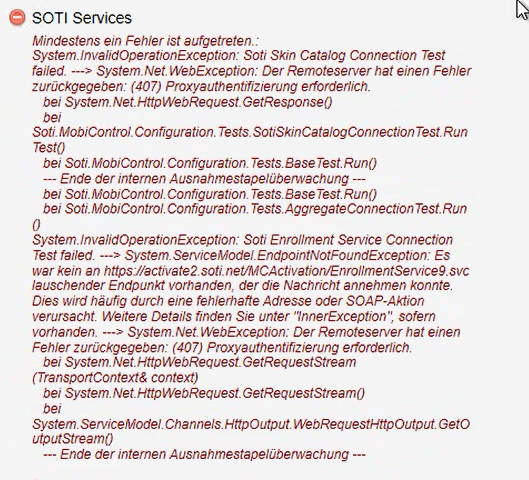
Now I am running into the following issues: 
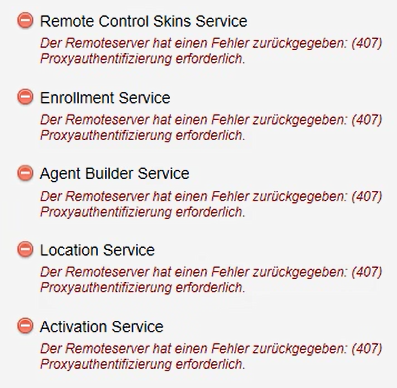


Do you got any idea how I can fix the "proxy authentication necessary" issue? 
My customer is using a proxy server to access the internet. 
We already configured this Proxy under Global Settings --> Global Proxy in the Web Console. 
The SOTI Services are unreachable and everything else is green. 
I didn't try to enroll a device into MobiControl because it should be impossible due to the unreachable services. 
It is planned to enroll Android devices only. 

As always thanks for your help! 

2 years ago
SOTI MobiControl
ANSWERS
SB
Simon Breuer Gold Contributor
2 years ago

As far as I know, the checks you run in the Administration Utility do not use the settings in the MobiControl Web Console.

So, the proxy settings you set in the Web GUI aren't used to perform these checks.

The Utility checks use the proxy settings from your web browser on the same server (i.e. Internet Explorer or Edge). Try to edit the settings here and run the SOTI Service checks again.

LC
Leon Callsen Bronze Contributor
2 years ago

Hi Simon, 

when I checked that correctly atleast Edge and Chrome are opening the proxy settings of Windows. 
The Installation is running on Win Server 2022. 

As I have no access to it now. Do you know if there could be a difference? 

SB
Simon Breuer Gold Contributor
2 years ago

The Windows proxy settings are the key. 

Maybe try to access any internet website via Chrome/Edge from this server. If this doesn't work, either the proxy settings or firewall settings are wrong.

If any website is reachable, I don't know why the SOTI services shouldn't be accessible as well. :(

LC
Leon Callsen Bronze Contributor
2 years ago

Hi Simon, 

I have a meeting tomorrow with the SOTI Support and my customer. 
Hopefully we can find a solution. 
As Zafer already mentioned a method for testing.
My customer did that but it wasn't successful. 

There must be an issue with their network configuration. 

ZC
Zafer Cigdem Platinum Contributor
2 years ago

Hi Leon,

Did you test out testnetconnection/tnc from Management Service to Soti Services FQDN/Port: Source for SOTI Services DNS/Ports: System Requirements (soti.net)

From powershell you can write as such as below:

tnc activate2.soti.net -port 443

What do you see output of this one. is it True or False? 

Zafer

Solution
LC
Leon Callsen Bronze Contributor
2 years ago

Hi Zafer, 

customer is receiving false. 
On Deployment and Management Server. 

J
JEMOD@SOTI Bronze Contributor
2 years ago

Hi Leon,

Thank you for posting on SOTI Pulse! 

As Zafer posted above. If port 443 is blocked from the server, then SOTI services would be unavailable. I did see you mentioned creating a support case with us. Do let us know if you were able to find a solution for the customer!

Kind regards,

Technical Support Specialist | SOTI | +1 905.624.9828 | SOTI.net lDiscussion Forum | Log a Case Online l Facebook l LinkedIn l Twitter 

LC
Leon Callsen Bronze Contributor
2 years ago

Hi Support Team, 

The customer could solve the issue by it's own. 
It was related to the nework configuration. 

The Support was unable to help me because it was a initial installation. 

Topic is solved anyways!
Thanks for asking :) 

J
JEMOD@SOTI Bronze Contributor
2 years ago